25
6.2.8 Transferring firmware between EcoCool configuration software and a controller
You can use the interface box and your computer to transfer firmware between EcoCool configuration software and a controller or copy card. Controller
firmware can be updated in a controller using a copy card or EcoCool configuration software. Firmware can be reinstalled in a controller, if it becomes
corrupted, using EcoCool configuration software. Firmware must be re installed on a controller if, when it is powered on, the LED startup sequence reports a
check sum error (refer to 5.1.5.2).
NOTE: When firmware is installed on the controller, the existing configuration is erased.
6.2.8.1 Installing firmware on a controller using EcoCool configuration software:
Disconnect power to the controller.
Connect the controller to the interface box as shown in section 6.2.7.
Start EcoCool configuration software.
Upload the configuration to EcoCool configuration software to create a backup file.
Click Update Controller Firmware.
Follow the on screen prompts
Disconnect the controller from the interface box.
6.2.8.2 Uploading firmware from a controller:
Disconnect power to the controller.
Connect the controller to the interface box as shown in 6.2.7.
Start EcoCool configuration software.
Click Update Controller Firmware and follow the on screen prompts
Disconnect the controller from the interface box.
6.2.9 Generating reports
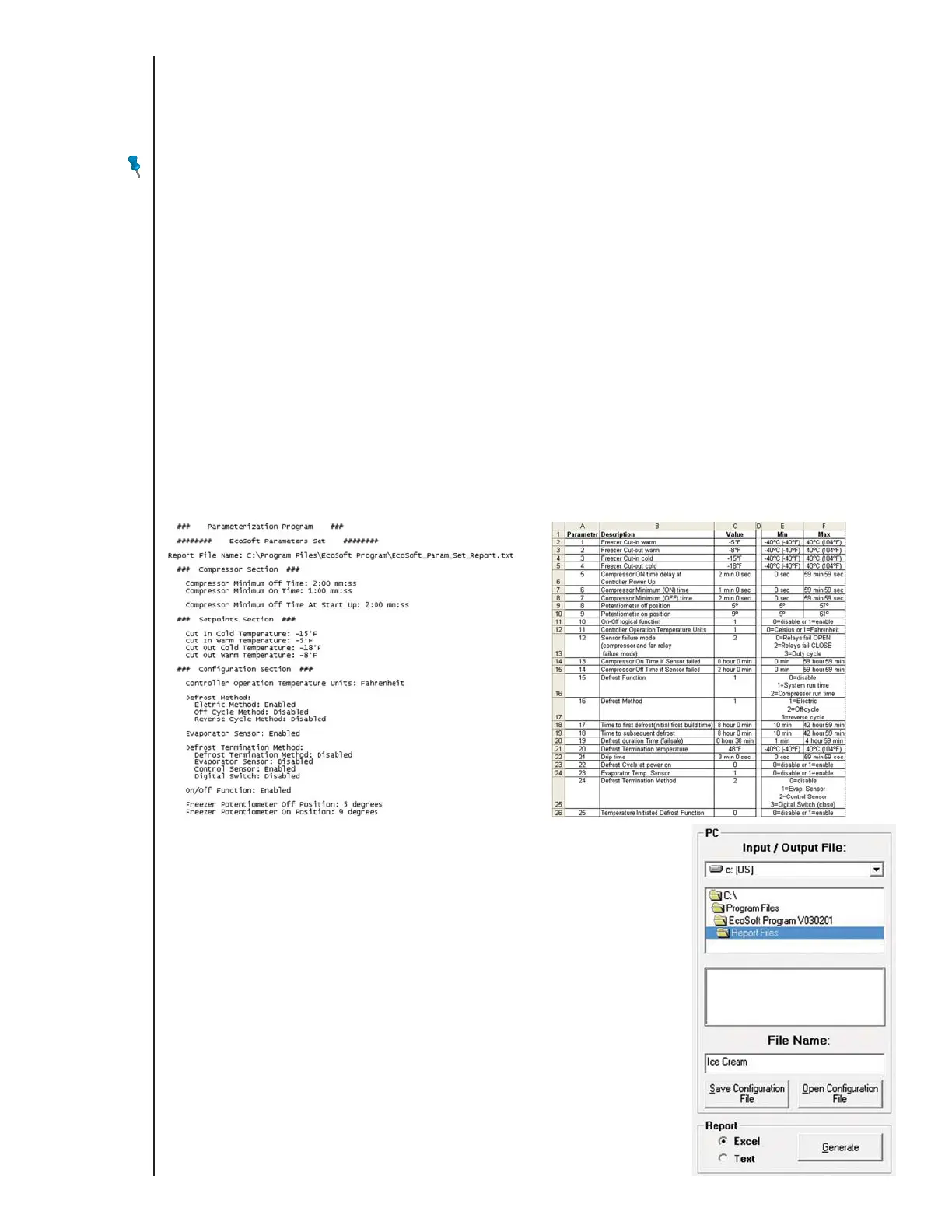
You can create a configuration parameters text file or spreadsheet file for Microsoft
®
Excel
®
.
Create, open, or upload a configuration file.
Select Excel or Text and click Generate.
By default, the file is saved in the C:\Program Files\EcoSoft Program xxx\Report Files directory.
Type E7 EcoCool™ Electronic Temperature and Defrost Controllers
©2008 Invensys Controls All rights reserved.
DRAFT VERSION



 To Next Page