14.10Depthanddistancewiththe
shnder
YoucanuseVRMmarkersanddepthlinestohelpyoudetermine
depthsanddistancesintheshnderdisplay.
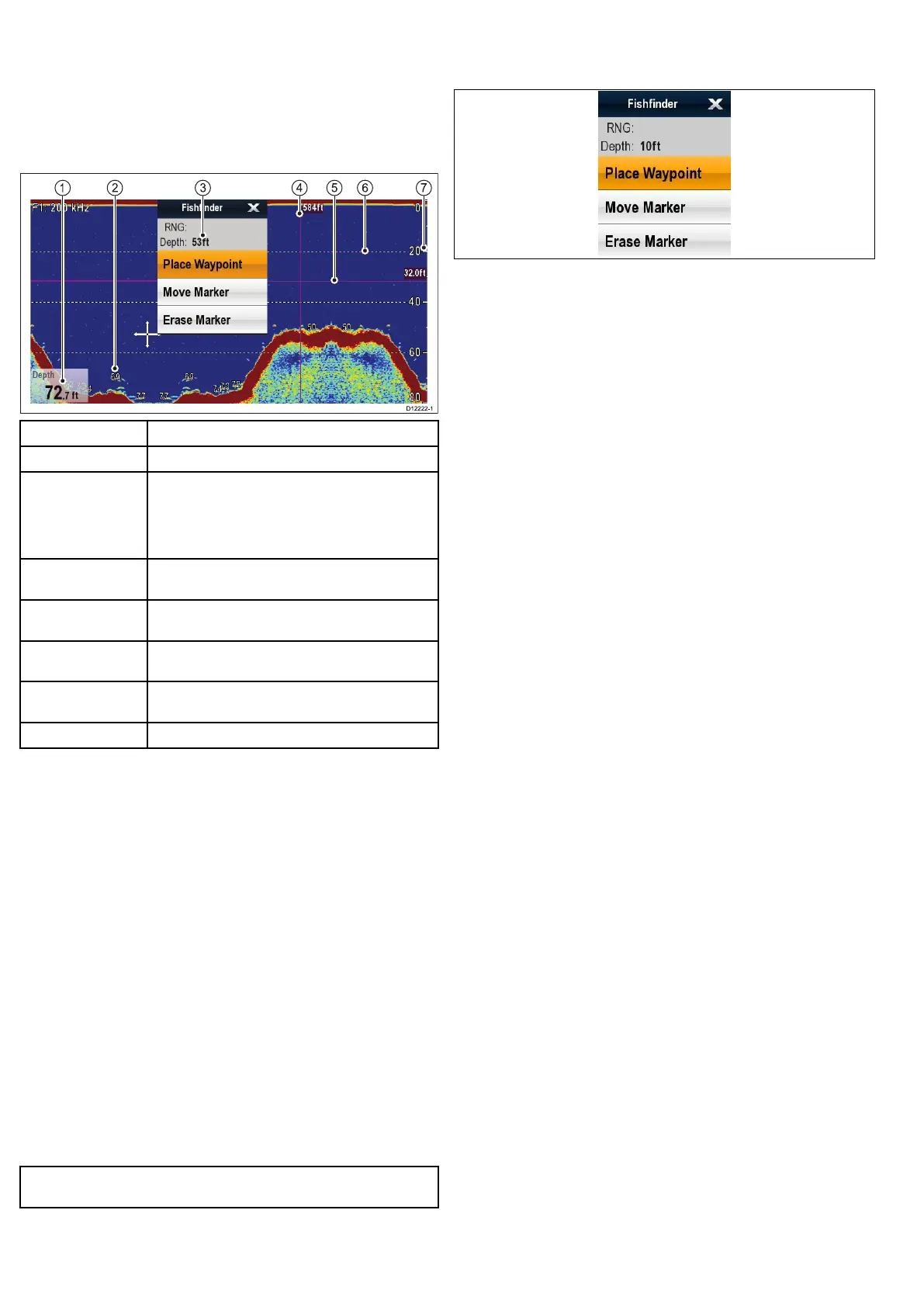
Theshnderdisplayprovidesanumberoffeaturestohelpyou
determinedepthsanddistances.Thesefeaturesareillustratedand
describedinmoredetailbelow:
ScreenitemDescription
1
Depthreading—currentdepthofseabed.
2DepthTargetID—depthsaredisplayedagainst
recognizedtargets.ThesensitivityoftheseIDsis
directlylinkedtotheFishAlarmsensitivity;thegreater
theshalarmsensitivity,thegreaterthenumberof
labelledreturns.
3
CursorDepth—thisisthedepthofthecursor
position.
4VerticalVRMmarker—indicatesthedistancebehind
yourvessel.
5
HorizontalVRMmarker—indicatesthedepthofthe
target.
6Depthlines—horizontaldashedlinesdrawnat
regularintervalstoindicatethedepthfromthesurface.
7
Depthmarkers—thesenumbersindicatedepth.
MeasuringdepthanddistancewithVRM
YoucanuseaVariableRangeMarker(VRM)todeterminean
object’sdepthanddistancebehindyourvessel.Thesemarkers
consistofahorizontal(depth)lineandavertical(distance)line,
eachofwhicharemarkedwiththeappropriatemeasurement.
Fromtheshnderapplication:
1.SelectMenu
2.SelectScrollsothatPauseishighlighted(Thismaymakeit
easiertopositionthemarker).
SelectingScrollwillswitchthescrollbetweenPauseand
Resume.
3.Selectthedesiredlocationonscreen.
4.PresstheOkbuttonorselectandholdthedesiredlocationto
opentheshndercontextmenu.
5.SelectPlacemarker.
6.PressOkorselectandholdonthepositionofthemarkerto
opentheshndercontextmenu.
7.SelectMovemarker.
8.Positionthemarkeratthedesiredlocation.
9.PresstheOkbuttontopositionthemarkerattherequired
position.
Note:TheVRMsusedintheshnderapplicationareunrelated
totheVRMsusedintheradarapplication.
Fishndermarkercontextmenu
Theshndermarkerfunctionincludesacontextmenuwhich
providesmarkerinformationandmenuitems.
Theshndermarkercontextmenucanbeaccessedby:
•HighlightingthemarkerlinesusingtheJoystickandpressing
theOkbutton,or
•Selectingandholdingonthemarkerlinesonscreen—
Hybridtouchmultifunctiondisplaysonly.
Thecontextmenuprovidesthedataforthepositionofthemarker:
•Range
•Depth
Thecontextmenualsoprovidethefollowingmenuitems:
•PlaceWaypoint
•MoveMarker
•EraseMarker
Themenuitemscanbeaccessed:
•usingtheRotaryControlandOkbutton,or
•selectingthemenuitemonscreen—Hybridtouchmultifunction
displaysonly.
166e7/e7D/e95/e97/e125/e127/c95/c97/c125/c127


 To Next Page