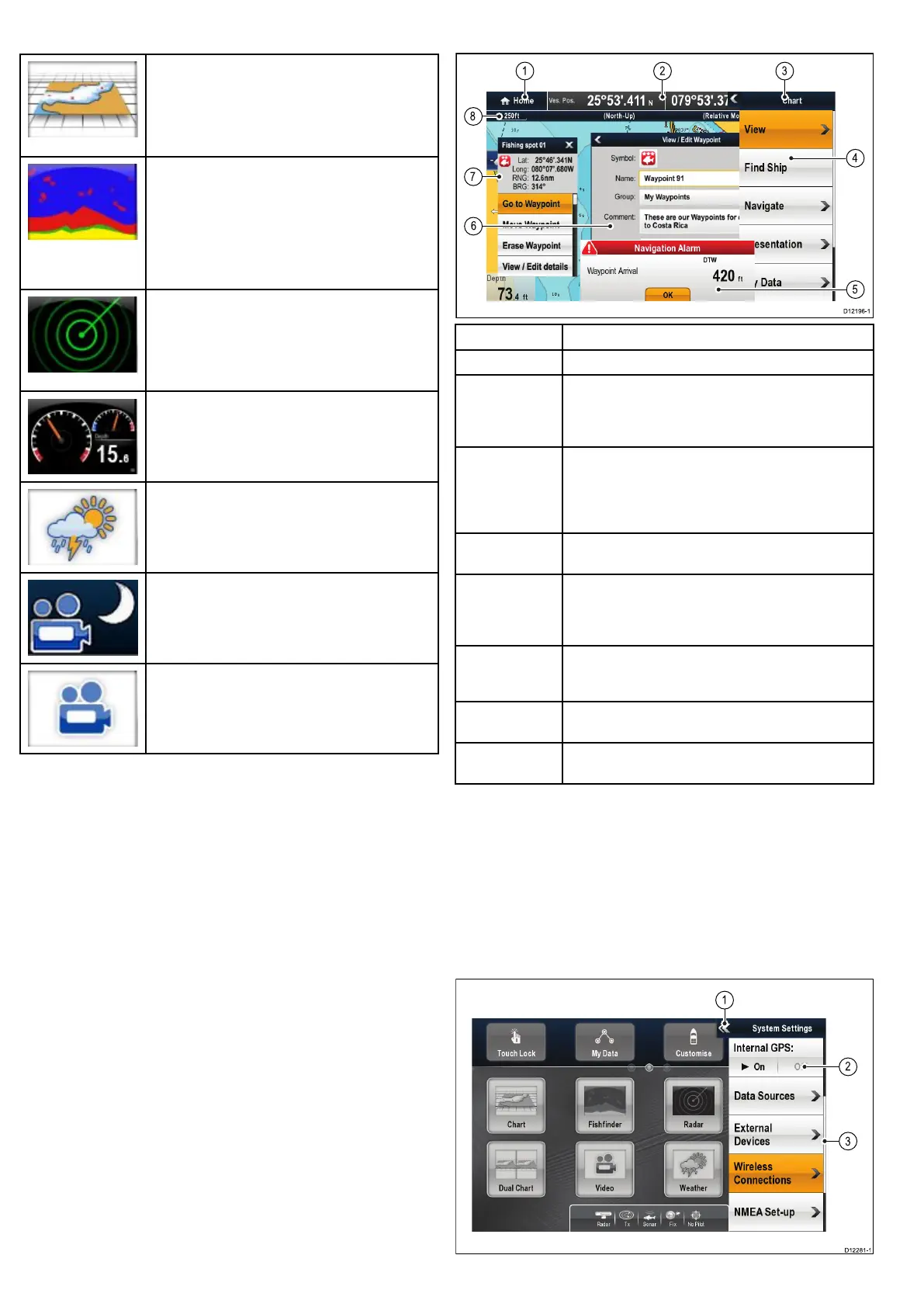
6.13Applications
Chartapplication—providesa2Dor3Dgraphical
viewofyourchartstohelpyounavigate.Waypoint,
route,andtrackfunctionsenableyoutonavigatetoa
speciclocation,buildandnavigateroutes,orrecord
whereyou’vebeen.Chartcardsprovidehigherlevels
ofdetailand3Dviews.
Fishnderapplication—withatransducerand
asonarvariantmultifunctiondisplayorcompatible
DigitalSounderModule(DSM),youcanusethe
shnderapplicationtohelpyouaccuratelydistinguish
betweendifferentsizesofsh,bottomstructure,and
underwaterobstacles.Youcanalsoviewseadepth
andtemperaturedataandmarkpointsofinterestsuch
asshingspotsorwrecks.
Radarapplication—withasuitableradarscanner,
youcanusetheradarapplicationtotracktargets
andmeasuredistancesandbearings.Anumberof
automaticgainpresetsandcolormodesareprovided
tohelpyougetthebestperformancefromyourradar
scanner.
Dataapplication—viewsystemandinstrumentdata
onyourmultifunctiondisplay,forarangeofcompatible
instruments.Usethejoystickortouchscreentoscroll
throughtheavailabledatapages.
Weatherapplication—(NorthAmericaonly).Witha
suitableweatherreceiverconnectedtoyoursystem,
theweatherapplicationoverlayshistorical,live,and
forecastedweathergraphicsonaworldmap.
Thermalcameraapplication—viewandcontrola
compatiblethermalcamerausingyourmultifunction
display.
Videoapplication—viewavideoorcamerasource
onyourmultifunctiondisplay.
6.14Screenoverview
ScreenitemDescription
1Home—selectthisicontoaccessthehomescreen.
2
Databar—providesinformationaboutyourvesseland
itsenvironment.Thepositionandtypeofinformationin
thedatabarcanbecustomizedfromtheHomescreen>
Customize>DatabarSet-upmenu,ifrequired.
3Menu—selectthisicontoaccessthemenu.Themenu
optionsarespecictotheapplicationthatyouarecurrently
using.Usethetouchscreen(HybridTouchdisplaysonly)
orusetheRotarycontroltoselectmenuitemsandscroll
longmenus.
4Pop-upmenu—menuoptionsaredisplayedwhenyou
selecttheMenuicon.
5
Pop-upmessages—alertyoutoasituation(suchasan
alarm),orunavailablefunction.Pop-upmessagesmay
requirearesponsefromyou—forexample,selectOKto
silencealarms.
6Dialogs—enabledatatobeselected,editedorentered.
Useinmanycommonfunctions—forexample,editing
awaypoint..
7
Contextmenu—providesinformationandoptions
specictoeachapplication.
8
Statusbar—providesinformationspecictoeach
application.Thisinformationcannotbeeditedormoved.
Usingpop-upmenus
Pop-upmenusenableyouconguresettingsandpreferences.
Menusareusedinthe:
•Homescreen—tocongureyourmultifunctiondisplayand
externally-connectedequipment.
•Applications—tocongurethesettingsforthatparticular
application.
Thefollowingdiagramshowsthemainfeaturesofapop-upmenu:
68e7/e7D/e95/e97/e125/e127/c95/c97/c125/c127


 To Next Page