EasyManua.ls Logo

Raymarine i50 - User Manual

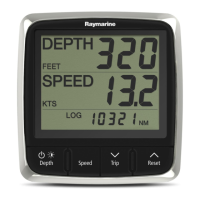
Raymarine i50
68 pages
Print Icon
To Next Page IconTo Next Page
Loading...
i
5 0
Installation and ope ra tion
instructions
Englis h
Date: 06-2012
Document numbe r: 81341-1-EN
© 2012 Raymarine UK Limite d
i50

Table of Contents

Questions and Answers

  • A
    Aaron SchneiderJul 31, 2025
    Why my Raymarine i50 Marine Equipment system doesn't start up?
    • J
      James McbrideJul 31, 2025
      If your Raymarine Marine Equipment system or part of it doesn't start, begin by inspecting the relevant fuses and breakers. Ensure the power supply cable is in good condition, with tight, corrosion-free connections. Finally, verify that the power source provides the correct voltage and sufficient current.
  • C
    Cassandra VazquezAug 3, 2025
    What to do if my Raymarine i50 display behaves erratically?
    • A
      Anthony ParksAug 4, 2025
      If your Raymarine Marine Equipment display behaves erratically, with frequent unexpected resets or system crashes, start by checking the relevant fuses and breakers. Also, check the power supply cable to ensure it's sound, with tight and corrosion-free connections. Verify that the power source provides the correct voltage and sufficient current. If the problem persists, go to www.raymarine.com and click on support for the latest software downloads. As a last resort, perform a factory reset, but remember this will erase all your settings and data; save important data to a memory card beforehand.
  • R
    Randy RodriguezAug 8, 2025
    What to do if a group of SeaTalk/SeaTalkng Raymarine Marine Equipment units not working?
    • J
      jonesjamesAug 8, 2025
      If a group of SeaTalk/SeaTalkng Raymarine Marine Equipment units aren't working, check the security of SeaTalk/SeaTalkng connectors between the functioning and non-functioning units. Also, check the condition of the SeaTalk/SeaTalkng cable between these units.
  • A
    abigailrussellAug 12, 2025
    How to fix a blank display on Raymarine i50?
    • A
      Anthony GarciaAug 12, 2025
      If your Raymarine Marine Equipment display is blank, check the fuse or circuit breaker and the power supply. Also, check the SeaTalk/SeaTalkng cabling and connector security.
  • M
    Michelle ThompsonAug 16, 2025
    Why SeaTalk/SeaTalkng information not being transferred between Raymarine i50 Marine Equipment instruments?
    • S
      Sarah MuellerAug 16, 2025
      If SeaTalk/SeaTalkng information isn't being transferred between Raymarine Marine Equipment instruments, check the security of SeaTalk/SeaTalkng connections between the units and the condition of the SeaTalk/SeaTalkng cables. To isolate the faulty unit, disconnect the units one by one.
  • C
    Cameron MartinAug 21, 2025
    What to do if LAST flashing or dashes displayed continuously on Raymarine i50 Marine Equipment?
    • R
      Ricky FrostAug 21, 2025
      If 'LAST' is flashing or dashes are continuously displayed on your Raymarine Marine Equipment (depth greater than 3 feet), check the condition of the transducer cable(s) and the security of the connections.
  • K
    katrinahernandezAug 26, 2025
    Why LAST flashes when underway on Raymarine i50 Marine Equipment?
    • C
      cyoungAug 26, 2025
      If 'LAST' flashes when your Raymarine Marine Equipment is underway, it may be due to aerated water from vessel wakes or propeller wash. Ensure the reading stabilizes when clear of disturbed water.

Summary

Important Information

Safety Notices and Warnings

Covers all safety warnings and cautions regarding product installation and operation.

Installation Guidelines and EMC

Details EMC installation guidelines and the importance of suppression ferrites for optimal performance.

Connections, Compliance, and Disposal

Information on connecting to other equipment, declaration of conformity, product disposal, and warranty.

Handbook Information

i50 Handbook and Instrument Range Details

Lists applicable i50 handbooks and describes the different variants in the i50 instrument range.

Planning the Installation

Installation Checklist and System Integration

Provides an installation checklist and an overview of system integration for Raymarine instruments.

Typical Systems and Protocols

Illustrates typical system examples and explains system protocols like SeaTalkng, NMEA 2000, and SeaTalk.

Parts Supplied and Tools Required

Lists the parts supplied with the instrument and the tools needed for installation.

Cables and Connections

General Cabling Guidance

Provides best practices for cable routing, strain relief, and shielding.

SeaTalkng Connections

Details connecting to the SeaTalkng network and the i50 Depth transducer.

Speed, Tridata, and ITC-5 Transducer Connections

Explains how to connect i50 Speed, i50 Tridata, and ITC-5 transducers.

Power Connection and SeaTalkng System

Covers power connection, SeaTalkng power, SeaTalkng cabling, and system power requirements.

SeaTalk and NMEA2000 Connections

Details how to connect to SeaTalk and NMEA2000 networks.

Location and Mounting

Display Location Selection

Guidance on selecting a suitable location for the display unit, considering ventilation and interference.

Mounting and Front Bezel Procedures

Instructions for surface mounting the unit and removing the front bezel.

Transducer Location Requirements

Requirements for selecting an optimal location for speed and depth transducers.

Getting Started

Controls and Power Operations

Overview of unit controls, powering on/off, and basic operation.

Data Master and Illumination Settings

Setting the data master unit and adjusting display illumination and contrast.

Calibration Procedures

Step-by-step guide for user calibration of depth, speed, and tridata instruments.

Using Your Display

Display Pages and Depth Operation

Explains display pages and how to operate the i50 Depth instrument.

Speed Operation and Timers

Details i50 Speed instrument operation, including speed pages, log, trip, and timers.

Tridata Operation

Covers i50 Tridata operation, including depth, speed, and log/trip pages.

Group Illumination

Explains how to synchronize backlighting levels across multiple units.

Using Alarms

Alarm Overview and Indications

Describes alarm types, indications, silencing, and enabling/disabling alarms.

Setting Alarm Thresholds

Guides users on how to adjust alarm thresholds for depth and speed.

Maintaining Your Display

Service, Condensation, and Checks

Covers service, handling condensation, and performing routine equipment checks.

Cleaning Procedures

Provides best practices for cleaning the display case and screen.

Troubleshooting

General Troubleshooting Approach

Information on diagnosing and correcting common problems with Raymarine electronics.

Instrument and Connection Issues

Troubleshooting faults related to instruments, SeaTalk/SeaTalkng, and transducers.

Power-Up and System Behavior Issues

Addresses problems with system startup, erratic display behavior, and software mismatches.

Self-Test Procedures for Fault Diagnosis

Guides users through the built-in self-test stages for fault diagnosis.

Technical Support

Raymarine Customer Support and Web Resources

Provides contact details for customer support and access to online resources.

Checking Software Version

Instructions on how to identify the software version of the instrument display.

Technical Specification

Detailed Product Specifications

Lists nominal supply voltage, operating range, power consumption, environmental specs, and conformance.

Spares and Accessories

i50 Transducers and Spare Parts

Lists available transducers and spare parts for the i50 instrument range.

SeaTalkng Cables and Converters

Details SeaTalkng cables, accessories, and converters for system integration.

NMEA 2000 Sentences

Supported NMEA 2000 PGN Sentences

Table listing NMEA 2000 Parameter Group Numbers (PGNs) supported by the i50 range.

Raymarine i50 Specifications

General IconGeneral
Waterproof StandardIPX6
Nominal Voltage12V DC
MountingFlush
Operating Temperature+55°C
Storage Temperature+70°C
Relative Humidity95%
ConnectionsSeaTalkng
Weight0.3kg

Videos

How to Test a Depth Transducer on Land | Airmar P319 | Raymarine i50

Related product manuals