3.1Installationchecklist
Installationincludesthefollowingactivities:
InstallationTask
1Planyoursystem.
2
Obtainallrequiredequipmentandtools.
3
Siteallequipment.
4Routeallcables.
5
Drillcableandmountingholes.
6Makeallconnectionsintoequipment.
7
Secureallequipmentinplace.
8Poweronandtestthesystem.
Schematicdiagram
Aschematicdiagramisanessentialpartofplanning
anyinstallation.Itisalsousefulforanyfutureadditions
ormaintenanceofthesystem.Thediagramshould
include:
•Locationofallcomponents.
•Connectors,cabletypes,routesandlengths.
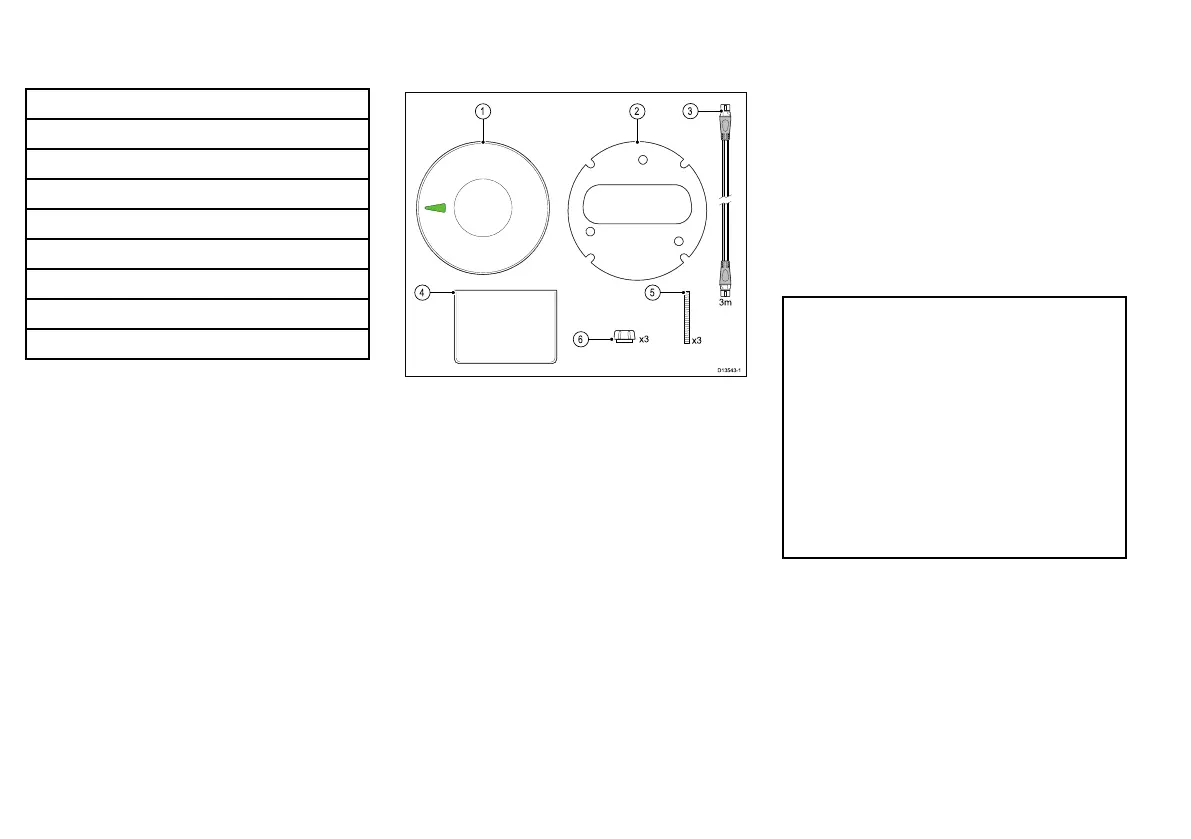
3.2Partssupplied
Thefollowingpartsaresuppliedwithyourproduct.
1.Unit
2.Mountingseal
3.3m(9.84ft)SeaT alkng®spurcable
4.Documentation
5.M4x40mmThreadedstudsx3(usedforsurface
mounting)
6.Fingernutsx3(usedforsurfacemounting)
Unpackyourproductcarefullytopreventdamageor
lossofparts,checktheboxcontentsagainstthelist
above.Retainthepackaginganddocumentationfor
futurereference.
3.3Softwareupdates
Thesoftwarerunningontheproductcanbeupdated.
•Raymarineperiodicallyreleasessoftwareupdatesto
improveproductperformanceandaddnewfeatures.
•Youcanupdatethesoftwareforyourproductusinga
connectedandcompatiblemultifunctiondisplay.
•Refertowww.raymarine.com/software/forthelatest
softwareupdatesandthesoftwareupdateprocedure
foryourproduct.
•Ifindoubtastothecorrectprocedureforupdating
yourproductsoftware,refertoyourdealeror
Raymarinetechnicalsupport.
Caution:Installingsoftware
updates
Thesoftwareupdateprocessiscarried
outatyourownrisk.Beforeinitiatingthe
updateprocessensureyouhavebacked
upanyimportantles.
Ensurethattheunithasareliablepower
supplyandthattheupdateprocessisnot
interrupted.
Damagecausedbyincompleteupdates
arenotcoveredbyRaymarinewarranty.
Bydownloadingthesoftwareupdate
package,youagreetotheseterms.
14



 To Next Page