Note:ThePoleMountAdaptormayalsobeusedto
railmounttheunitusinga3rdpartyrailclampwith
a1inch14TPIthread.
5.3Surfacemountingusing
theDeckmountingkit
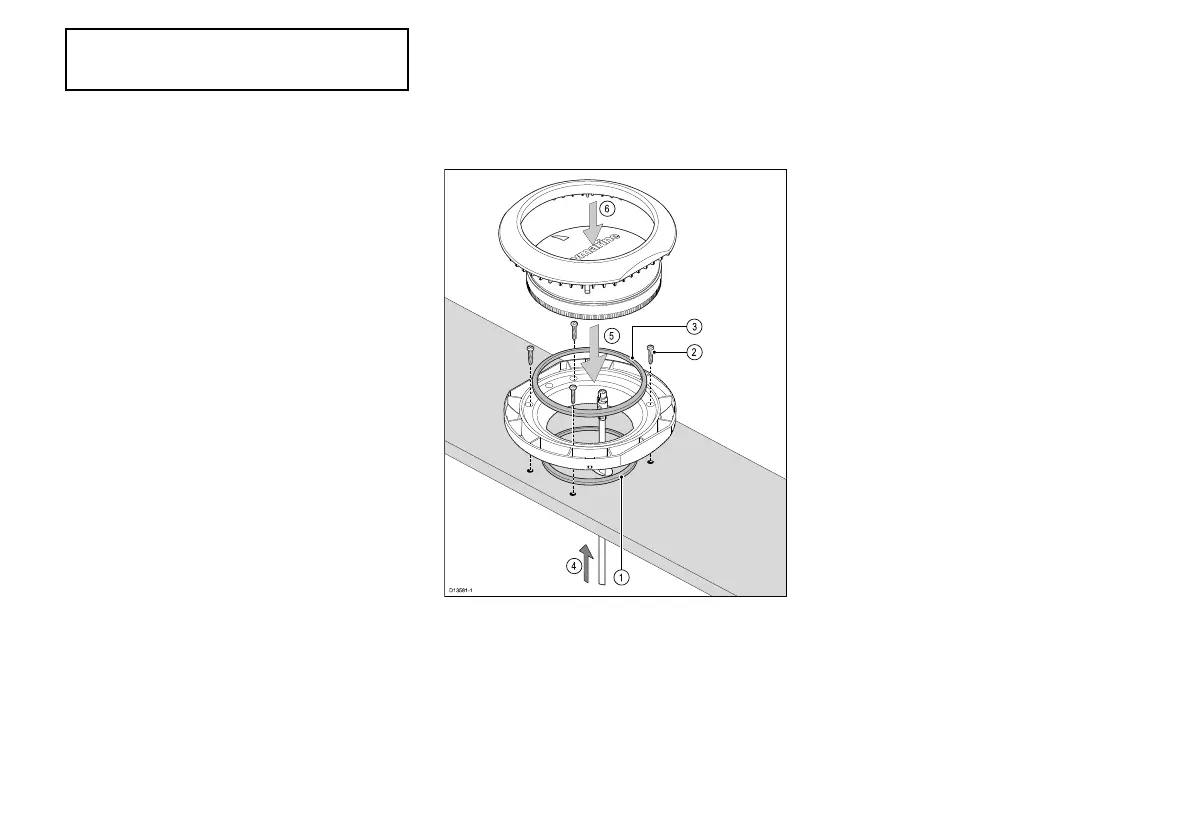
TheDeckmountingkit(A80437)canbeusedtosurface
orbracketmountyourproduct.
TheRiserandBracketpiecesarenotrequiredforthis
installation.
1.UsetheMountingtraytemplatesuppliedwiththe
Deckmountingkittodrill4holesinthemounting
surface,plusa22mm(7/8in)holeforthe
SeaTalkng®cable.Placethesmallsealingringin
thegroovelocatedonthebottomofthemounting
tray.
2.Securethetraytothemountingsurfaceusingthe
suppliedxings.
3.Placethelargesealingringintothegrooveonthe
uppersideofthemountingtray.
4.PulltheSeaTalkng®cablethroughthemounting
surfaceholeandthemountingtray.Pluginthecable
connectorontheundersideoftheunitandsecure
byrotatingthelockingcollarclockwise2clicks.
5.SecuretheunittotheMountingtraybypositioning
theunitwiththeLEDfacingforwardandinserting
theunitintothegroovesintheMountingtray.
6.PlacetheMountingtrimovertheunitslightlyoffset,
andthentwisttheMountingtrimclockwiseuntilit
locksintoposition.
Installation
27



 To Next Page