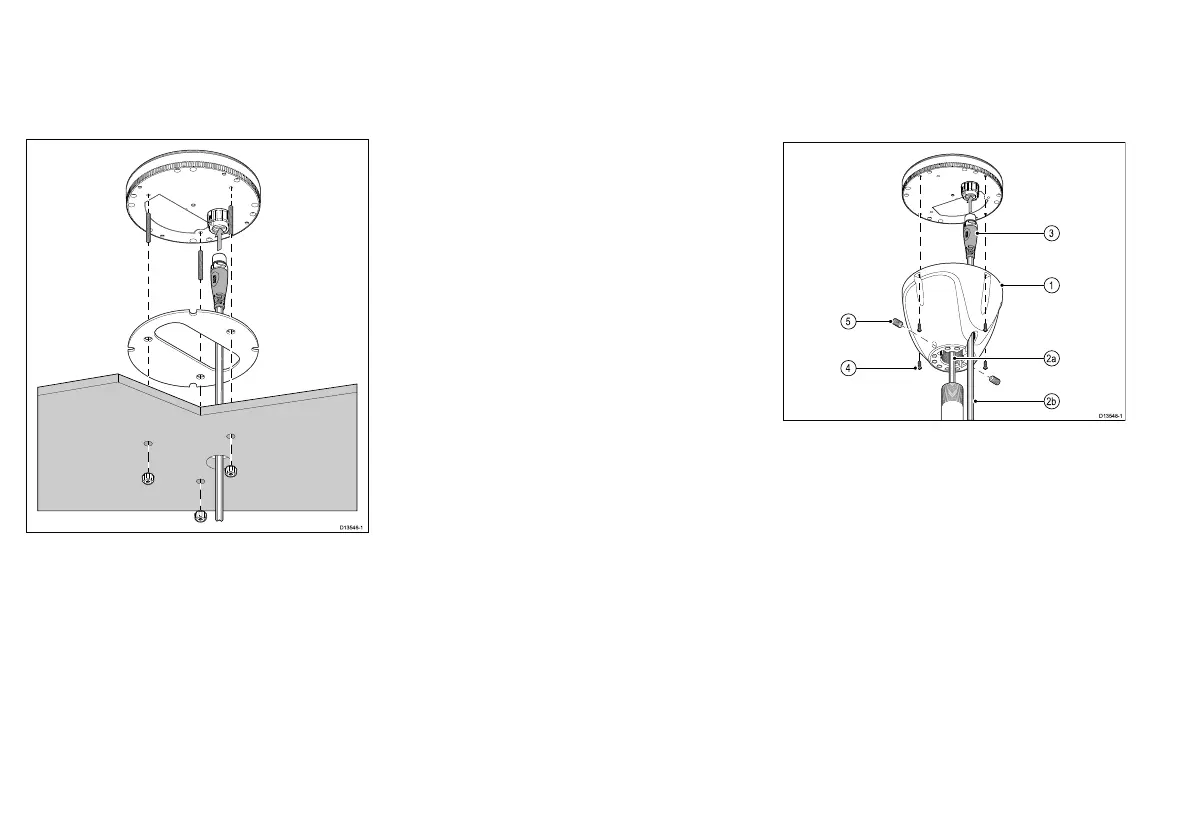
5.1Surfacemounting
Theunitcanbemountedonasurfacethatisupto
approximately28mm(1.10in)thickusingthexings
suppliedwiththeunit.T omountonathickersurface
longerstudswillberequired.
1.Ensuringcorrectorientation,afxthesupplied
mountingtemplatetothemountingsurfaceatthe
desiredlocation.
2.Drill3xxingholesand1xcableholeusingdrillbit
sizesasindicatedonthetemplate.
3.Placethewaterproofgasketintopositiononthe
undersideoftheunit.
4.ConnectthecabletoanavailableSeaTalk
ng
spur
connectionthenconnecttheotherendtothe
connectorontheundersideoftheunitandsecure
usingthelockingcollar.
5.Screwthethreadedstudsintotheundersideofthe
unit(theseshouldbehand-tightonly).
6.Positiontheunitsothatthemountingstudspass
throughtheholesinthemountingsurface.
7.Securetheunittothemountingsurfaceusingthe
thumbnuts.(theseshouldbehand-tightonly).
5.2Polemounting
ThePolemountkit(A80370)canbeusedtomount
yourproductonapoleorrail.
Polemountingrequiresapolewitha1inch14TPI
thread:
1.ScrewthePolemountadaptortothetopofthepole.
2.Feedthecablethrougheither:
•2a)thecenterofthePolemountadaptorand
pole,or
•2b)thecableexithole.
3.ConnectthecabletoanavailableSeaTalk
ng
spur
connectionthenconnecttheotherendofthecable
totheconnectorontheundersideoftheunitand
secureusingthelockingcollar.
4.Ensuringcorrectorientation,Securetheunittothe
Polemountadaptorusingthexingssuppliedwith
theadaptor.
5.Fixtheunit’sorientationbytighteningthegrub
screws.
Thegrubscrewsandtheircaptivenutsaresupplied
ttedtotheadaptor.
26


 To Next Page