Chapter 3: Installation
13
Chapter 3: Installation
This chapter describes how to install the ST60 Tridata instrument, and
associated speed and depth transducers. The transducers are fitted in
the hull of the vessel and connected to the rear of the instrument. The
actual type of transducers depends on the type of hull in which they are
to be installed.
For advice, or further information regarding the installation of this
equipment, please contact the Raytheon Product Support Department
or your own National Distributor.
3.1 Planning your installation
Before starting the installation, spend some time considering the best
positions for both transducer and instrument, such that the Site
Requirements and the EMC Guidelines (below) are satisfied.
Site requirements
TransducersTransducers
TransducersTransducers
Transducers
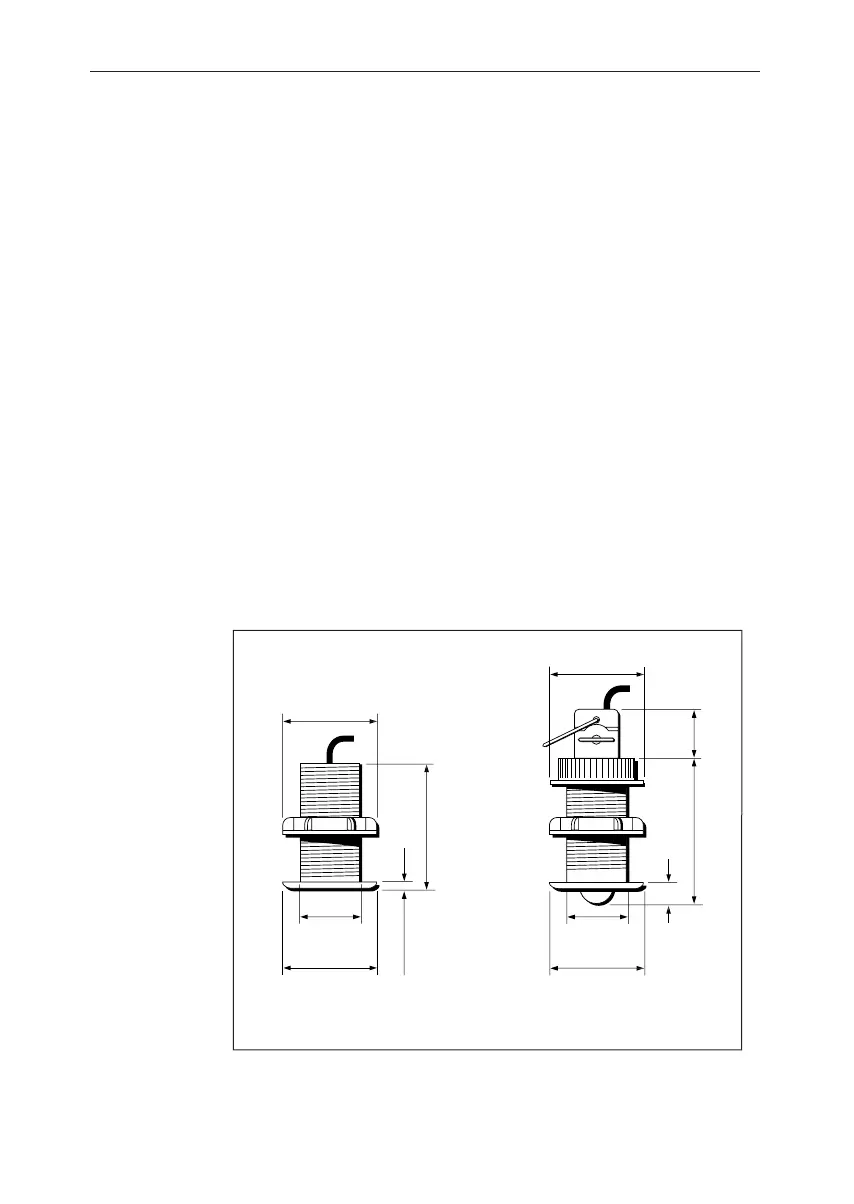
75mm (2.94in)
diameter
5mm
(0.19in)
75mm (2.94in)
diameter
51mm (2.0in)
diameter
89mm (3.50in)
D4447-1
Transducer dimensions
75mm (2.94in)
diameter
14mm
(0.57in)
90mm
(3.53in)
35mm
(1.370in)
75mm (2.94in)
diameter
51mm (2.0in)
diameter
Depth
Speed
The transducer types required for the various hull types are as follows:
040_2c03.p65 09/08/99, 09:3213


 To Next Page