20
ST60 Tridata Instrument Owner’s Handbook
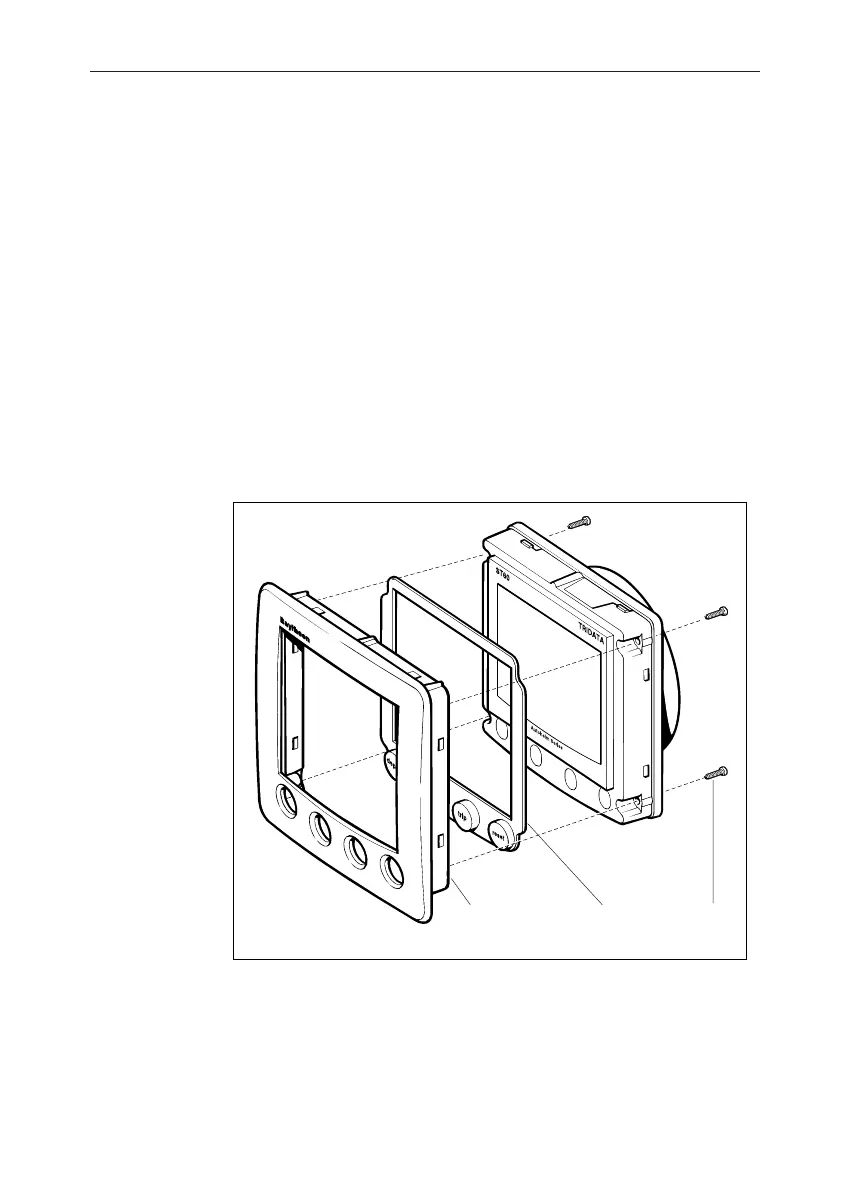
3. Referring to the Fitting the low-profile bezel illustration, place the
instrument face upwards on a flat surface and place the rubber
keypad (7) in position around the display window (i.e. so that each
key outline is located over its associated key on the instrument).
4. Snap the low-profile bezel (8) in position over the instrument, so
that the rubber keys are correctly located in the holes on the bezel.
CAUTION:
It is essential that only screws of the correct size are used to secure
the instrument to the bezel. Failure to observe this caution could
result in damage to both the instrument and the bezel.
5. Using the four, self-tapping screws (9) provided, secure the
instrument and bezel together. Fit the screws from the rear of the
instrument and tighten them sufficiently to secure the instrument
and bezel together. DO NOT OVERTIGHTEN.
D4362-1
789
Fitting the low profile bezel
Flush mounting procedureFlush mounting procedure
Flush mounting procedureFlush mounting procedure
Flush mounting procedure
Flush mount your instrument ( see the Flush mounting illustration) as
follows:
1. Assemble the ST60 instrument and low-profile bezel as described
under Fitting the low-profile bezel.
040_2c03.p65 09/08/99, 09:3220


 To Next Page