28
ST60 Tridata Instrument Owner’s Handbook
4.2 User calibration
The User calibration procedures enable you to:
• Set the required units for depth readings.
• Set the offset for depth readings, i.e. determine whether depth
readings are from the keel of the vessel or from the water line.
• Lock the shallow alarm.
• Set the required units for speed readings.
• Set the speed resolution.
• Select the log distance units
• Either calibrate the speed reading to Speed Over Ground (SOG) or
manually apply a calibration factor, to obtain correct speed through
the water.
• Select temperature units.
• Calibrate for correct temperature readings.
• Set timer alarm buzzer on or off.
Separate routines are provided for the User calibration of the depth and
speed functions. To carry out either of these routines:
1. Power up the ST60 Tridata instrument.
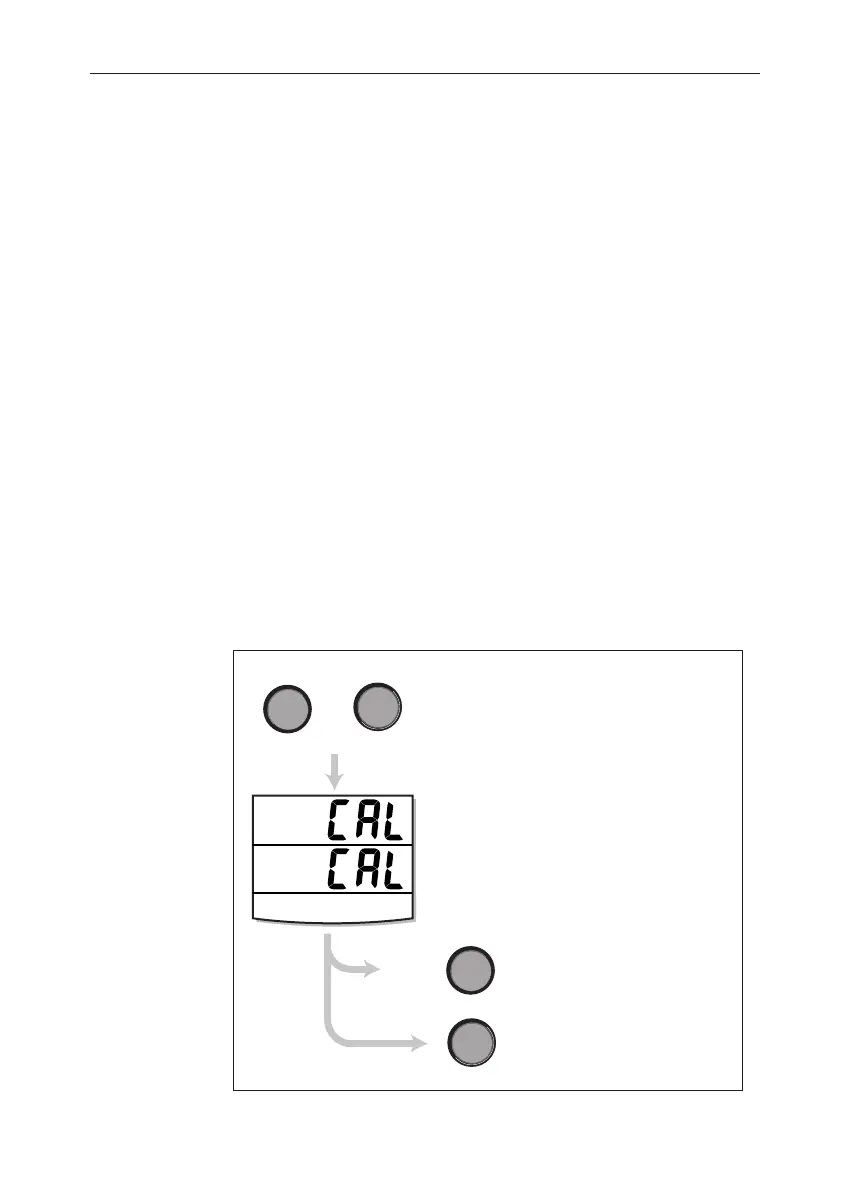
To start User calibration
hold down
and
for approximately 2 seconds
speed
depth
speed
press either
depth
or
Starting User calibration
D4416-1
see illustration
User calibration - depth
see illustration
User calibration - speed
User calibration
entry screen
040_2c04.p65 09/08/99, 09:3228


 To Next Page