REMOTE BUTTONS
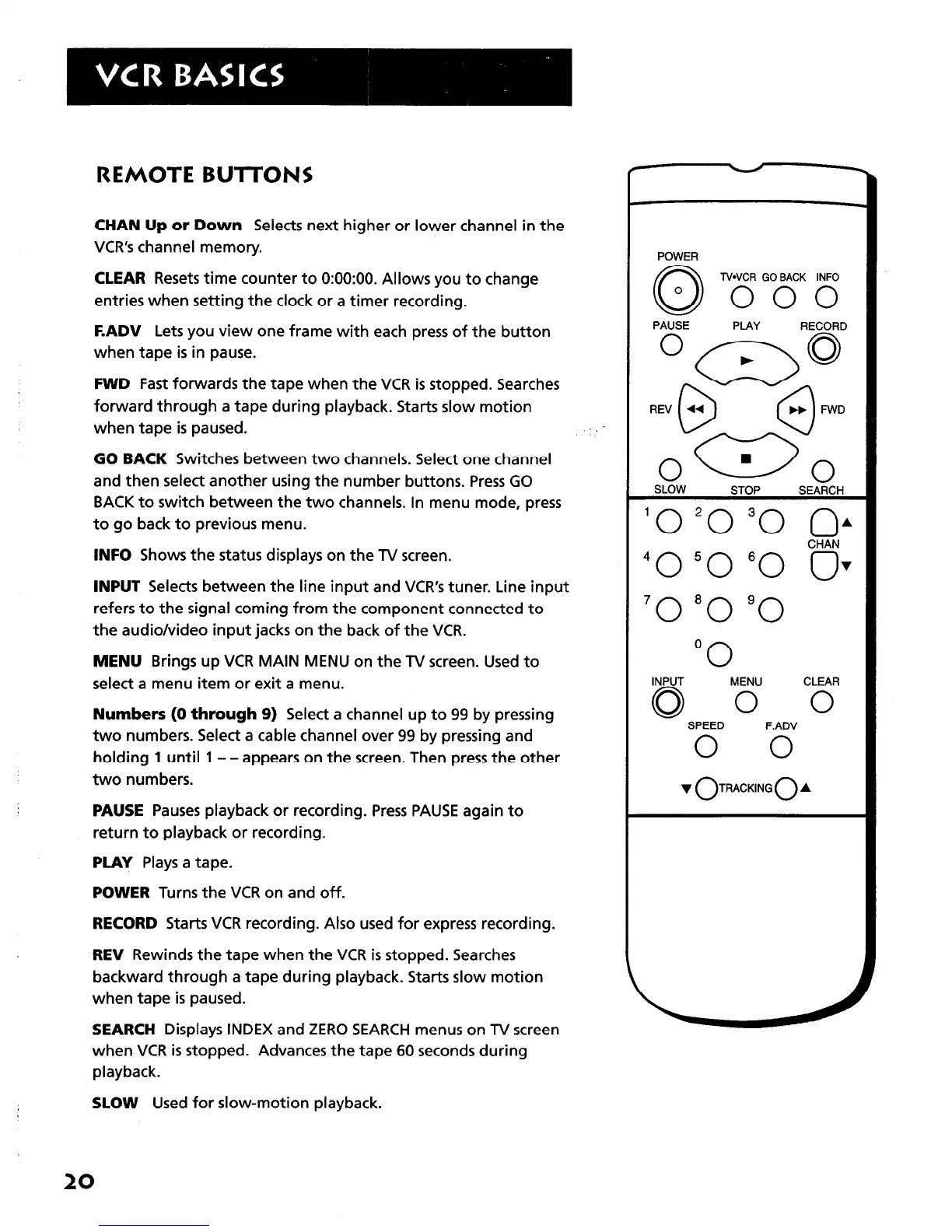
CHAN Up or Down Selects next higher or lower channel in the
VCR’s channel memory.
CLEAR Resets time counter to 0:OO:OO. Allows you to change
entries when setting the clock or a timer recording.
F.ADV Lets you view one frame with each press of the button
when tape is in pause.
FWD Fast forwards the tape when the VCR is stopped. Searches
forward through a tape during playback. Starts slow motion
when tape is paused.
GO BACK Switches between two channels. Select one channel
and then select another using the number buttons. Press GO
BACK to switch between the two channels. In menu mode, press
to go back to previous menu.
INFO Shows the status displays on the TV screen.
INPUT Selects between the line input and VCR’s tuner. Line input
refers to the signal coming from the component connected to
the audio/video input jacks on the back of the VCR.
MENU Brings up VCR MAIN MENU on the TV screen. Used to
select a menu item or exit a menu.
Numbers (0 through 9) Select a channel up to 99 by pressing
two numbers. Select a cable channel over 99 by pressing and
holding 1 until 1 - - appears on the screen. Then press the other
two numbers.
PAUSE Pauses playback or recording. Press PAUSE again to
return to playback or recording.
PLAY Plays a tape.
POWER Turns the VCR on and off.
RECORD Starts VCR recording. Also used for express recording.
REV Rewinds the tape when the VCR is stopped. Searches
backward through a tape during playback. Starts slow motion
when tape is paused.
SEARCH Displays INDEX and ZERO SEARCH menus on TV screen
when VCR is stopped. Advances the tape 60 seconds during
playback.
SLOW Used for slow-motion playback.
POWER
N*VCR GOBACK INFO
000
PAUSE PLAY RECORD
O-0
. . FWD
R&l
n
0
SLOW
STOP SEARCH
‘0 ‘0 “0 OA
CHAN
“0 “0 “0 ov
‘0 “0 “0
0
0
INPUT
MENU
CLEAR
Q 0 0
SPEED F.ADV
0 0
v OTRACKING 0 A
20



 To Next Page