EasyManua.ls Logo

Realtek RTL87 2 Series - Page 12

Default Icon
25 pages
Print Icon
To Next Page IconTo Next Page
To Previous Page IconTo Previous Page
Loading...
RTL87x2x Quick Start User Guide
Copyright 2023 Realtek Semiconductor Corporation.
All Rights Reserved. 6
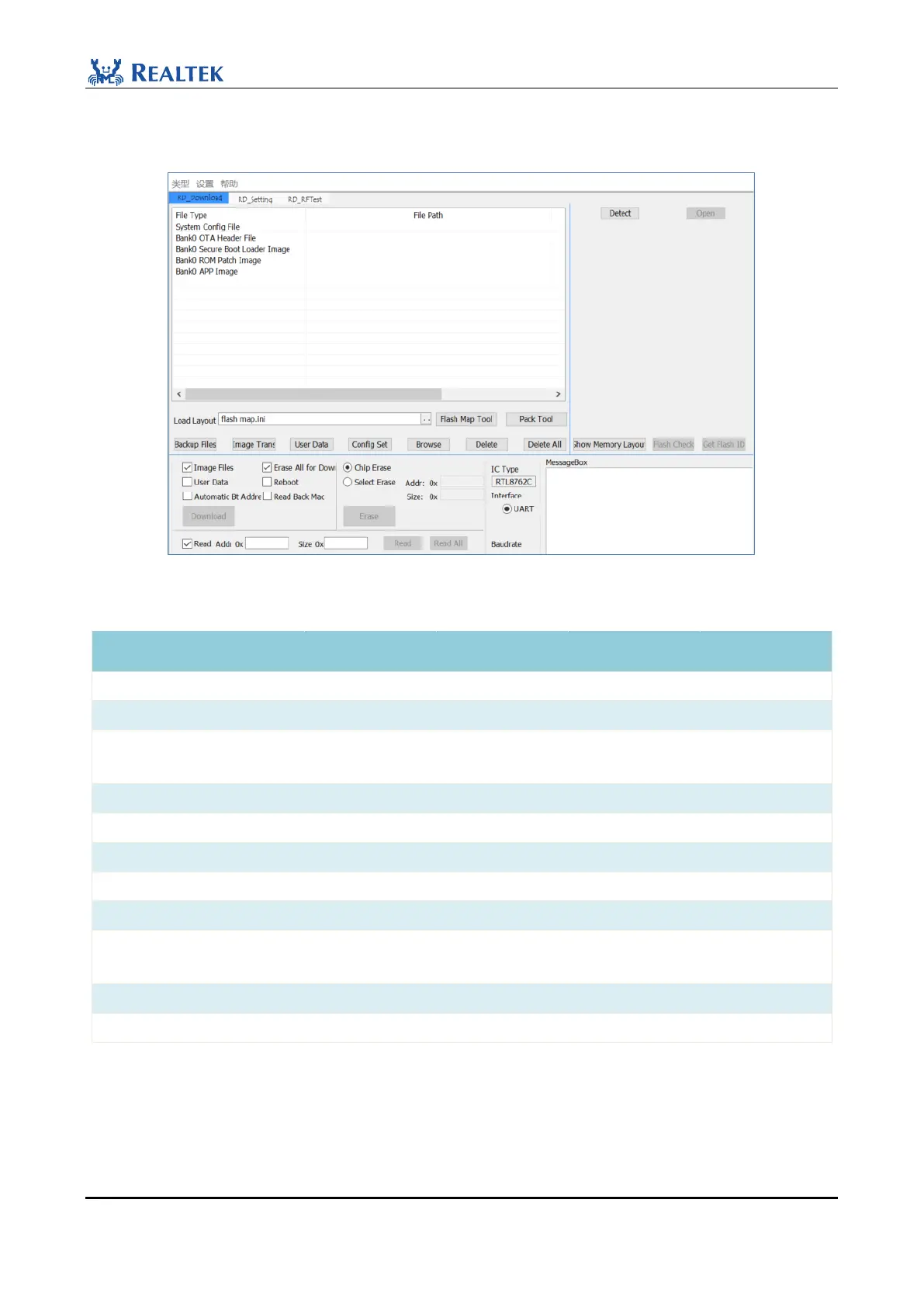
Click Confirm to enter the file burning interface shown in Figure 2-8 , and the default burning files for each IC are
shown in Table 2-1.
Figure 2-8 RTL87x2C Downloading Interface
Table 2-1 Default files
File
RTL87x2C
RTL8762D/E
RTL8752H
RTL87x2G
System Config File
OTA Header File
Secure Boot Loader Image
(FSBL)
Bank0 Boot Patch
Bank1 Boot Patch
Secure APP Image
ROM Patch Image
System Patch Image
Upperstack Image/
BT Host Image
BT Stack Patch Image
APP Image
NOTE:
Please save SDK, Tool and other documents in a non-Chinese directory without Spaces. The "flash map.ini" file
needs to be loaded before burning the file, flash_map.ini is the generated flash layout, which can be understood as
the address allocation of each part in flash. Using the new version of MP Tool, click "Flash Map Tool" on the