4. Stand & Wheel Kit Assembly - cont.
4.2 Stand Assembly
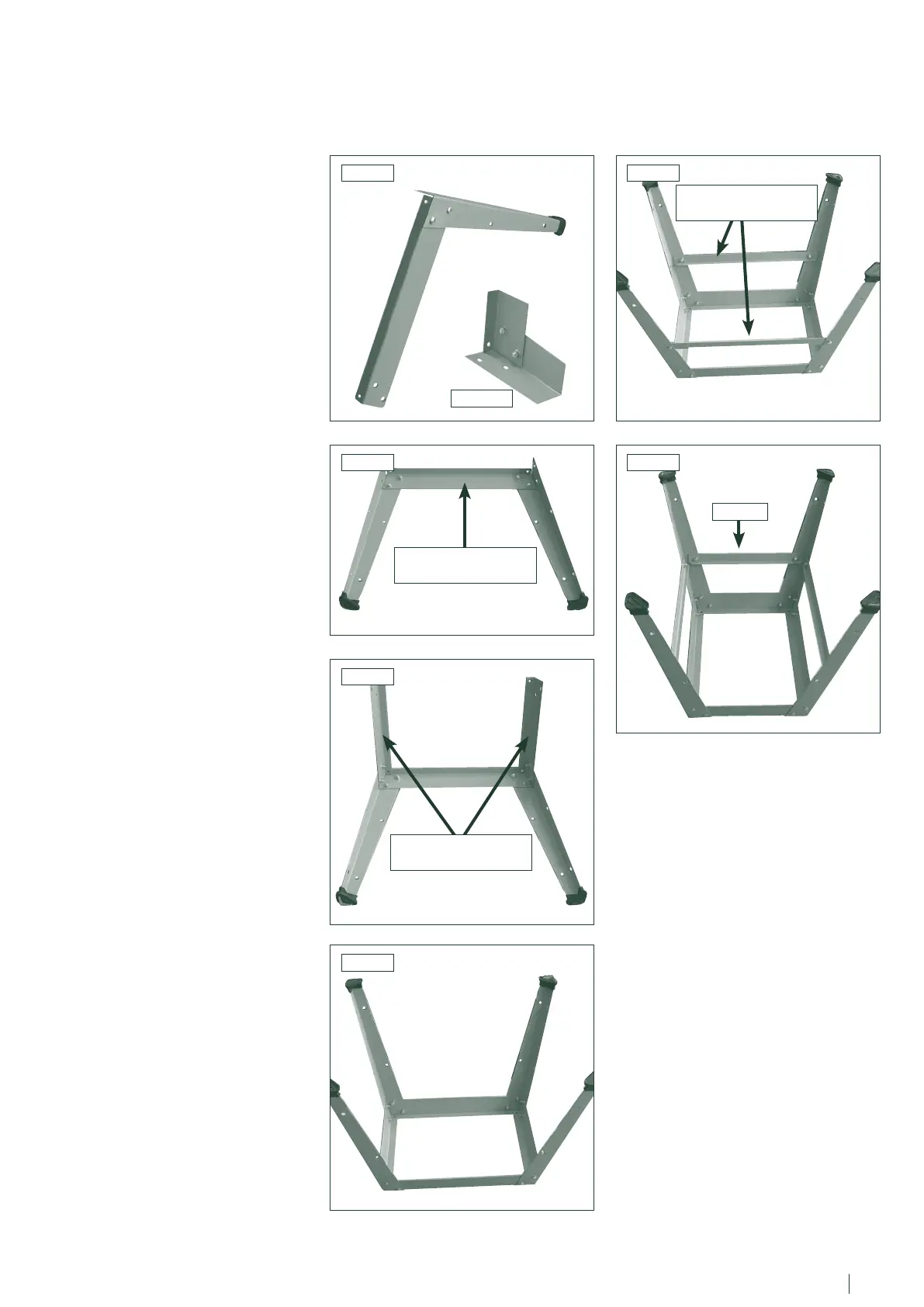
1. Locate the first leg and secure it to
one of the long top brace supports using
the nuts, bolts and washers supplied
Fig.4.2 and Fig.4.2B.
2. In the same way, attach the second
leg to the brace support Fig.4.3.
3. Locate the short top brace supports
and fix the to the legs as shown Fig.4.4.
4. Continue in this way until all of the
legs and top brace supports have been
fitted Fig.4.5.
5. Locating holes a third of the way
down each leg are for securing the mid
brace supports. Fix the long mid brace
supports to the frame using the nuts,
bolts and washers Fig.4.6.
6. Finally, fit the short mid brace support
to one of the shorter sides Fig.4.7.
Note
The side with the short mid brace
support fitted will referred to as the
front of the stand. This leaves the back
area free for wheel kit operation.
Fig.4.3
Fig.4.4
Fig.4.5
Fig.4.6Fig.4.2
Fig.4.7
Fig.4.2B
FRONT
LONG TOP BRACE
SUPPORT
SHORT TOP BRACE
SUPPORTS
LONG MID BRACE
SUPPORT
12 13


 To Next Page