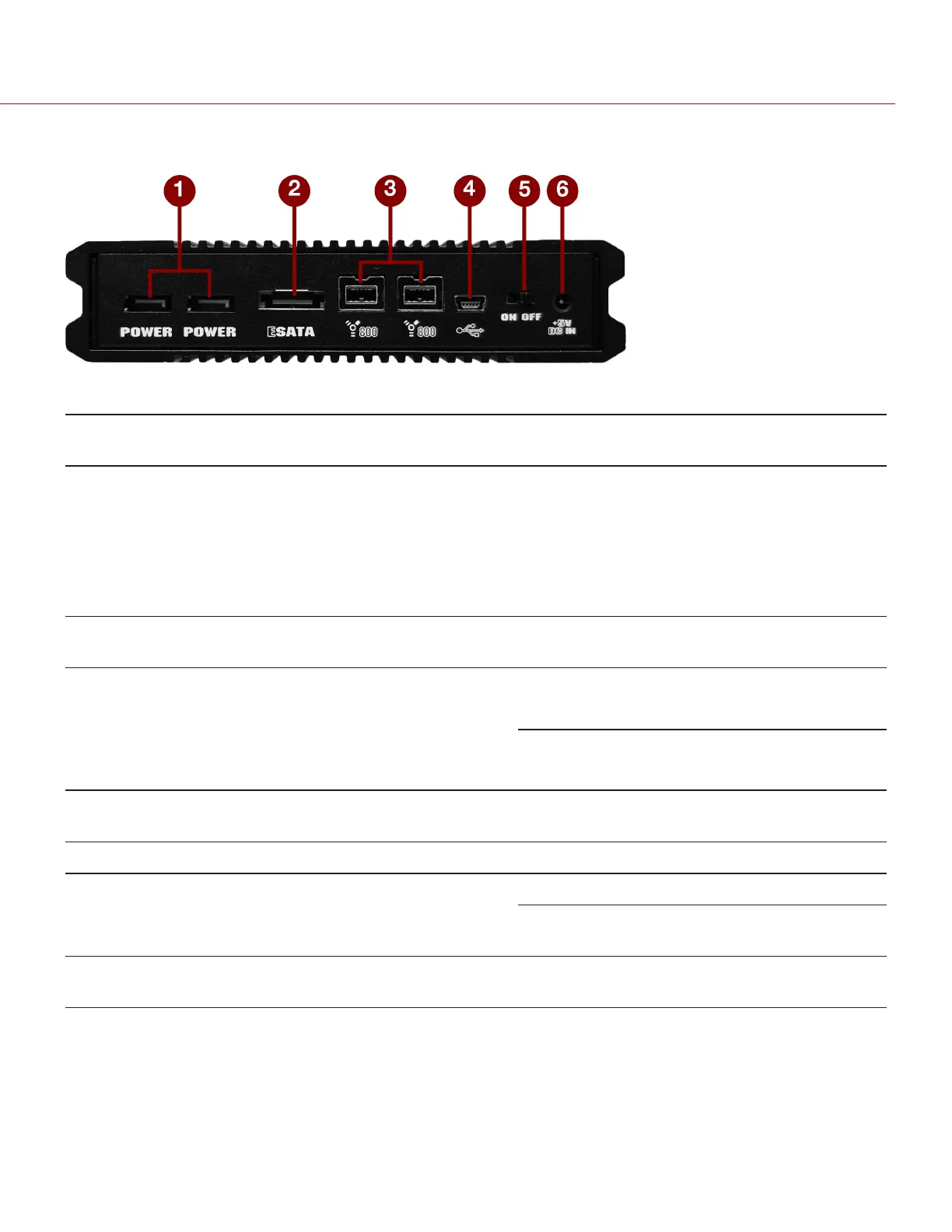
RED STATION REDMAG 2.5" CONNECTORS AND CONTROLS
Figure: RED STATION REDMAG 2.5" (Rear)
# CONNECTOR DESCRIPTION COMPATIBLE PARTS PART
NUMBERS
1 POWER Both connectors accept power from
any RED STATION that is already
connected to a RED STATION Base;
can also output power to another RED
STATION in a stand-alone
configuration or when powered by a
RED STATION Base
RED STATION DC Power Coupler (2") 790-0249
2 eSATA
connector
1
Connect to computer via an eSATA
connection
RED STATION eSATA Cable (24") 790-0250
3
FireWire 800
Use either connector to connect to a
computer or additional RED STATIONs
via a FireWire 800
connection
RED STATION FW800 Cable (2") 790-0253
RED STATION FW800 Cable (24") 790-0251
4 MINI USB slot Connect to computer via a Mini USB
connection
USB-to-MINI USB Cable (24") 790-0315
5 On/Off Switch Turn on/off N/A N/A
6
+5 VDC IN
+5 VDC power in
RED STATION AC Power Adaptor 790-0292
RED STATION USB to DC Power
Cable (24")
790-0316
N/A 2.5" Hard Drive
slot (front)
Slot for inserting a third-party 2.5" SSD
or spinning hard drive
N/A N/A
1. Only Silicon Image or HighPoint SATA cards connect to the RED STATION REDMAG 2.5" through eSATA.
C O PYRIGHT © 2 017 R ED.C OM , LLC 955- 0047, REV- AH| 34
RED DSMC MEDIA OPERATION GUIDE


 To Next Page