53
18. Changing the joystick assignment
The steering functions shown in Figure 8 to Figure 12 with the associated joystick assignments correspond to the
widely used remote control mode II. However, some model operators prefer mode I, in which the right joystick controls
the pitch function and the left joystick controls the bob function.
To operate the transmitter in mode I, proceed as follows:
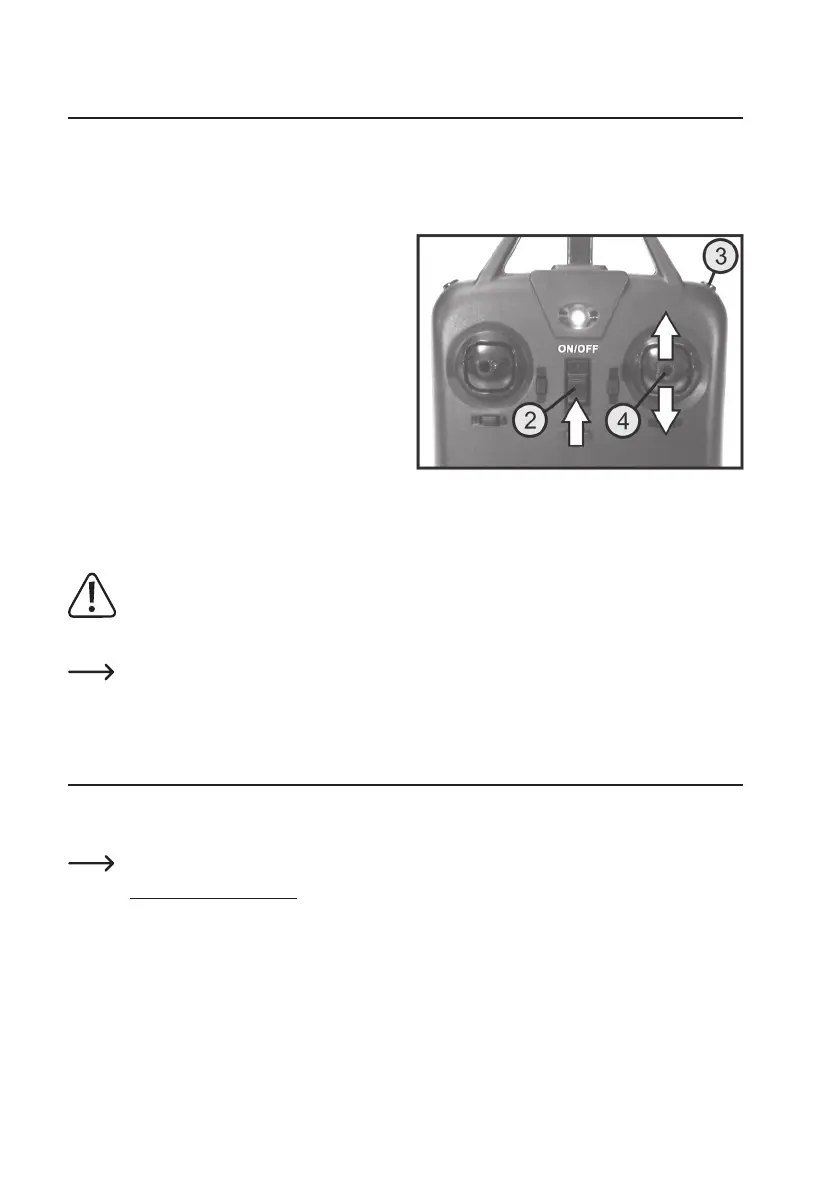
With the transmitter switched off, press and hold down the
push button for the remote control mode switching (see
Figure 1, no. 3).
With the button held down, switch the transmitter on using
the on/off switch (see also Figure 1, no. 2). Then release
the push button for the remote control mode switching.
Now slide the helicopter battery into the helicopter battery
compartment.
Then move the right joystick all the way up, then down and
then back to the middle position.
The transmitter is now switched to mode I. The model is
linked to the transmitter and ready to use.
If done correctly, the swash plate responds with tilting
movements forwards and backwards when the left joystick
is moved up or down.
Warning!
Mode switching does not only affect the function of the joysticks. The functions of the push button for bob
trimming(seeFigure1,no.5)andthepushbuttonforbeginnerandexpertmodes(seegure1,no.8)are
also switched over.
To switch the transmitter back to mode II, switch it off and then on again as described in chapter 9.
19. Declaration of Conformity (DOC)
Conrad Electronic SE, Klaus-Conrad-Straße 1, D-92240 Hirschau, hereby declares that this product conforms to
Directive 2014/53/EU.
Click on the following link to read the full text of the EU Declaration of Conformity:
www.conrad.com/downloads
Entertheproduct'sordernumberinthesearcheld;youcanthendownloadtheEUDeclarationofCon-
formity in the available languages.
Figure 18


 To Next Page