ler
— English Servitec 35-95 with
— 18.12.2019 - Rev. A
9 Controller
9.1 Configuring settings in the controller
You can configure the controller settings regardless of the currently selected and
active operating mode.
9.1.1 Customer menu
9.1.1.1 Customer menu – overview
Use the Customer menu to correct or determine system-specific values. In the
course of initial commissioning, the factory settings must be adjusted for the
system-specific conditions.
Note!
For a description of the operation,
see chapter 7.4 "Operator panel" on
A three-digit PM code is assigned to the setting options
001 Select the language
002 Set the time
003 Set the date
004 Select the system type
• Levelcontrol
• Magcontrol
005
Set the P
0
minimum operating pressure, see chapter 7.2 "Setting the
minimum operating pressure for Magcontrol" on page 13 .
006 Set the actuating pressure for the system safety valve.
– The actuating pressure protects the device.
Degassing
012 • Degassing programme
• Continuous degassing
• Interval degassing
• Run-on degassing
013 • Continuous degassing time
Make-up >
023 • Maximum make-up time …min.
024 • Maximum make-up cycles … /2 h.
• Frequency of make-up cycles in 2 hours.
024 • Make-up pressure
– Standard = Make-up pressure ˃ 2.3 bar.
– Setting range 1.3 – 2.3 bar.
– < 1.3 bar.
027 • With contact water meter "Yes/'No".
– If "Yes", continue with 028.
– If "No", continue with 007.
028 • Reset make-up quantity "Yes/No".
– If "Yes", reset to "0".
029 • Maximum make-up quantity ... l
030 • Water treatment "Softening / Desalination / None".
– If "Softening", continue with 031.
– If "Desalination", continue with the next point
– If "None", continue with 007.
With conductivity monitoring "Yes/'No".
031 • Shut off make-up "Yes/No" (if water capacity is exhausted).
032 • Soft water capacity ... l
– Calculation required before input.
• Fillsoft I + softening:
Soft water capacity = 6000 l / hardness reduction.
• Fillsoft I + desalination:
Soft water capacity = 3000 l / hardness reduction.
• Fillsoft II + softening:
Soft water capacity = 12000 l / hardness reduction.
• Fillsoft II desalination:
Soft water capacity = 6000 l / hardness reduction.
033 • Hardness reduction … °dH = GHactual – GHtarget
– Can be called when softening or desalination is active.
– Calculate the required reduction in overall hardness GH
before input.
034 • replacement interval… months (for softening cartridges
according to manufacturer).
007 Maintenance interval… months
008 Floating contact
• Message selection: only messages marked with "√" are
output.
• All messages: All messages are output.
Fault memory > History of all messages
Parameter memory > History of parameter input
Display settings > Brightness, screen saver
Information >
• Position of the "PV" 2-way motorized ball valve at the pressure
side of the pump.
– Position in %
• Software version
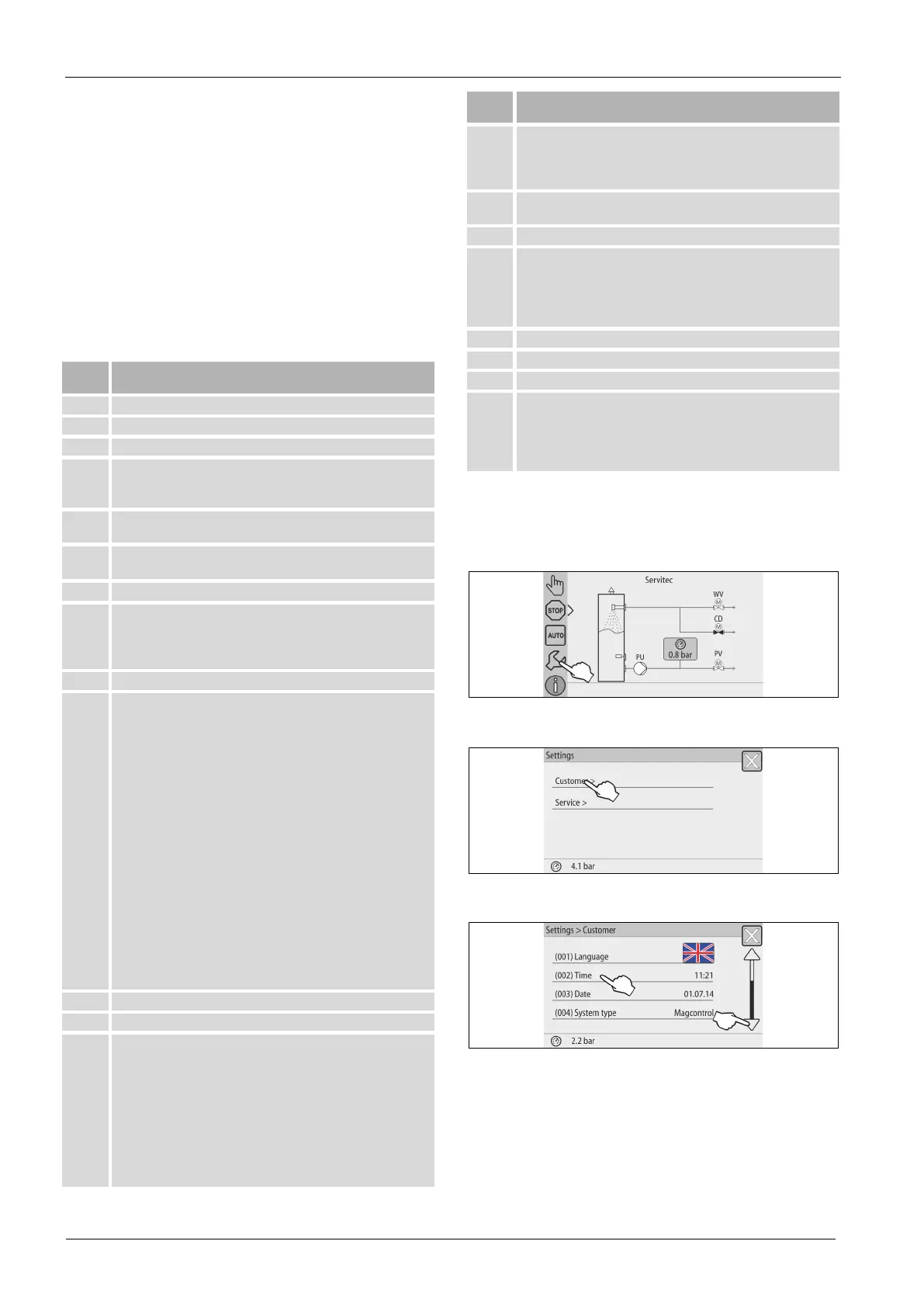
9.1.1.2 Setting the customer menu - "Time" example
The setting of system-specific values is explained below using the setting of the
time as example.
To adjust the system-specific values, proceed as follows:
1. Press "Settings".
– The controller switches to the setting area.
2. Press "Customer >".
– The controller opens the Customer menu.
3. Press the required area.
– The controller switches to the selected area.
– Use the scroll bar to navigate through the list.



 To Next Page