38
WIRELESS SENSORS/CONTROLLERS SET UP
RADIO FREQUENCY (RF)
6.0
6.1
REHAU wireless sensors can be used in
conjunction with wired sensors. When using
wireless sensors, a receiver unit has to
be connected to the main controller. The
sensors/controllers are powered by standard
AAA batteries and an alarm signal indicates
when these are running low. A frequency
band of 868 MHz is used in order to
maximise communication stability.
6.1.1 Set up
Where wireless Room sensors/controllers are being used, it is
necessary for the BA Master Controller to confi rm that the Room
Sensors/Controllers are communicating correctly.
To achieve this:
1. On master, switch on DIP-3 to activate Sensor Check:
2. All wireless Room sensors/controllers now have to be initialized (to
ensure controllers/sensors are communicating with the main controller)
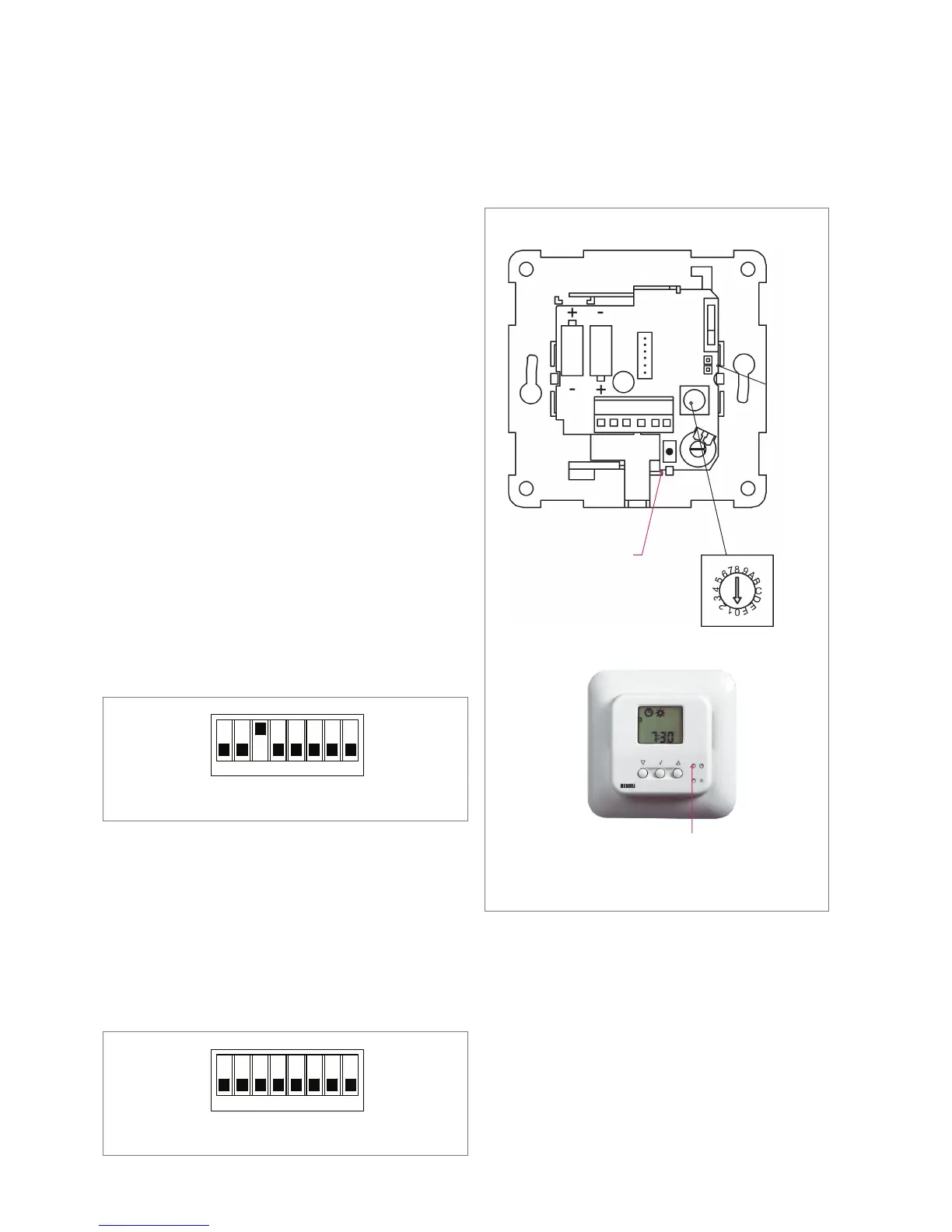
a) Room Sensors (RF TA, RF TD, RF TM, RF TP) are initialized by
pressing the internal learning mode button until a beep is heard.
(See Fig. 35)
b) Room controllers (RF CT2, RF CT2/HW, RF CT2/R, RF CT2/2) by
pressing the pin hole button with the clock symbol until a beep is heard.
(See Fig. 35)
3. Switch off DIP-3 to de-activate Sensor Check.
DIP Switch 3 turned to ‘OFF’ on the Master Controller to disable ‘Sensor Check’
35. Wireless Room Sensor / Controller
Jumper
Sensor check
mode button
Sensor check mode button
Channel
selector
Sensor
RF CT2 Programmable Room Sensor/Controller
DIP Switch 3 turned to ‘ON’ on the Master Controller to enable ‘Sensor Check’


 To Next Page