18
Control Tests
3
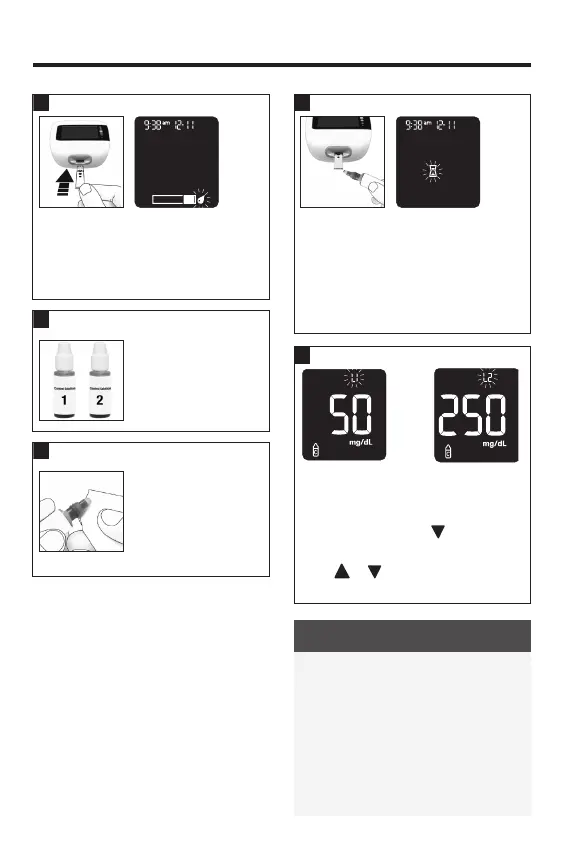
Insert the metallic end of the test strip
into the meter. Place the meter on a flat
surface. The meter turns on.
A flashing drop symbol appears.
Select the control
solution to test. You
will confirm the level
later in the test.
Remove the bottle
cap. Wipe the tip of
the bottle with a
tissue. Squeeze the
bottle until a tiny drop
forms at the tip.
Touch the drop to the yellow edge of
the test strip. Do not put control solution
on top of the test strip.
A flashing hourglass symbol appears
when there is enough control solution in
the test strip.
or
(example) (example)
The control result, the bottle symbol,
and the flashing L1 or L2 appear on the
display. Press and hold
to confirm
the control level you tested.
Press or to alternate between L1
and L2.
NOTE
When performing a control test: If the
control bottle symbol and the flashing
L1 or L2 DO NOT appear on the display
with your control result, an error has
occurred.
• Do not act on the control result.
• Discard the test strip and repeat the
control test with a new test strip.
83561_09410155001A EN ReliON.indd 1883561_09410155001A EN ReliON.indd 18 3/23/2022 11:24:06 AM3/23/2022 11:24:06 AM



 To Next Page