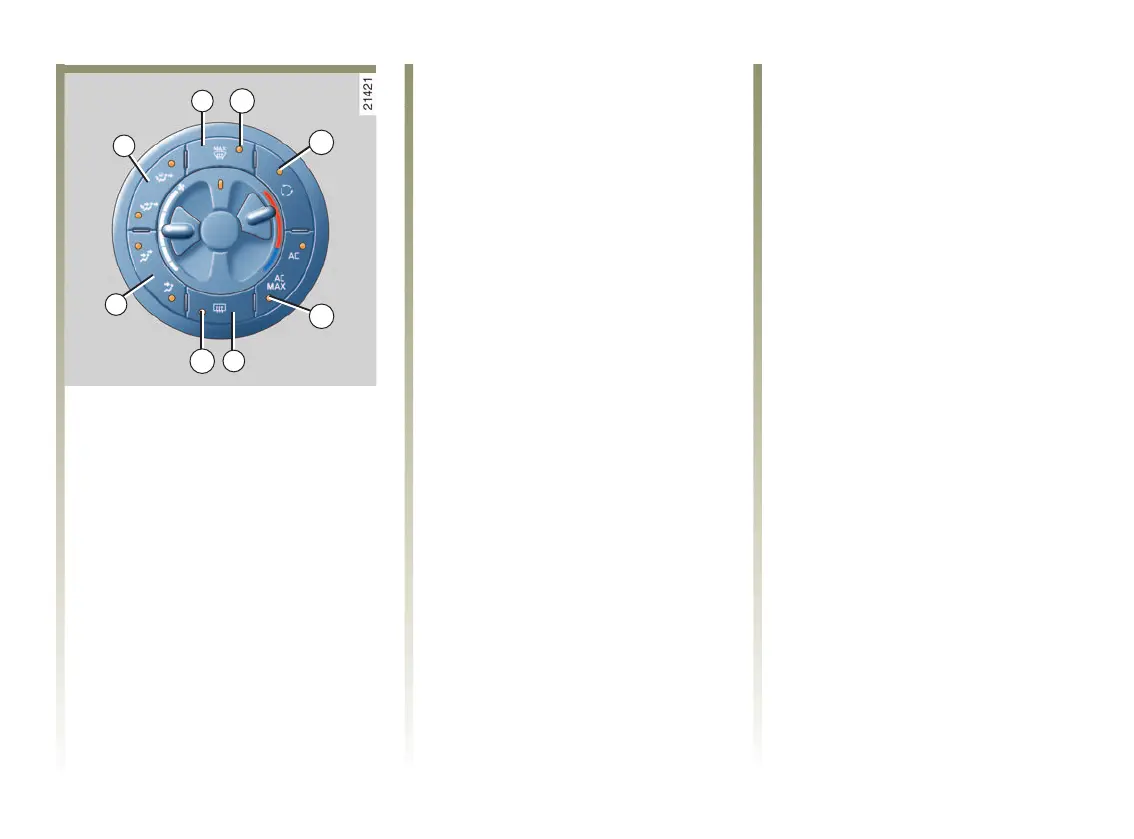
6b
8
1
2
4a
7
2a
7a
NU760_1_G3-FRA.qxd 9/11/05 17:16 Page 3.07
3.07
HEATING/AIR CONDITIONING (continued)
Clear View function
Press button 2, the indicator light 2a
lights up.
This function allows rapid de-icing
and demisting of the windscreen,
front side windows, electric door
mirrors and electric rear screen
(indicator light 7a lit).
For increased efficiency, it
automatically operates the air
conditioning (indicator light 6b lit)
and cancels air recirculation
(indicator light 4a off).
The best possible flow of air is then
directed towards the windscreen
and front windows.
There are two ways to switch this
function off:
- press button 2 again;
- press one of the air distribution
buttons 1 or 8.
Rear screen and door mirror de-
icing/demisting
Press button 7, the indicator light 7a
lights up.
This function rapidly de-ices and
demists the rear window and the
heated door mirrors.
There are two ways to switch this
function off:
- it stops automatically after a
specified time;
- by pressing key 7 again.
Note:
De-icing the rear screen and door
mirrors is put into automatic
operation when the Clear View
function (button 2) is operating.
NU760_1_G3-ENG.qxp 27-Dec-05 18:41 Page 3.07 (Black/Process Black plate)













 To Next Page