8
1
2
NU760_1_G3-FRA.qxd 9/11/05 17:16 Page 3.08
HEATING/AIR CONDITIONING (continued)
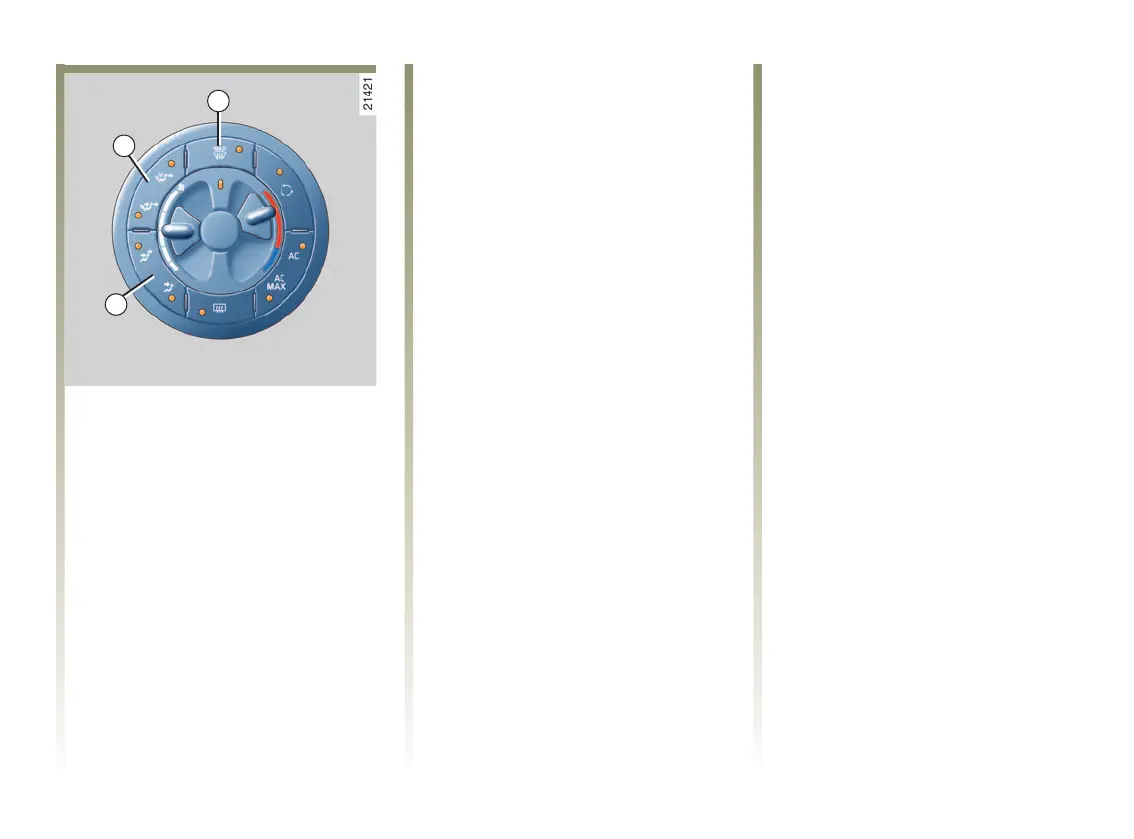
Air distribution in the passenger
compartment, buttons 1 and 8
The indicator light lit up shows the
position selected.
Note:
If the Clear View function, button 2,
is operating, the air is automatically
directed towards the windscreen
and side windows: the operating
lights on buttons 1 and 8 are not lit.
3.08
Button 8
Pressing button 8 in succession
transfers from one distribution to
another.
Distribution
o
Air through the front and rear vents.
Advice for using this distribution: it
is preferable to use this distribution
under very sunny outside
conditions or to rapidly cool down
the passenger compartment if the
vehicle has been left in the sun for a
long time.
Distribution
m
Air exits the front vents.
User advice for this distribution:
use it when you want to cancel the
air flow to the rear vents.
Key 1
Pressing button 1 in succession
transfers from one distribution to
another.
Distribution
j
The air is directed towards the
windscreen, side windows and front
and rear footwells.
User advice for this distribution: it
is preferable to use it when outside
conditions are cold or fresh.
Distribution
l
The air is distributed between the
front and rear vents and the front
and rear footwells.
User advice for this distribution: it
is preferable to use it when outside
conditions are warm or sunny.
NU760_1_G3-ENG.qxp 27-Dec-05 18:41 Page 3.08 (Black/Process Black plate)














 To Next Page