display .......................................................
(up to the end of the DU)
control instruments ....................................
(up to the end of the DU)
energy consumption ..................................
(up to the end of the DU)
indicators:
instrument panel ..................................
(up to the end of the DU)
instrument panel ........................................
(up to the end of the DU)
1.142
ENG_UD81051_3
Afficheurs et indicateurs (XFK - Renault)
displays and indicators, trip computer
DISPLAYS AND INDICATORS (1/7)
Instrument panel in miles
(option to switch to km/h)
Vehicles not fitted with a multimedia
screen
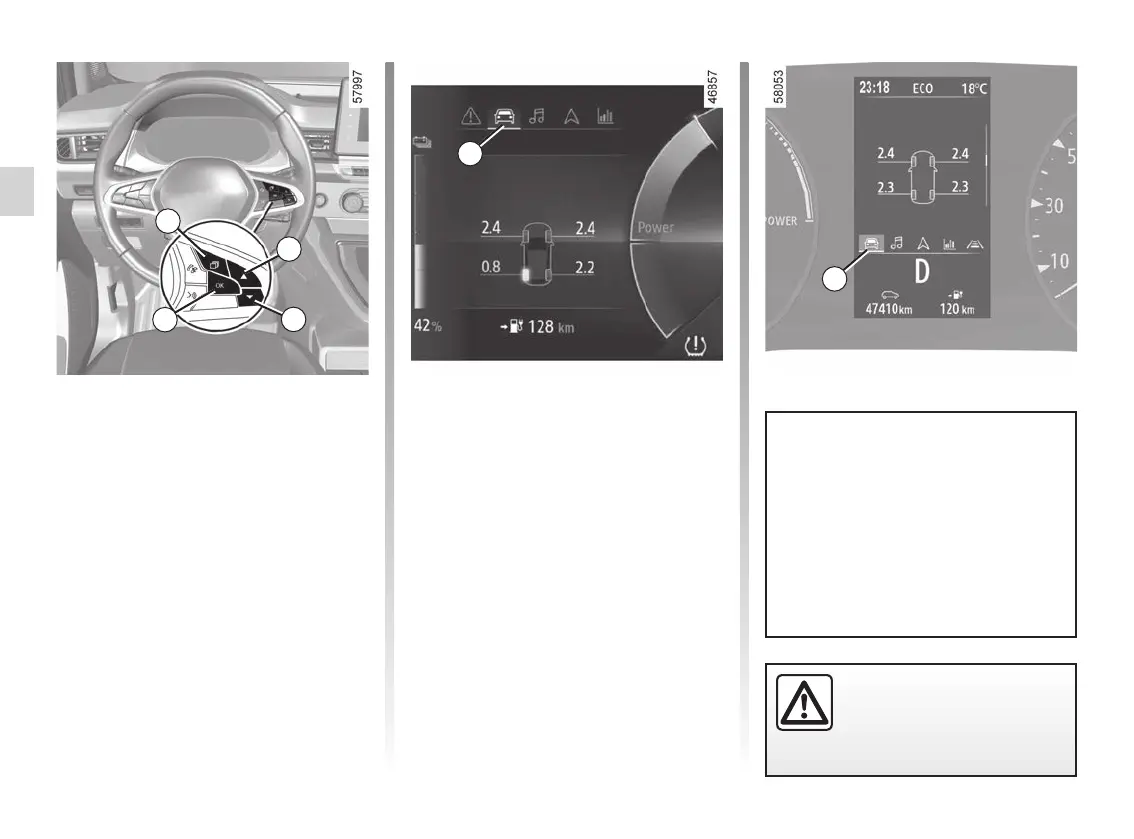
– With the ignition off, press the 1
switch as many times as required to
reach the vehicle tab 5;
– press 2 or 3 repeatedly to access
“Settings”, then press 4 “OK ";
– repeat the same operation to access
"DASHBOARD", then "Units".
Vehicles fitted with a multimedia
screen.
With the vehicle stationary and the
engine on, from the multimedia
screen, select the “Settings” menu, the
“System” tab, then “Units”.
Note: in both cases, once the battery
is switched off, the on-board computer
automatically returns to the original unit
of measurement.
To return to the previous mode, repeat
the same operation.
Please refer to the multimedia instruc-
tions for more information.
1
2
4
3
5
5
To use certain driving aid functions,
it is necessary to change the unit
of measurement on the instrument
panel in order to obtain the correct
information when driving in a coun-
try where the speed units differ from
those set as default on your vehicle.
For safety reasons, change
these settings while the ve-
hicle is stationary.










 To Next Page