2.13
ENG_UD82083_3
Frein de parking assisté (XFK - Renault)
ELECTRONIC PARKING BRAKE (2/4)
Manually releasing the electronic
parking brake
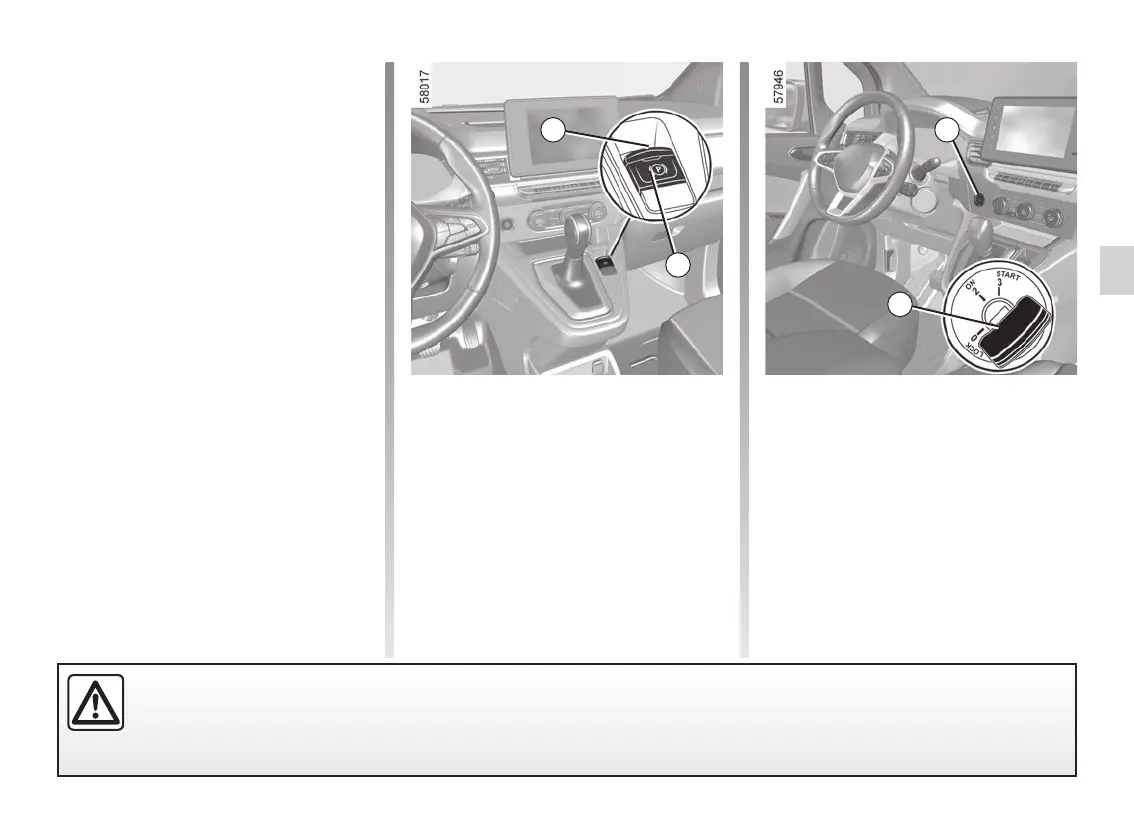
Press the switch 1 without pressing the
brake pedals or turn the key 2 to the
“ON 2” position to switch on the igni-
tion. Press the brake pedal then press
switch 4: indicator light 3 on the switch
and indicator light
} displayed on
the instrument panel go out.
Manual operation
You can apply the electronic parking
brake manually.
Manually applying the electronic
parking brake
Pull switch 4. Warning light 3 and warn-
ing light
} on the instrument panel
light up.
Assisted operation
(continued)
Note: in some situations (electronic
parking brake failure, manual release of
the parking brake, etc.), a beep sounds
and the message “WARNING: Apply
Parking Brake” appears on the instru-
ment panel to warn you that the elec-
tronic parking brake has been released.
– with the engine running: when the
driver’s door is opened;
– with the engine switched off (e.g.
when the engine stalls): when a front
door is opened.
In this case, pull and release switch 4 to
apply the assisted parking brake.
Assisted release of the parking
brake
The parking brake is released as soon
as the vehicle is started and accelera-
tion begins, or when shifting out of gear
lever position P.
Before leaving the vehicle, check that the electronic parking brake is fully applied. Warning light 3 on switch 4 and
warning light
} on the instrument panel light up to show that the parking brake is applied but go out when the
doors are locked.
1
2
3
4










 To Next Page