charging cord .............................................
(up to the end of the DU)
charge programming .................................
(up to the end of the DU)
1.22
ENG_UD74737_1
Véhicule électrique : programmation de la charge (XFK - Renault)
Charging programming
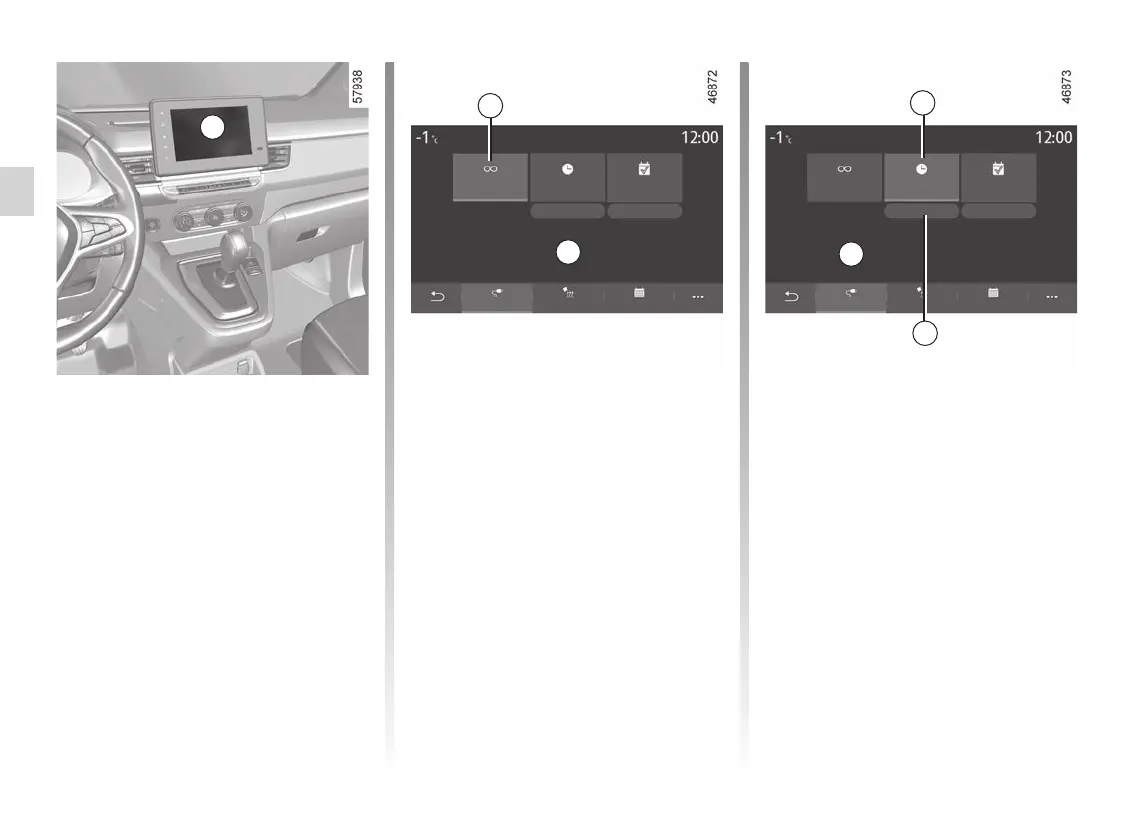
With the vehicle stationary and the
engine on, from the “Settings” menu
on the multimedia screen 1, select the
Vehicle” tab. Use the “EV program-
ming” menu to configure charging for
your vehicle.
When the programming is confirmed,
the indicator light lights up on
the instrument panel.
Note: charging will start if the engine is
shut down and the vehicle is connected
to a power supply and access is author-
ised.
ELECTRIC VEHICLE: programming charging (1/2)
“Immediate charging” 2
With the vehicle connected to a power
supply, charging starts.
Area A informs you that “Immediate
charging” is activated.
Please refer to the multimedia instruc-
tions for further information.
1
“Postponed charging” 3
You can programme the start time for
charging.
Press “Edit” 4 to open the settings to
set the start time for charging.
Set the start time for charging then
press “Save” to confirm.
Area B shows the time programmed for
charging to start.
With the vehicle connected to a power
source and the engine switched off,
charging starts at the scheduled time.
Program
Immediate
charge
Charging will begin when the vehicle is plugged in
Postponed
charging
Edit Edit
Climate
Charge
Calendar
Program
2
A
Charging will start at 12:34
Program
Immediate
charge
Postponed
charging
Edit
Edit
Climate
Charge Calendar
Program
3
B
4










 To Next Page