ADDITIONAL DRIVING AID FUNCTIONS
3
Driving - 229
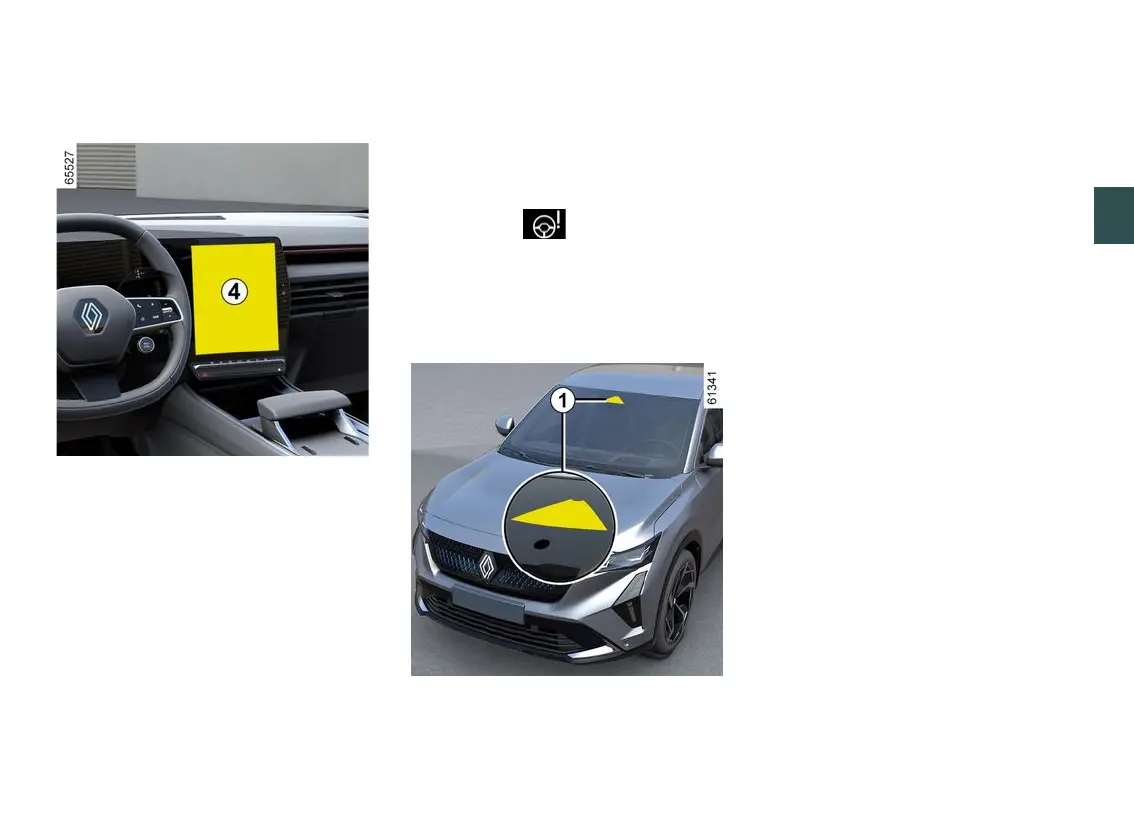
Activating and deactivating the
alerts from the multimedia screen
4
To activate or deactivate the alerts,
pleaserefertothemultimediainstruc-
tions.
Select "ON" or "OFF".
Limitation of the system operation
Someconditionscandisruptordam-
age the system operation, for example:
– certaindrivingstyles(incorrectdri-
ving etc.);
– driving on a road in poor condition;
– strong side wind;
– Theclockiswronglyconfigured(de-
pending on vehicle);
– winding roads;
– trailer traction.
Operating faults
If the system detects a fault, the
"CheckFatigueWarningSystem"mes-
sage and the warning light are
displayed on the instrument panel.
Havethesystemcheckedbyanautho-
rised dealer.
Detection of road signs
The system displays speed limits on
the instrument panel according to road
signs detected on the side of the road.
It mainly uses information taken from
the camera
1
attachedtothewind-
screenbehindtherearviewmirror.De-
pendingonthecountry,thesystemal-
sousesinformationfromamapsub-
scription to interpret certain signs
(town entrance, etc.).
The sign displayed on the instrument
panelchangeswhenaroadsignisde-
tected by the system.
Once the speed limiter or the adaptive
cruise control is activated, you can
adapt the limited speed setpoint to the
speed displayed on the instrument
panel by the system (🡺248andAdap-
tive cruise control ).
If the detected limit speed is exceeded,
theroadsigndisplayismodifiedtoin-
form you.
Location of the camera
1
Makesurethewindscreenisnotob-
scured(bydirt,mud,snow,condensa-
tion etc.).
Special features
For vehicles with a map subscrip
tion:
– if the vehicle is travelling in a country
where the speed units differ from those
of the vehicle, the system displays the
speedlimitsignintheunitofthecoun-
try, alongside the speed limit converted



 To Next Page