DOORS AND OPENING ELEMENTS
2
Getting to know your vehicle - 63
– thevehicleislocatedinahighelec-
tromagnetic radiation zone;
– vehicle locked using a digital key
🡺58.
It is then possible:
– to use the radio frequency remote
controlortheemergencykeyintegrat-
edintothecard(dependingontheve-
hicle) to unlock the driver's door;
– tousetheinteriordoorlocking/un-
locking control;
– to use the digital key, depending on
the vehicle 🡺58.
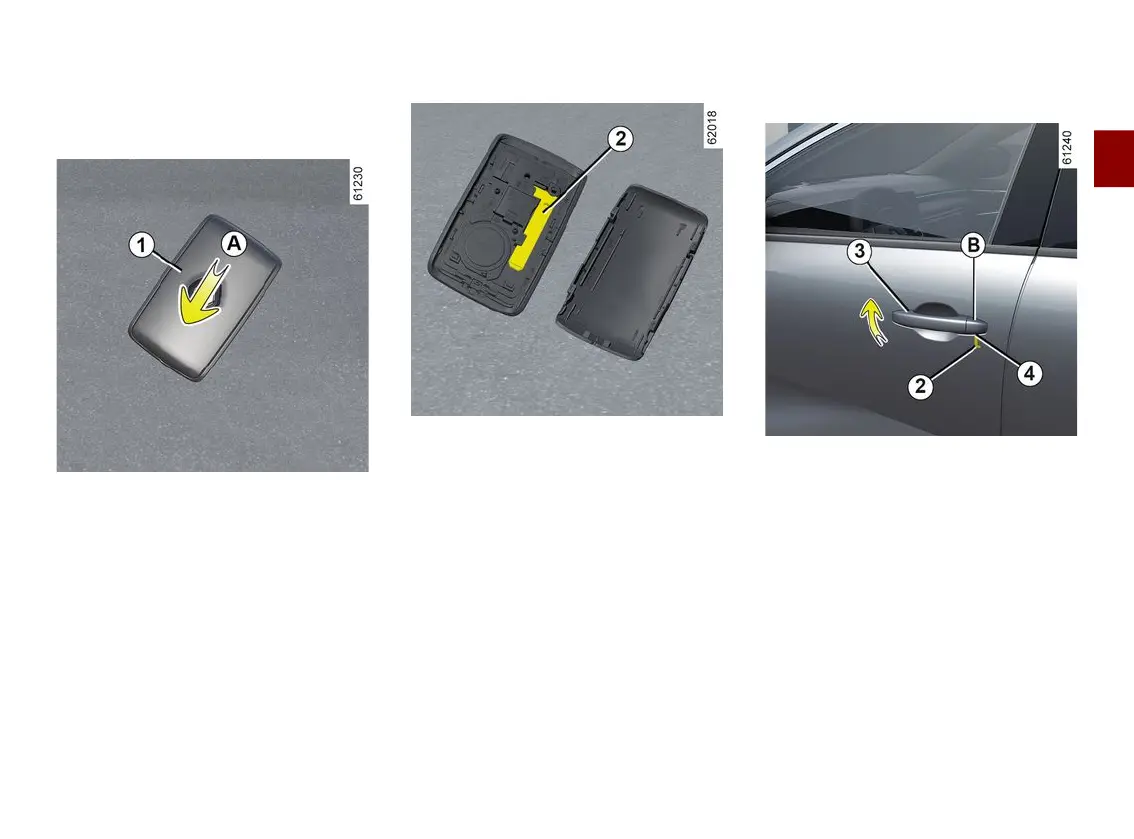
The card's built-in key
The built-in key
2
can be used to lock
or unlock the driver's door when the
card is not working.
Access with key 2
Slide the rear casing
1
downwards
while pressing on area
A
.
Using the key integrated in the
card
– Pull the handle
3
;
– press downwards on the cover
B
on
the driver's door;
– insert the end of the key
2
into the
notch
4
at the bottom of the cover
B
;
– rotateitupwardstoremovethecov-
er
B
;
– insert the key
2
into the lock of the
driver's door, then lock or unlock.
Once you are inside the vehicle, put
the key back in its casing in the card.



 To Next Page