Need help?
Do you have a question about the Renesas RA2 Series and is the answer not in the manual?
Steps to prevent static electricity damage to CMOS devices, ensuring proper grounding and handling.
States of product and pins are undefined when power is supplied until reset is complete.
Avoid inputting signals to a powered-off device to prevent malfunction or degradation.
Proper handling of unused pins to prevent noise induction and false signal recognition.
Ensure clock signals are stable before releasing reset or switching during execution.
Prevent waveform distortion and chattering noise at input pins to avoid malfunction.
Access to reserved addresses is prohibited as their function is not guaranteed and may cause issues.
Confirm compatibility when changing to different part numbers within the same product group.
Guidelines for using the board in a lab environment and managing radio frequency interference.
User's assumed knowledge of microcontrollers and recommended reading for board familiarization.
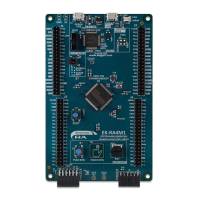
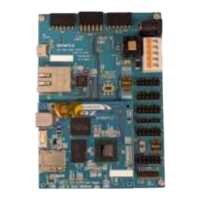
Describes the board's design, components like MCU, headers, and connectors.
Visual representation of the FPB-RA2E1 board's system architecture and interconnections.
Introduces the types of jumpers (copper, pin header) used for board configuration.
Details on trace-cut and solder-bridge copper jumpers used for board configuration.
Description of standard 0.1" pitch pin header jumpers for manual configuration.
Table outlining default settings for all jumpers on the FPB-RA2E1 board.
Explains power supply options, considerations, and power-up behavior indicators.
Details on the on-board E2 emulator and external debugger interfaces.
Configuration steps for debugging the FPB-RA2E1 in Renesas' e2 studio IDE.
Description of the Pmod connectors for attaching expansion modules.
Detailed pinout and configuration for the Pmod 1 connector.
Detailed pinout and configuration for the Pmod 2 connector.
Details on the Arduino Uno R3 compatible connector for shields and expansion.
Describes the function and control ports of the user and power LEDs on the board.
Details on the user switch (S1) and reset switch (S2) functions and their MCU connections.
How to select boot mode using the J7 header, including SCI boot mode.
Information on oscillator crystals providing precision reference clocks to the MCU.
Description of breakout pin headers for MCU I/O and power access.
How to measure MCU current using test points TP1, TP2 and resistor R3.
Compliance with FCC and ICES regulations for electromagnetic compatibility.
Compliance with RoHS and China SJ/T standards for materials and disposal.
Compliance with UL 94V-0 safety standard for flammability.
Lists the files included in the design package, such as schematics, drawings, and BoM.
URLs for obtaining FPB-RA2E1 resources, product information, and support.
Information on the initial release (Rev. 1.00) and publication date of the user's manual.
The Renesas FPB-RA2E1 is a Fast Prototyping Board designed for the RA2E1 MCU Group, enabling users to evaluate the features of the RA2E1 microcontroller group and develop embedded systems applications. It integrates with the Flexible Software Package (FSP) and the e² studio Integrated Development Environment (IDE), providing a comprehensive platform for embedded system development.
The FPB-RA2E1 board serves as a development platform for the Renesas RA2E1 MCU, which features an Arm® Cortex®-M23 core. It provides access to all MCU I/O and power pins through breakout headers, facilitating custom circuit prototyping and testing. The board includes an on-board programmer/debugger (E2 Emulator On-Board) that supports the Serial Wire Debug (SWD) interface, allowing for seamless re-programming and debugging of the target RA MCU firmware. For external debugging, a 10-pin Cortex® Debug Connector (CN4) is available, supporting JTAG, SWD, and Embedded Trace Module (ETM).
The board's architecture is designed to be similar to other boards in the FPB series, incorporating essential components like a power supply regulator, user interface elements (LEDs and switches), and popular ecosystem I/O connectors. It supports multiple clock sources, including internal low-precision clocks and the option to fit external 20.000 MHz and 32,768 Hz crystals for precision reference clocks.
The FPB-RA2E1 offers several features to enhance usability and flexibility:
The FPB-RA2E1 incorporates features that aid in maintenance and testing:
 General
| Operating Voltage | 1.6 V to 5.5 V |
|---|---|
| Operating Temperature | -40°C to +85°C |
| Microcontroller Core | Arm Cortex-M23 |
| Flash Memory | Up to 256KB |
| SRAM | Up to 32KB |
| DAC | 12-bit |
| Communication Interfaces | SPI, I2C, USB |


 To Next Page