EN
7 Troubleshooting
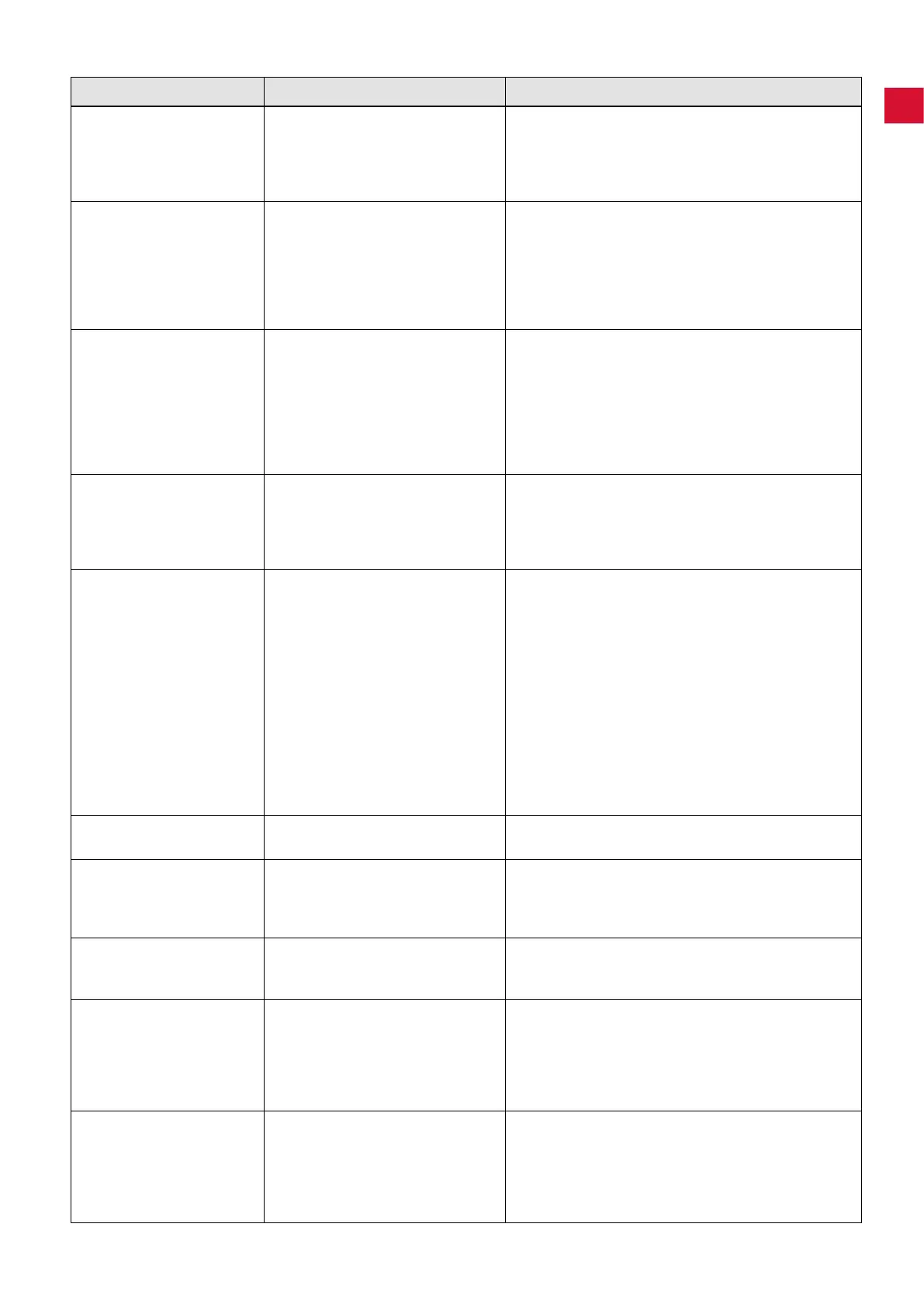
Trouble Possible Cause Corrective Action
During an interruption in
operation, an acoustic
signal occurs 3 times and
then the lter cleaning
function is carried out.
• After 16 hrs� constant operation
(turbine running time) without hav-
ing been switched off in between,
theltercleaningfunctioniscarried
out�
• Always switch appliances off at the on/off switch at the
end of the working day (9, Fig� 1)�
When the unit is switched
on, the display dust drawer
(24, Fig. 12) lights up and
an acoustic signal occurs
3 times.
• The time period for emptying the
dust drawer has elapsed and the
dust drawer has not yet been emp-
tied�
• The emptying of the dust drawer
hasnotbeenconrmed.
• Emptythedustdrawerandconrmbypressingthe
key (25, Fig� 12)�
• Emptythedustdrawerandconrmbypressingthe
key (25, Fig� 12)�
Display error (26, Fig. 2)
lights up and an acoustic
signal occurs 3 times.
• The difference between the cho-
sen rpm at the handpiece and the
stand-by current is too low; it is not
possible to determine the switch-on
threshold�
• It is not possible to determine the
switch-on threshold�
• Determine the switch-on threshold by increasing the
rpm on the handpiece�
• Use the unit in continuous operating mode�
The error message
(26, Fig. 2) blinks.
• The electronic device has become
too hot�
• Switch the device off and allow it to cool down�
• Ensuresufcientcooling,e.g.with:
- Chapter 4�2 installation instructions�
- External ventilation (see chapter 4�6)�
- Changenelter.
The suction performance is
insufcient.
• The set suction performance is too
low�
• There is a blockage or leak in the
suction tube�
• Dust drawer is not airtight�
• Thenelterisfull.
• Select higher suction level�
• Check suction tube�
• Please observe the points in chapter 4�4
• Check the dust drawer is in the correct position
(chapter 6�2)�
• Switch the unit off and back on in order to initiate the
ltercleaningfunction.
• Changethenelter(seechapter6.3)(ifthereisno
improvementinsuctionperformanceafterthelter
cleaning process)�
Dust drawer is over full. • The time period for “empty dust
drawer” has been set too high�
• Adjust to a lower time period (see chapter 6�2�1)�
The signal to empty the
dust drawer shows even
though the dust drawer is
not yet full.
• The time period for “empty dust
drawer” has been set too low�
• Adjust to a higher time period (see chapter 6�2�1)�
The electronic device con-
nected to the unit power
socket cannot be operated.
• Suction is not switched on� • Switch the suction on�
The suction starts even
though the electronic de-
vice connected to the unit
is not being used.
• The switch-on threshold for the
automatic operation mode is set
too low�
• Malfunction due to another device
using the same power circuit�
• Re-set the switch-on threshold for the automatic mode
(see chapter 5�5)�
• Connect the extraction unit and the device causing
interference to different power circuits (phases)�
The suction does not stop
when the electronic device
is switched off.
• The switch-on threshold for the
automatic operation mode is set
too low�
• Malfunction due to another device
using the same power circuit�
• Re-set the switch-on threshold for the automatic mode
(see chapter 5�5)�
• Connect the extraction unit and the device causing
interference to different power circuits (phases)�
- 13 -


 To Next Page