19
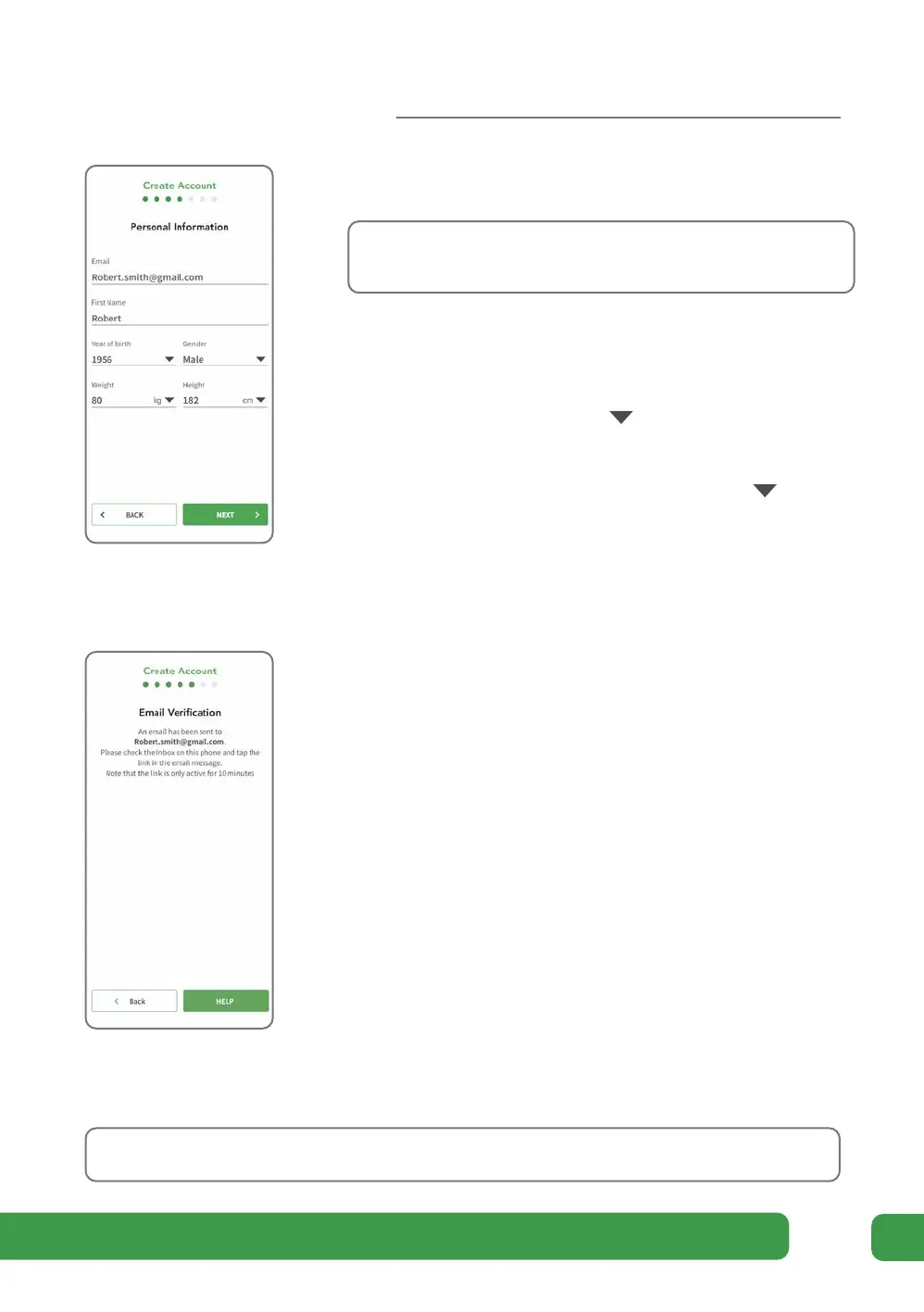
h On the Personal Data screen, enter the email address
you want to use for your Revitive account.
Note: This must be an email account available on this
mobile phone.
Enter your first name or nickname. Revitive will use
this throughout the app.
Select your year of birth and gender from the options
given by tapping the arrows .
Enter your weight and height. You can choose the
units of measurement by tapping the arrows and
selecting from the options given.
Tap NEXT.
i An email is sent to the email address you entered.
When the Email Confirmation screen displays, switch
to the email app on this phone, open the email from
Revitive and then tap the link in the message.
Note: On Android you may be asked how you want
to open the link in the email, choose the Revitive app
and “just once”
You will automatically be switched back to the
Revitive app.
If you do not receive an email within one minute,
revert to the Revitive app and tap BACK at the bottom
of the screen. Check that the email address entered is
correct.
If necessary, correct the address and tap NEXT again.
This resends the email to the mail address provided.
You will need to respond to the email message within 10 minutes.
Getting started



 To Next Page