21
Step 5: Connect the app with your Revitive
Connecting the app to your Revitive means you will be able to use your phone as a
controller and you will be able to track your therapy.
a Check that Bluetooth on your phone is switched on. If you are unsure, go to Settings
on your phone and look for Bluetooth, check that it is enabled.
Note that Android devices may ask whether the Revitive app can use Location
Services. Please accept this as it required for the Bluetooth connectivity to work as
expected.
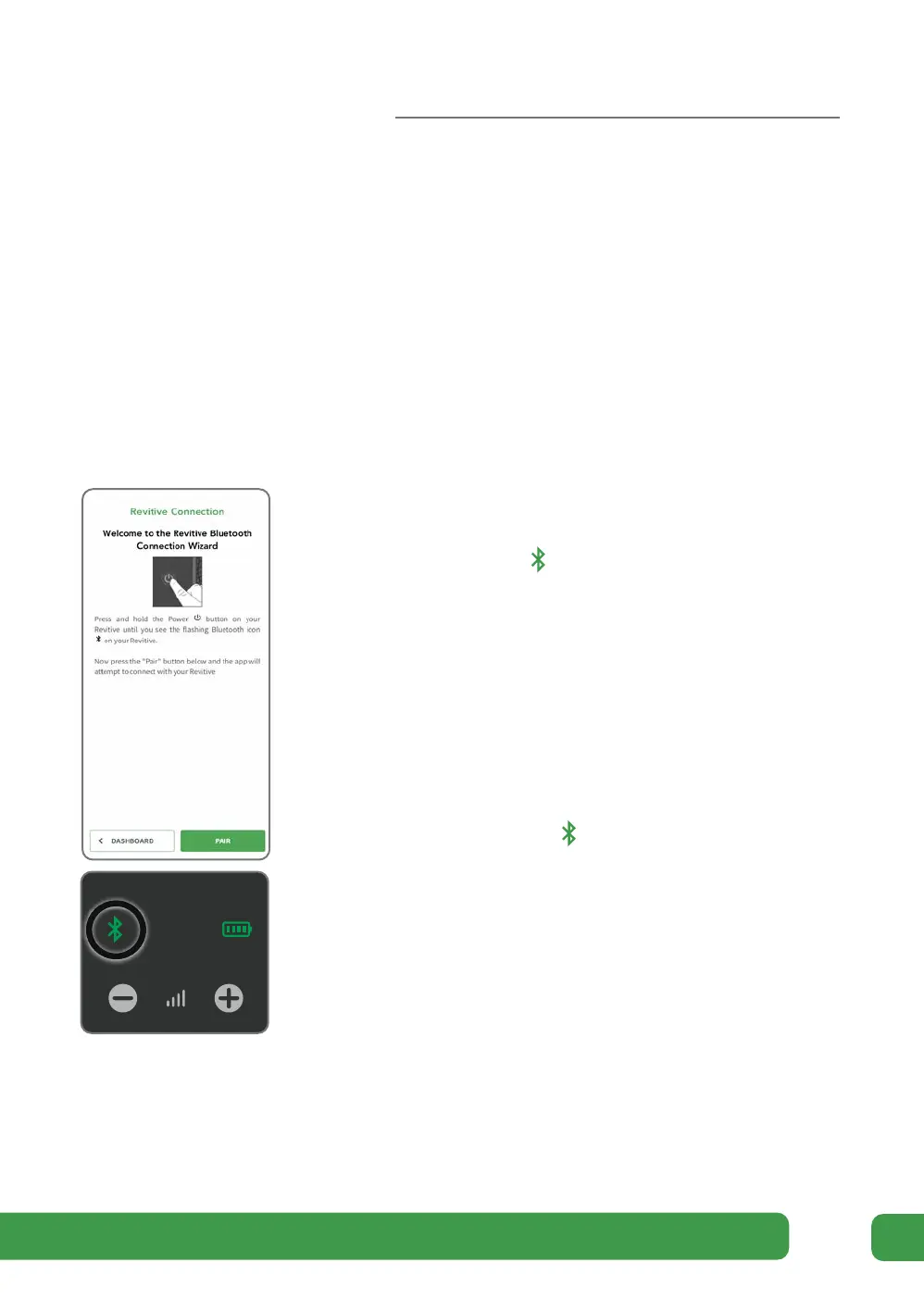
c As directed by the wizard, press and hold the
POWER button on Revitive until you see the
Bluetooth symbol flashing on Revitive’s
control panel. This indicates that Revitive is in
Bluetooth pairing mode and is ready to connect
to your mobile phone.
Tap the PAIR button displayed on your phone
to connect to your Revitive.
d Aer a short time, the app will find your Revitive
and connect. When the connection is made,
the Bluetooth symbol on Revitive will stop
flashing and remain illuminated.
The app will switch to display the Dashboard screen.
If a problem occurs, please refer to the
Troubleshooting guide on pages 52-55.
0
0
Getting started



 To Next Page