31
Run your Therapy Plan
Your 10-week suggested Therapy Plan is designed by Revitive to be the most eective at
relieving the key symptom you provided in step 5 of ‘Getting Started’.
Follow the instructions in this section every time you want to run a stimulation session
according to your suggested Therapy Plan.
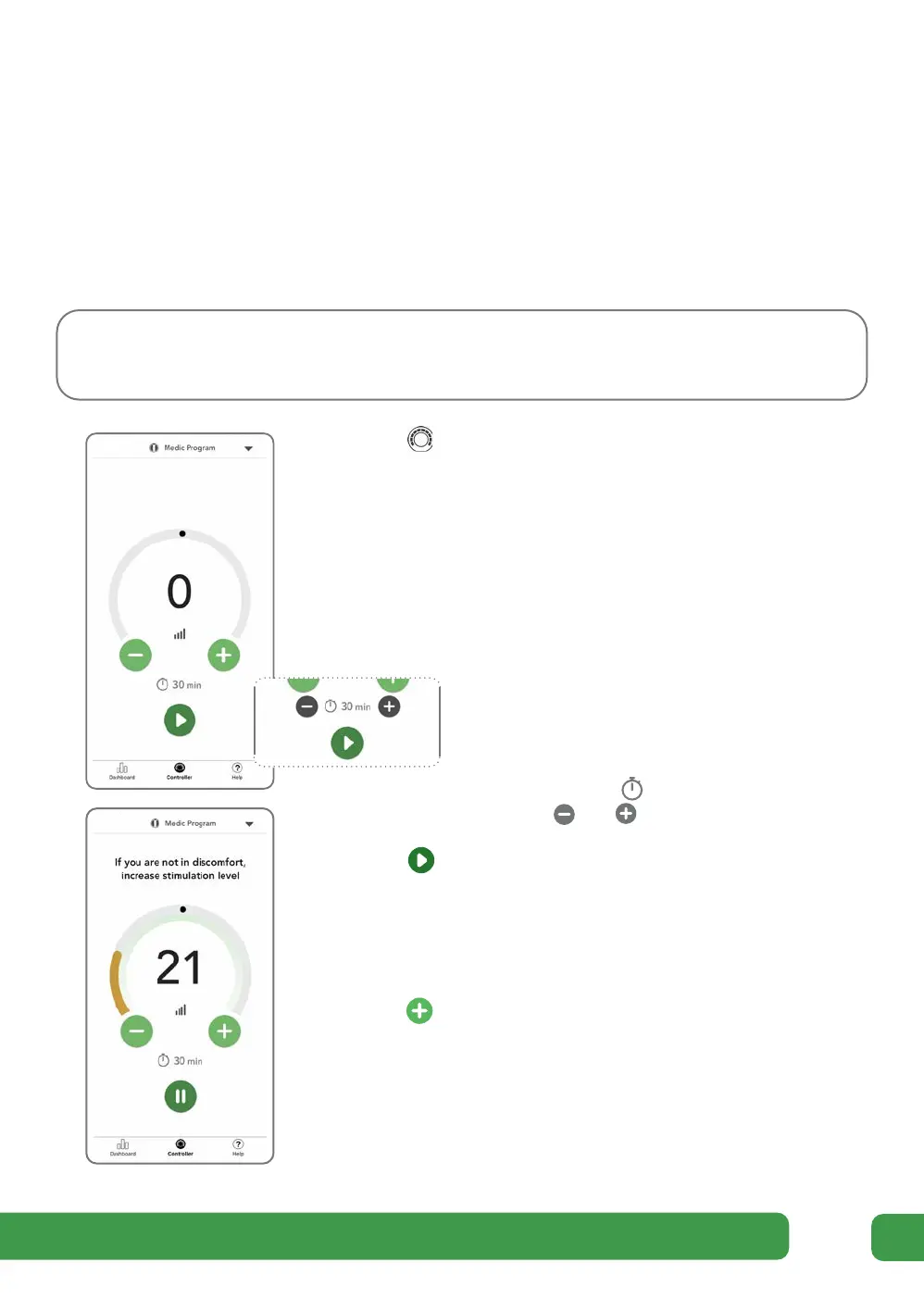
a Tap Controller on the tab bar at the bottom of the
screen to navigate to the Controller screen.
The name of the scheduled program in your
suggested Therapy Plan is displayed at the top of
the screen.
If required, apply the necessary electrode pads by
following the instructions starting on page 41.
The duration of the scheduled program
is set automatically. You can adjust the
time at any point during a therapy
session by tapping the ‘remaining
time’ indication to display the timer
buttons and .
b Tap to start the program, responding to any
on-screen questions.
c If you have not previously opted to run your
stimulation sessions in Auto Ramp-up mode, you
will need to increase the intensity level by tapping
the button. The intensity needs to be increased
until Revitive is at a suicient intensity to provide
the therapy and you are not feeling any discomfort.
A suicient intensity level to provide the therapy is
indicated by your Revitive rocking and the intensity
level arc turning from orange to green.
Running & monitoring your therapy plan Running & monitoring your therapy plan



 To Next Page