EasyManua.ls Logo

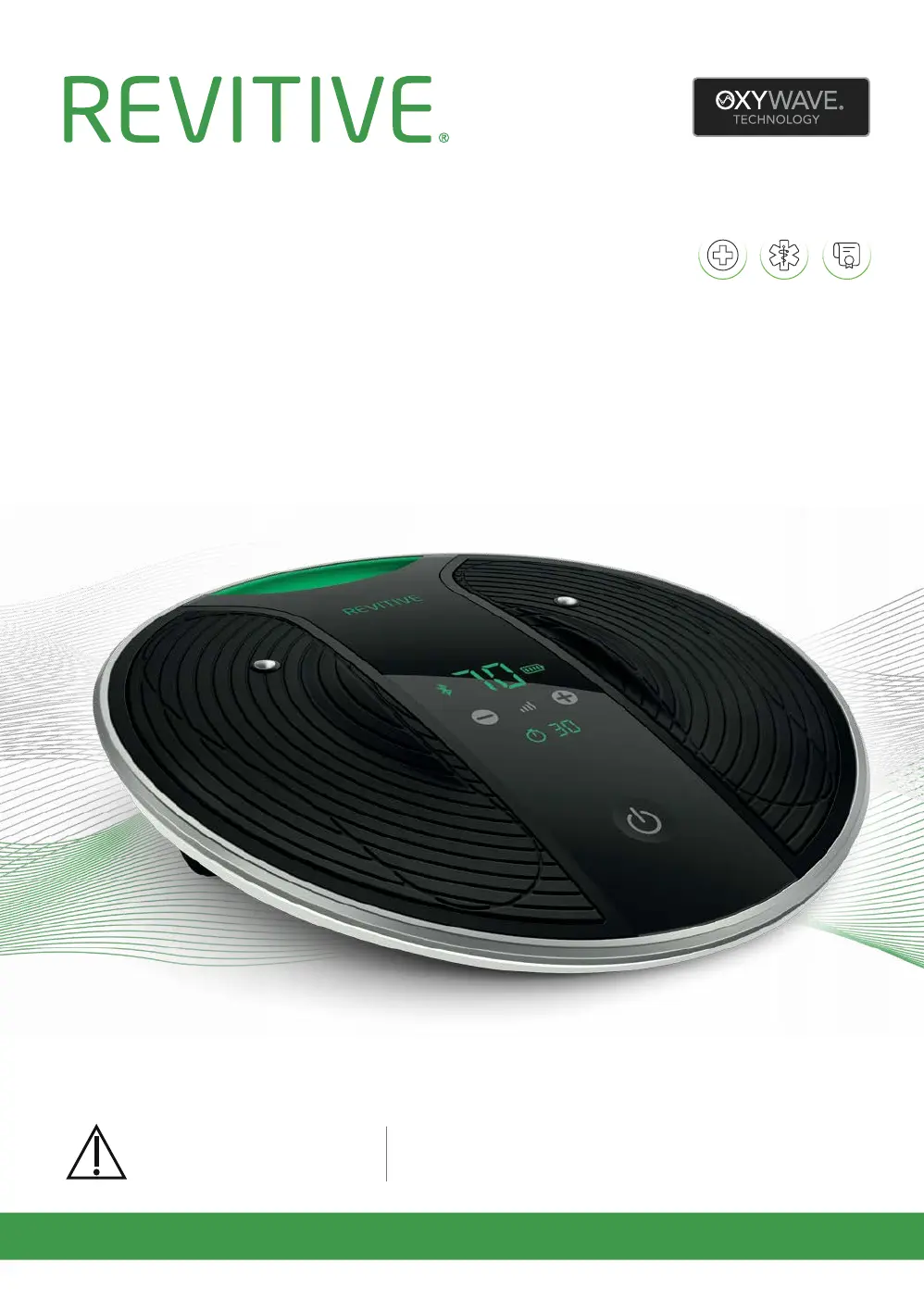
Revitive Medic Coach - User Manual

Revitive Medic Coach
61 pages
Print Icon
To Next Page IconTo Next Page
Loading...
Model number
5575AQ
Please read the
User’s Manual carefully
before using this product
USE ONLY AS DIRECTED
If symptoms persist, consult
your healthcare professional
Medic Coach
Drug-Free
Clinically Proven
Certified Medical Device
User’s Manual
CIRCULATION BOOSTER
®

Questions and Answers

  • J
    Jacob SimpsonSep 12, 2025
    Why I suddenly can’t feel stimulation when using the electrode pads on Revitive Fitness Equipment?
    • K
      Kayla SmithSep 12, 2025
      If you suddenly can’t feel stimulation when using the electrode pads, you may have accidentally paused the stimulation session by disconnecting a pad, a cord, or by pressing the pause button. Reconnect the pads or the cord. If the stimulation is paused, sections of the display on the app and Revitive pulse. Tapping resumes the stimulation and tapping ends the stimulation session.
  • K
    Kristin LeAug 23, 2025
    Why do my thigh muscles ache when using Revitive Fitness Equipment Thigh Pads?
    • F
      Felicia GarciaAug 23, 2025
      If your thigh muscles ache before the end of the treatment when using the thigh pads, your muscles may not be strong enough for a full 20-minute session. End the session early. In your next session, start with a lower intensity and reduce the duration until your muscles have acclimatized to the stimulation.
  • S
    shawangelaAug 27, 2025
    What to do if I can't feel stimulation in thigh using Revitive Medical Equipment?
    • C
      Catherine LeachAug 27, 2025
      If you can’t feel the stimulation in your thigh when using the Thigh Pads with your Revitive Medical Equipment, it might be because the therapy has started and is in the rest period. Depending on the program you're using, you may need to wait up to 10, 20, or 50 seconds before the stimulation starts again.
  • M
    Matthew HernandezAug 27, 2025
    What to do if Revitive Fitness Equipment is on but I feel no stimulation?
    • L
      Lisa FieldsAug 28, 2025
      If your Revitive is on but you cannot feel the electrical stimulation through the foot-pads, there might be several reasons: * Ensure that both bare feet are placed on the foot-pads simultaneously and increase the intensity. * If your feet are dry, moisturize them to improve conductivity. * The intensity level might be too low; gradually increase it. The goal is to find a comfortable setting with strong muscle contractions in your calves, not necessarily reaching the maximum of 99. * Make sure the electrode cord is disconnected, as the foot-pads won't work when it's plugged in. * Check if Revitive is in auto-pause; tapping the display resumes the stimulation. Also, ensure you're hydrated and your feet are well-moisturized.
  • K
    Karen ByrdAug 29, 2025
    Why is my Revitive Fitness Equipment plugged in but has no power?
    • M
      Mrs. Lisa AyalaAug 29, 2025
      If your Revitive is plugged in but there are no lights or power, it could be due to the following reasons: * Check that the power adaptor is properly plugged into both the electrical socket and the Revitive device, and that the electrical socket is switched on. * If the device has a flat battery, plug it into an electrical socket to charge the battery or run it using the mains power option.
  • R
    rjohnsonAug 31, 2025
    Why is my Revitive Fitness Equipment not rocking?
    • H
      Helen BriggsAug 31, 2025
      The 'rocking' motion in Revitive is caused by your leg muscles, not the device itself. The IsoRocker® is a pivot. Revitive will only rock when the intensity is high enough to cause sufficient calf muscle contraction. Increase the intensity to a manageable level. Also, ensure you sit with your knees at a 90-degree angle and that Revitive is not too far in front of you.
  • S
    Stephanie WestSep 18, 2025
    Why do my thigh muscles ache when using Revitive Medical Equipment thigh pads?
    • H
      halltravisSep 22, 2025
      If your thigh muscles are aching before the end of the treatment when using the Thigh Pads with your Revitive Medical Equipment, it may be because your muscles aren't strong enough for a full 20-minute session. End the session early and start your next session on a lower setting where you can feel a mild, comfortable electrical stimulation. Reduce the duration until your muscles have adjusted to the stimulation.
  • J
    jeffreyrivasNov 23, 2025
    Why can't I feel the electrical stimulation on my Revitive Medical Equipment?
    • N
      Nicholas MckeeNov 23, 2025
      If your Revitive Medical Equipment is on but you can't feel the stimulation through the foot-pads, here are a few things to check: * Make sure both of your bare feet are placed on the foot-pads simultaneously. * Your feet may be dry, so moisturize the soles of your feet. * Ensure you are well-hydrated by drinking plenty of water. * The intensity level might be too low; gradually increase it until you feel the stimulation. * Also, ensure the electrode cord is disconnected, as the foot-pads won't work when it's plugged in. * Check if Revitive is in auto-pause, indicated by pulsing sections on the display. Tapping resumes the stimulation. If none of these steps work, test the device by placing one hand across both foot-pads and increasing the intensity. If you still feel nothing...
  • H
    Harold RussellSep 9, 2025
    Why can’t I feel stimulation in my thigh with Revitive Fitness Equipment?
    • G
      gbrownSep 9, 2025
      If you can’t feel the stimulation in your thigh when using the thigh pads, the therapy may have entered a rest period. Depending on the program you're using, you may need to wait up to 10, 20, or 50 seconds before the stimulation starts again.
  • N
    Nichole BensonSep 6, 2025
    What to do if Bluetooth icon is permanently on but Revitive Fitness Equipment pairing failed?
    • W
      Willie SandovalSep 6, 2025
      If the Bluetooth icon is permanently on but pairing failed, your Revitive is likely connected to another phone via Bluetooth. Disconnect it from the other phone before attempting to connect to your current device. Go to the other phone and shut down the Revitive.

Summary

Whats in the box?

Parts and Controls

Device Components

Identifies physical parts like carry handle, sensors, ports, and IsoRocker.

Control Panel and App Overview

Explains the device's display and the Revitive mobile application.

Introduction to Revitive

Operator Profile

Describes the intended user and usage context for the device.

Indications for Use

Lists the medical conditions and symptoms the device is intended to treat.

Important Safeguards

Contraindications

Lists conditions where the device should not be used.

Warnings and Precautions

Covers general warnings, pad usage warnings, and operational cautions.

Safety Advice and Adverse Reactions

General safety tips and potential side effects of device usage.

Getting Started

Unpacking and Initial Charging

Guides users through unboxing the device and its initial charging process.

App Download and Account Creation

Instructions for installing the Revitive app and setting up a user account.

Connecting the Revitive Device and App

Steps for pairing the Revitive device with the mobile app via Bluetooth.

Setting Up Your Personal Therapy Plan

Guides users through configuring their therapy plan based on symptoms.

Navigating the App Interface

Overview of the Dashboard and Controller screens in the Revitive app.

Completing the Assessment Program

Instructions for the initial 10-minute assessment program.

Running & Monitoring Your Therapy Plan

Revitive Medic Coach Program Descriptions

Details the various programs available for therapy.

Running a Therapy Session

Step-by-step guide to starting and managing a therapy session.

Tracking Therapy Progress

Instructions on how to monitor daily, weekly, and overall progress.

App Screen Overviews (Activity, Awards, Life Score)

Explains the functionality of key app sub-screens.

Using the Dual Mode Body Pads

Body Pad Program Types (EMS & TENS)

Explains EMS for muscle strengthening and TENS for pain relief.

Applying and Removing Body Pads

Step-by-step instructions for applying and detaching electrode pads.

Knee Programs Using Thigh Pads

Details specific programs for using thigh pads for knee therapy.

Using the Thigh Pads

Thigh Pad Application Guide

Instructions for correctly applying thigh pads to the leg.

Intensity Adjustment for Knee Programs

Guidance on setting the intensity level for thigh pad therapy.

Maintenance

Device Cleaning and Storage

Guidelines for proper care and storage of the Revitive device.

Electrode Pad Care and Replacement

Information on electrode pad stickiness and when to replace them.

Appendix

Manual Operation of Revitive

Instructions for using the device without the mobile app.

Manual Foot Pad Operation

Specific instructions for manual use of the SoftTouch foot pads.

Manual Body Pad Operation

Specific instructions for manual use of the electrode body pads.

Troubleshooting

Power, Pairing, and Connectivity Issues

Solutions for problems related to device power, phone pairing, and app connectivity.

Stimulation and Sensation Issues

Addresses problems with feeling stimulation or experiencing incorrect sensations.

Operation and Program Troubleshooting

Solutions for device noises, program selection, and user discomfort.

Thigh Pad Usage Problems

Specific solutions for issues encountered when using thigh pads.

Technical Specifications

Device and Bluetooth Specifications

Details on product model, output, battery, and Bluetooth connectivity.

Electrical Stimulation Output Parameters

Technical specifications for EMS and TENS output.

Symbols, Certifications, and Ratings

Explanations of device symbols, certifications, and ratings.

Your 2-year warranty

Warranty Terms, Exclusions, and Claims

Information on guarantee coverage, exclusions, and how to make a claim.

Revitive Medic Coach Specifications

General IconGeneral
CategoryMedical Equipment
ConnectivityBluetooth
TimerYes
PortabilityPortable
TechnologyElectrical Muscle Stimulation (EMS)
App CompatibilityCompatible with iOS and Android
Remote ControlIncluded
Power SourceAC adapter
DisplayLCD

Related product manuals