EasyManua.ls Logo

Revitive Medic Coach - Navigating the App Interface

Revitive Medic Coach
61 pages
Print Icon
To Next Page IconTo Next Page
To Previous Page IconTo Previous Page
Loading...
24
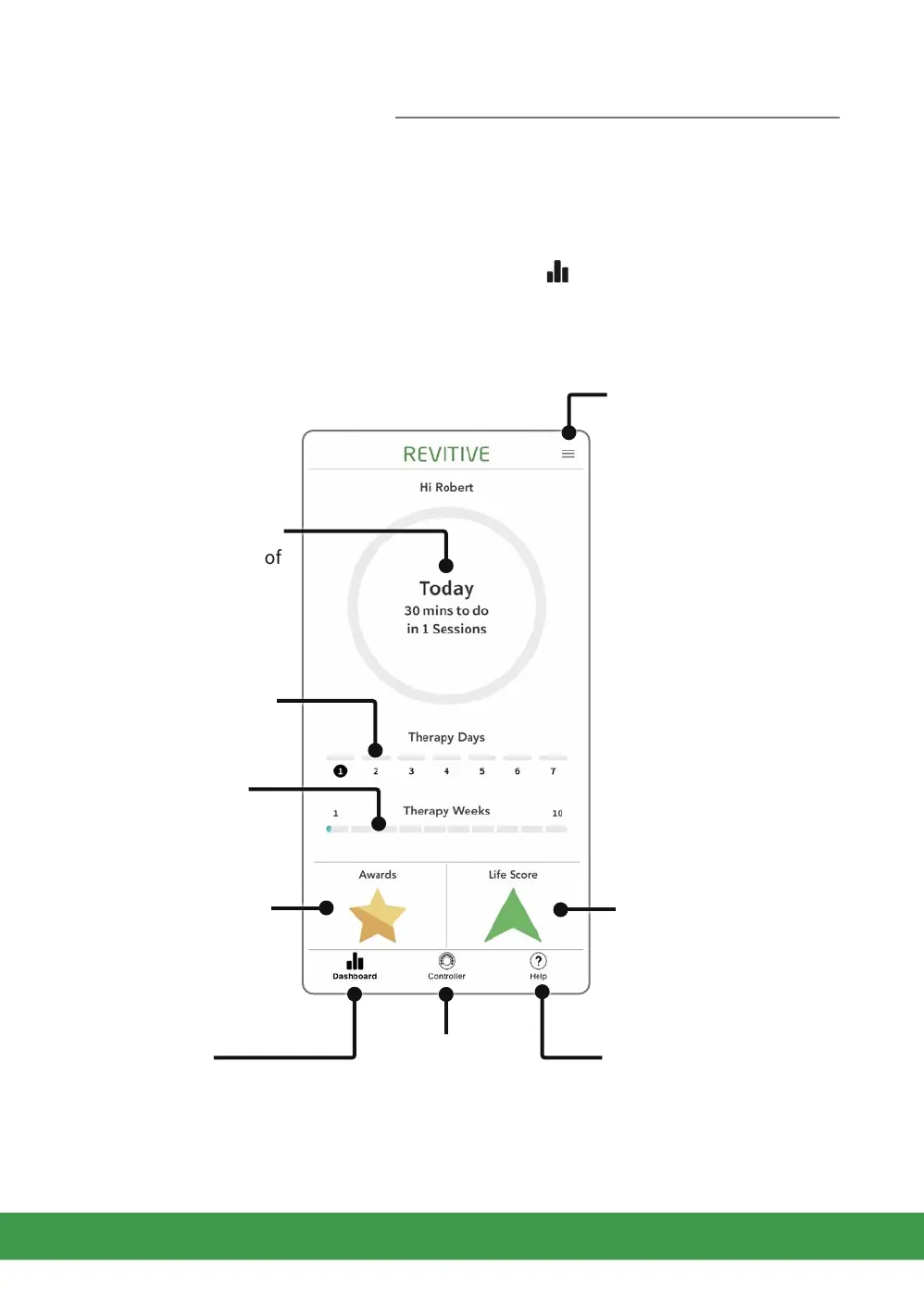
Introducing the Dashboard Screen
You will see the Dashboard screen every time you open the Revitive app.
You can always get back to the Dashboard by pressing . This will always be at the
bottom of the screen, no matter where you are in the app.
Options menu for
further functions
and support, including
the User’s Manual.
Dashboard
Switches back to
Dashboard from any
other screen
Controller
Switches to Controller
screen to start and
manage a therapy session
Help
Support on using this
screen
Tap to track your life
Impact Score
Tap to see the Awards
you have earned
Shows Today’s therapy
information.
Tap anywhere
in the centre of the
circle to see a record of
your usage to date.
Shows your usage
this therapy week
Shows your progress
through your
overall therapy
Getting started

Related product manuals