MIRACO Quick Start Guide
C
2023 REVOPOINT 3D ALL RIGHTS RESERVED
07
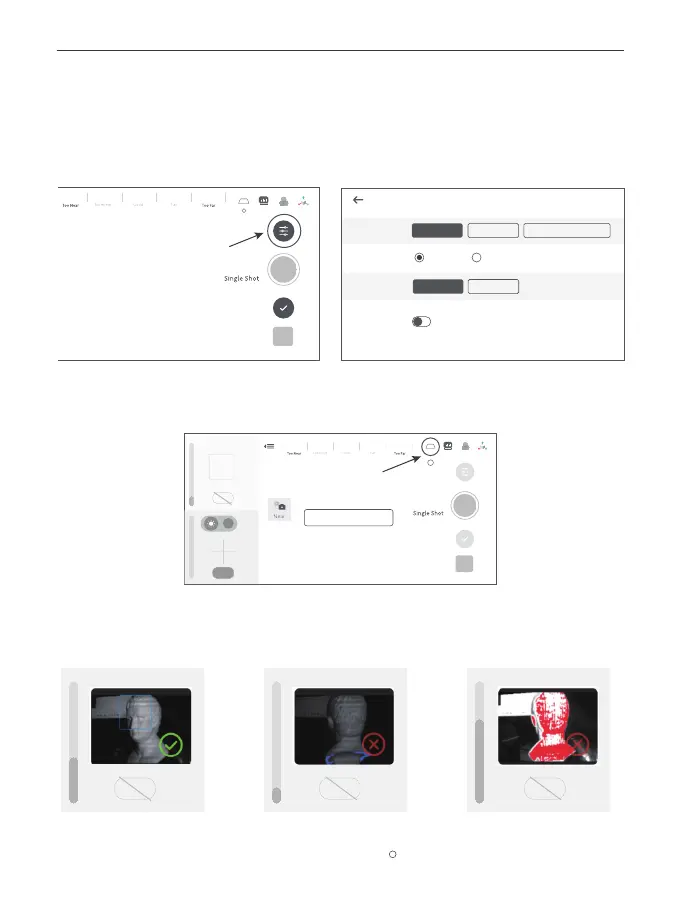
Step 4: Scan settings before scanning.
1) Scan Settings
The recommended scan settings for Sample Bust are [High Accuracy], [Feature], [General], and
[Color] toggled off.
2) It’s also recommended to turn [Base Removal Off].
Scan Settings
Color
OK
3) Depth Cameras’ exposure Adjustment
It is recommended to disable [Auto] exposure for the Depth Cameras and manually adjust
the exposure bar until there are minimal red or blue areas in the preview.
Correct Exposure Underexposed Overexposed
Accuracy
Alignment
Object Type
Standard
General Dark
Feature
Marker
High
High-speed (15 fps)
Model
Continuous
Auto Auto Auto
12 6
Model
Continuous
Base Removal Off
Auto
Auto
WB
1
?
?



 To Next Page