➃ RGB Camera’s Exposure Settings
MIRACO Quick Start Guide
C
2023 REVOPOINT 3D ALL RIGHTS RESERVED
13
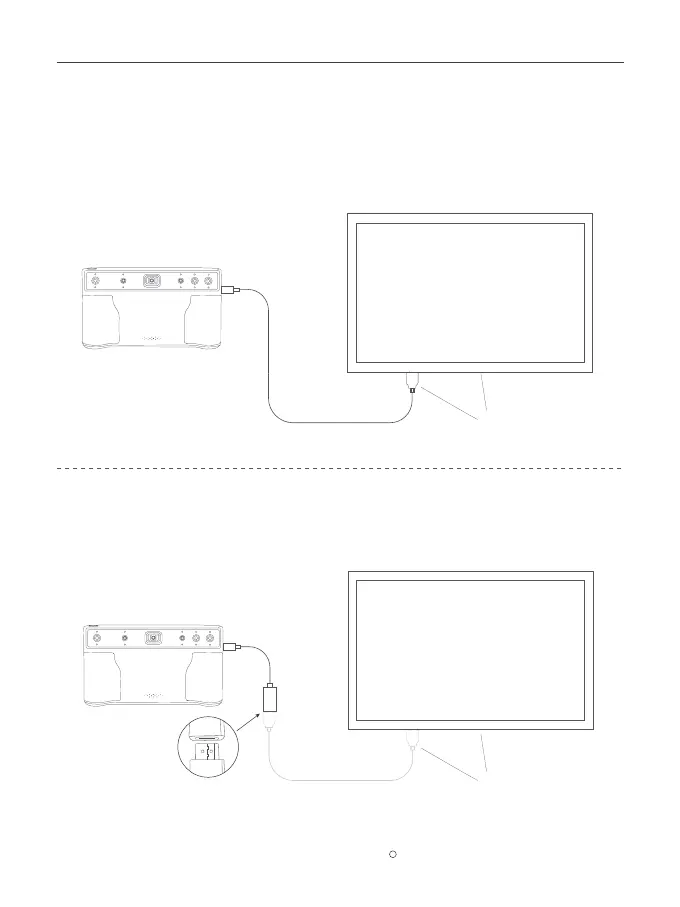
Connecting to an External Screen
MIRACO supports the DisplayPort (DP) interface by using the USB Type-C port.
Method 1: A monitor or TV can be connected to MIRACO's DisplayPort (DP) via its USB Type-C port.
Method 2: Use the DP to HDMI Adapter (included with MIRACO Pro) to connect MIRACO to an HDMI
cable on a TV or monitor.
MIRACO �D SCANNER
Adapter
HDMI Cable
Self-provided
A monitor or TV
MIRACO �D SCANNER
A monitor or TV
Self-provided



 To Next Page