10
DAB/FM/Bluetoo clock radio
The digital clock radio has 2 alarm functions at can be activated togeer for 2
different alarm settings (Alarm 1 and Alarm 2) or you may wish to activate one alarm
at a time. Once an alarm is activated you will find e alarm icons displayed on e front
display. Note at you have approximately 60 seconds between each selection before
e alarm is automatically cancelled by e clock radio and you have to start again.
1. Turn ON your digital clock radio.
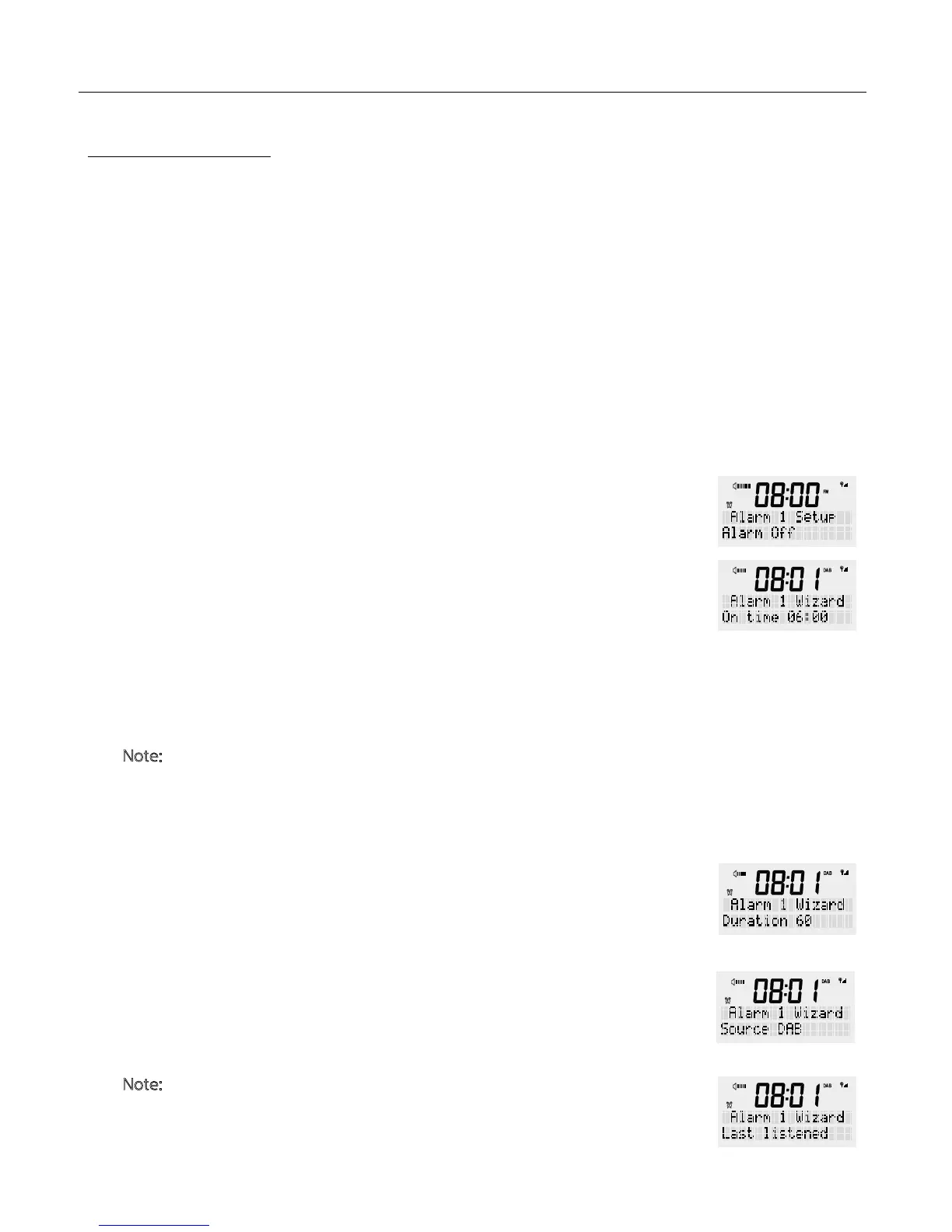
2. Press e <ALARM> button to select alarm 1 or press e <Alarm> button again
to select Alarm 2. Press <SCROLL/SELECT>.
3. Use e rotary dial to select alarm “On” or “Off”, press e <SCROLL/SELECT>
dial to confirm your selection.
4. The clock radio will display e time screen and e hour part will flash. Turn e
rotary button to set e hour for your alarm, en press <SCROLL/SELECT> to
confirm.
5. Next e Minute part will flash. Turn e rotary button to set e minute for e
alarm, en press <SCROLL/SELECT> to confirm.
N
ote: If your time is set to 24hr mode in e menu settings move straight to point
6. However if your time is set to 12hr mode(AM/PM) you will need to turn e
rotary button to select e desired preference, en press <SCROLL/SELECT> to
confirm.
6. Use e rotary dial to set e duration of how long you would like e alarm to
stay on before it automatically turns off. The options are 15/30/45/60/90/120
minutes, en press <SCROLL/SELECT> to confirm.
7. The “source” function allows you to select what sound will be emitted when e
alarm is activated. Turn e rotary dial to select between BUZZER/DAB/FM, en
press <SCROLL/SELECT> to confirm.
N
ote: If you select DAB or FM in e source mode radio will display an option of
“Last listened” or any preset stations if you have em set. You can wake up to
e last listened to radio station if at is what is selected or you can select a
preset station to wake up to if you have ese previously set.
ALARM SETTING
ALARM SET UP


 To Next Page