15
DAB/FM/Bluetoo clock radio
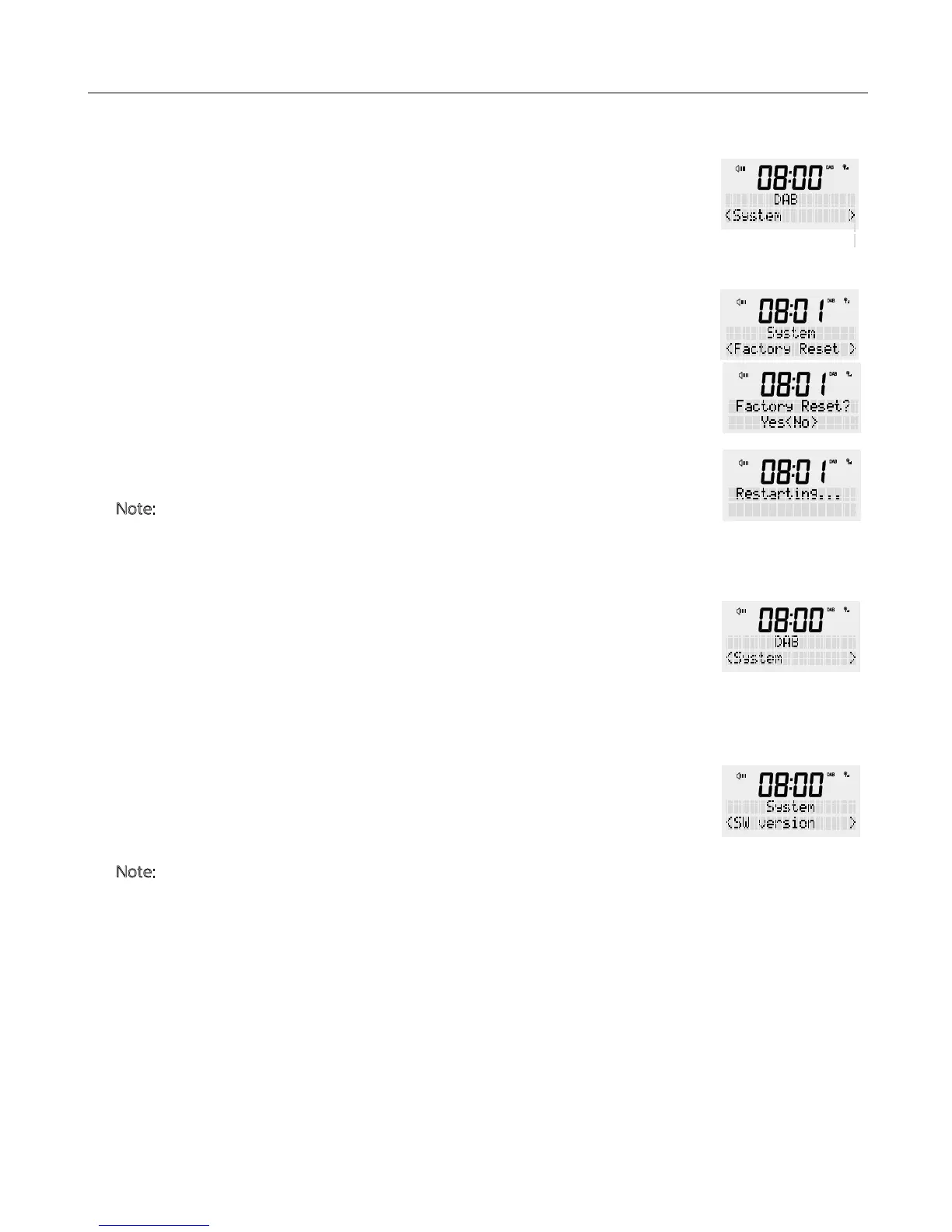
This section allows you to restore your radio to all original factory settings.
Press e power button to turn your radio ON.
1. Press and hold e <MENU / INFO> button, release once an option is available on
e display. Turning e rotary dial until ‘System’ appears in e display and confirm
by pressing <SCROLL/SELECT>.
2. Scroll rough e menu using e rotary dial until you reach ‘Factory Reset’ and
confirm by pressing <SCROLL/SELECT>.
3. Using e rotary button, choose <Yes> and confirm by pressing
<SCROLL/SELECT> to enter ‘Restarting …’. Aer which e radio will perform a
reset and restart.
N
ote: Factory reset will erase all station lists, setting and station presets previously
stored.
You can check e current soware version here.
Press e power button to turn your radio ON.
1. Press and hold e <MENU / INFO> button, release once an option is available on
e display. Turning e rotary dial until ‘System’ appears in e display and confirm
by pressing <SCROLL/SELECT>.
2. Scroll rough e menu using e rotary dial until you reach ‘SW version’ and
confirm by pressing <SCROLL/SELECT>.
This will display e correct version of soware on your product.
N
ote: This soware version is only used by Bush customer service and repair workshops.
FACTORY RESET
SOFTWARE VERSION


 To Next Page