Procedure for Sending E-mails
71
6
D Press [OK].
The sender is displayed above
[Attach Sender’s Name].
Using a short ID number to select
a sender's name
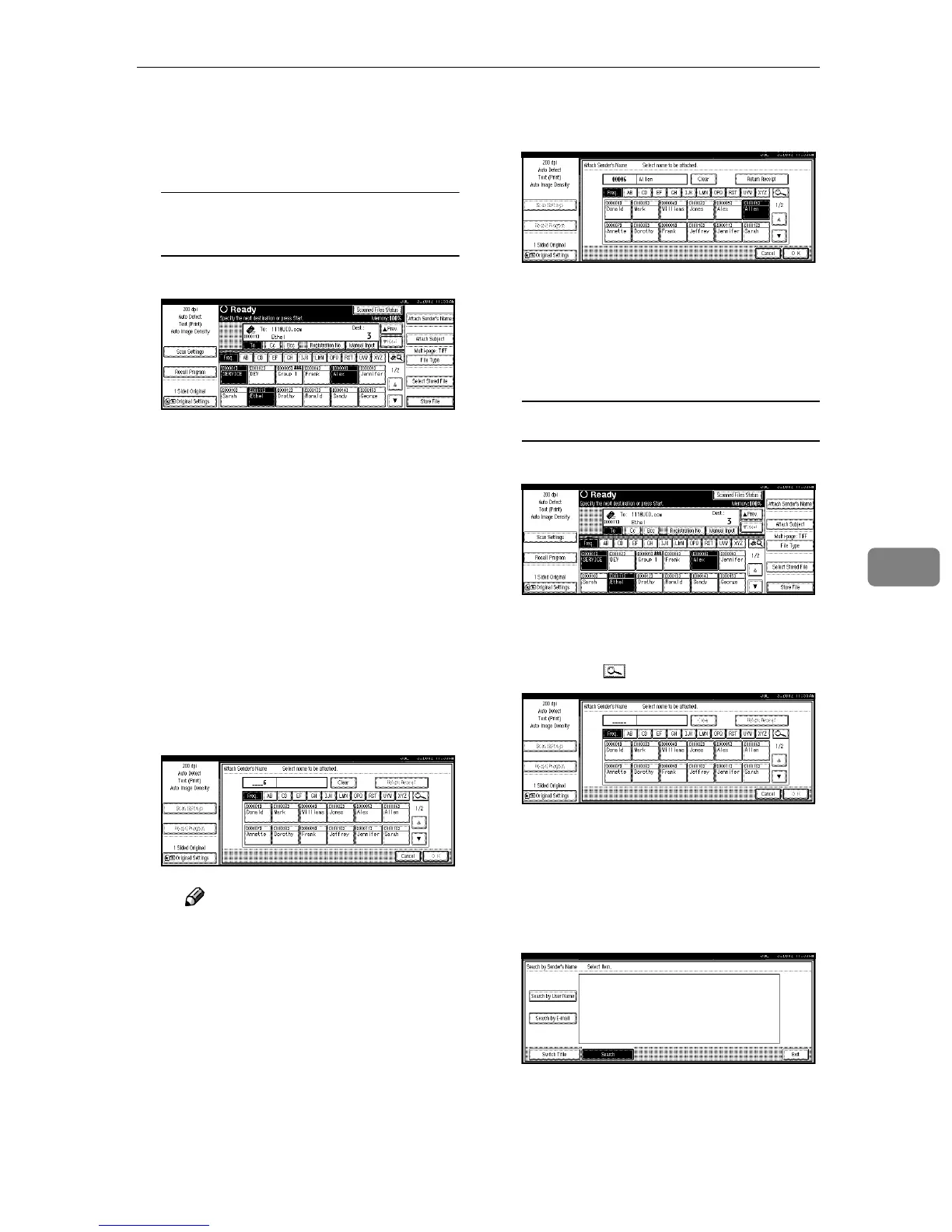
A Press [Attach Sender’s Name].
The list of senders registered in
this machine is displayed.
B Use the number keys to enter
the 5-digit short ID number
that has been assigned to a
sender.
If the entered number is less
than 5 digits long, press the {
{{
{#}
}}
}
key after the last number.
Example:
To enter 00006
Press the {
{{
{6}
}}
} key and then the
{
{{
{#}
}}
} key using the number keys.
Note
❒ If a password has been set, a
screen for entering the pass-
word is displayed after se-
lecting the sender.
Enter the password, and then
press [OK].
After verification of the pass-
word, the sender name is dis-
played.
C To verify receipt, press [Return
Receipt].
[Return Receipt] is highlighted.
D Press [OK].
The sender is displayed above
[Attach Sender’s Name].
Searching for a sender to select
A Press [Attach Sender’s Name].
The list of senders registered in
this machine is displayed.
B Press [].
The Search by Sender’s Name
screen is displayed.
C Press [Search by User Name].
To search using e-mail address-
es, press [Search by E-mail].







 To Next Page