Sending Stored Scan Data by E-mail
72
6
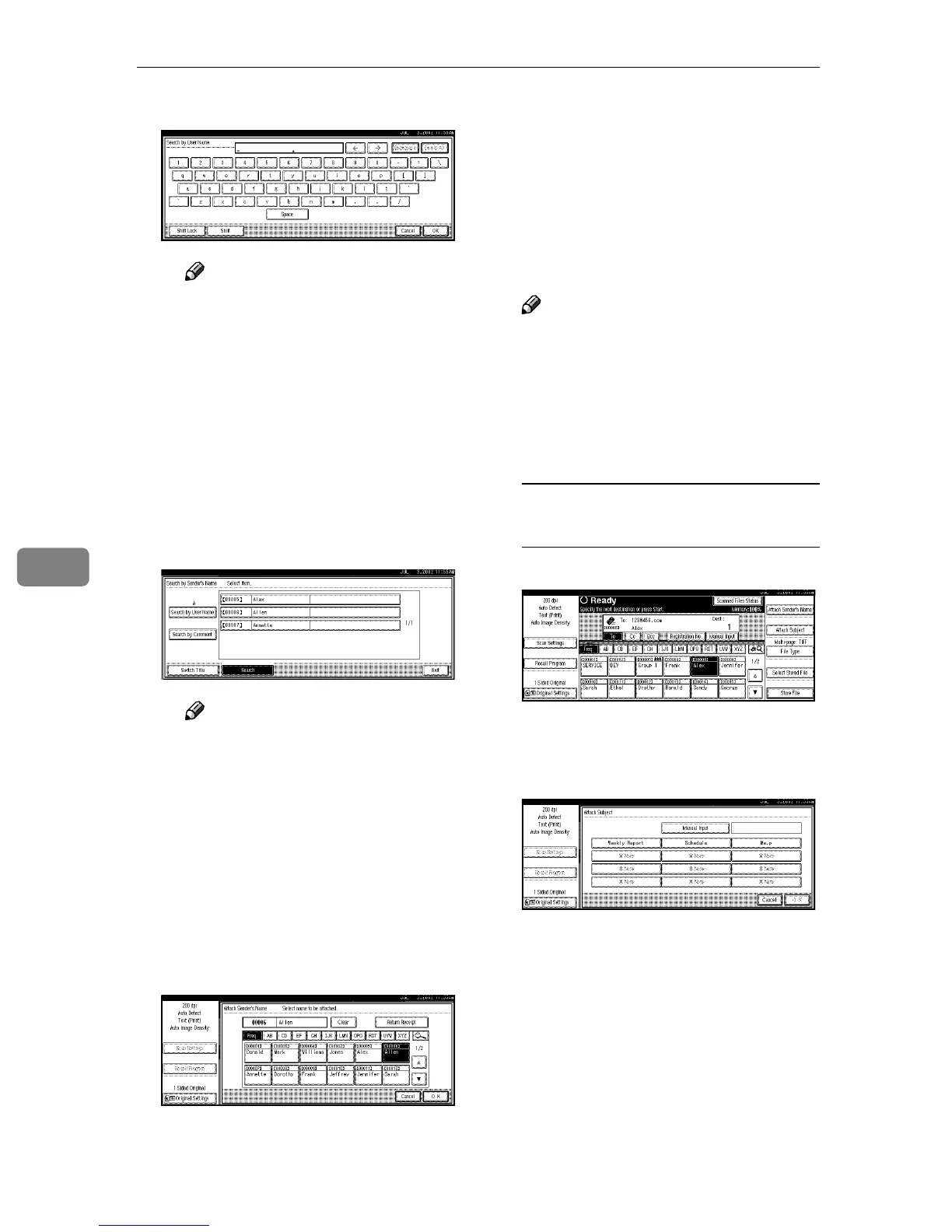
D Enter part of the sender name.
Note
❒ Enter the first character or
characters of the sender
name.
❒ It is also possible to perform
a combined search using
[Search by User Name] and
[Search by E-mail].
E Press [OK].
A list of senders is displayed ac-
cording to the user name search.
F Select the sender.
Note
❒ If a password has been set, a
screen for entering the pass-
word is displayed after se-
lecting the sender. Enter the
password, and then press
[OK]. After verification of the
password, the sender name
is displayed.
G Press [Exit].
H To verify receipt, press [Return
Receipt].
[Return Receipt] is highlighted.
I Press [OK].
The sender is displayed above
[Attach Sender’s Name].
J
JJ
J
If required, select a subject.
Select a subject from the registered
ones. ⇒ p.26 “Making Scan Data
Subject Settings”
Note
❒ The selected subject name is au-
tomatically placed in the Subject
field of the mailing soft.
Two methods are available for se-
lecting a subject, selecting it from
the list or entering it directly.
When selecting a subject from
the list
A Press [Attach Subject].
The list of registered subjects is
displayed.
B Select a subject.
C Press [OK].
The selected subject is dis-
played above [Attach Subject].







 To Next Page