EasyManua.ls Logo

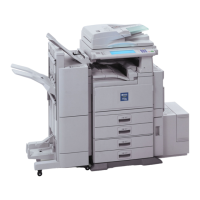
Ricoh Aficio 2035 - User Manual

Ricoh Aficio 2035
132 pages
Print Icon
To Next Page IconTo Next Page
Loading...
Paper type: OK Prince Eco G100(55kg), Paper Thickness=80 µm // Pages in book=128 // Print scale=81%
Gap (when printed at 81% scale) = Pages in book × Paper thickness / 2 = 5.120000 mm
Operating Instructions
Copy Reference
For safe and correct use of this machine, please be sure to read the Safety Information in the
"General Settings Guide" before you use it.
Placing Originals
Copying
Troubleshooting
User Tools (Copier/Document Server Features)
Specifications
1
2
3
4
5
Type for 4035e/DSm635/LD135 AG/Aficio 2035e
Type for 4045e/DSm645/LD145 AG/Aficio 2045e
Printed in China
EN USA B138-6607
All manuals and user guides at all-guides.com
all-guides.com

Table of Contents

Questions and Answers

  • J
    jimmyparrishAug 11, 2025
    Why Ricoh Copier cannot detect original size?
    • S
      sharmonAug 11, 2025
      The Ricoh Copier might fail to detect the original size if the original is not placed properly. To resolve this, select paper manually, avoiding Auto Paper Select mode and the Auto Reduce/Enlarge function. Also, ensure the original is placed on the exposure glass, or simply place your originals correctly.
  • A
    Andrew HammondAug 17, 2025
    What to do if Rotate Sort is not available with the image size on Ricoh Copier?
    • R
      Ronald KingAug 17, 2025
      If Rotate Sort is unavailable with the current image size on your Ricoh Copier, it's because the selected paper size is incompatible with Rotate Sort. Choose a proper paper size to enable this function.
  • S
    Stephanie GordonAug 23, 2025
    What to do if Ricoh Aficio 2035 Copier says 'Check original orientation'?
    • S
      Sarah AlexanderAug 23, 2025
      If your Ricoh Copier displays a 'Check original orientation' message, it means the original document is not placed in the correct orientation. Simply change the orientation of the original on the copier.
  • P
    Paige ChavezAug 29, 2025
    Why Ricoh Copier says 'It is over stapling capacity'?
    • T
      Travis CameronAug 29, 2025
      The Ricoh Copier indicates 'It is over stapling capacity' because the number of sheets per set exceeds the stapler's limit. Review and reduce the number of sheets to be stapled to within the stapler's capacity.
  • K
    Kevin HessSep 4, 2025
    What paper sizes are compatible for punching on Ricoh Copier?
    • A
      Anthony WeaverSep 4, 2025
      The Punch function on your Ricoh Copier is limited to specific paper sizes. You can use A3L, B4 JISL, A4KL, B5 JISKL, A5KL, 11"×17"L, 81/"×14" L and 251/"×81/"KL. Make sure to select one of these sizes to use the punch function.

Ricoh Aficio 2035 Specifications

General IconGeneral
Printing TechnologyLaser
Max Copying Resolution600 x 600 dpi
Warm-Up Time30 seconds
First Copy Out Time4.5 seconds
Max Document SizeA3
DuplexOptional
ADF Capacity50 sheets
Network ConnectivityOptional
Maximum Paper SizeA3
Copy Speed35 ppm
Reduction / Enlargement25% - 400%
Scanner TypeFlatbed
Power SourceAC 220-240 V

Related product manuals