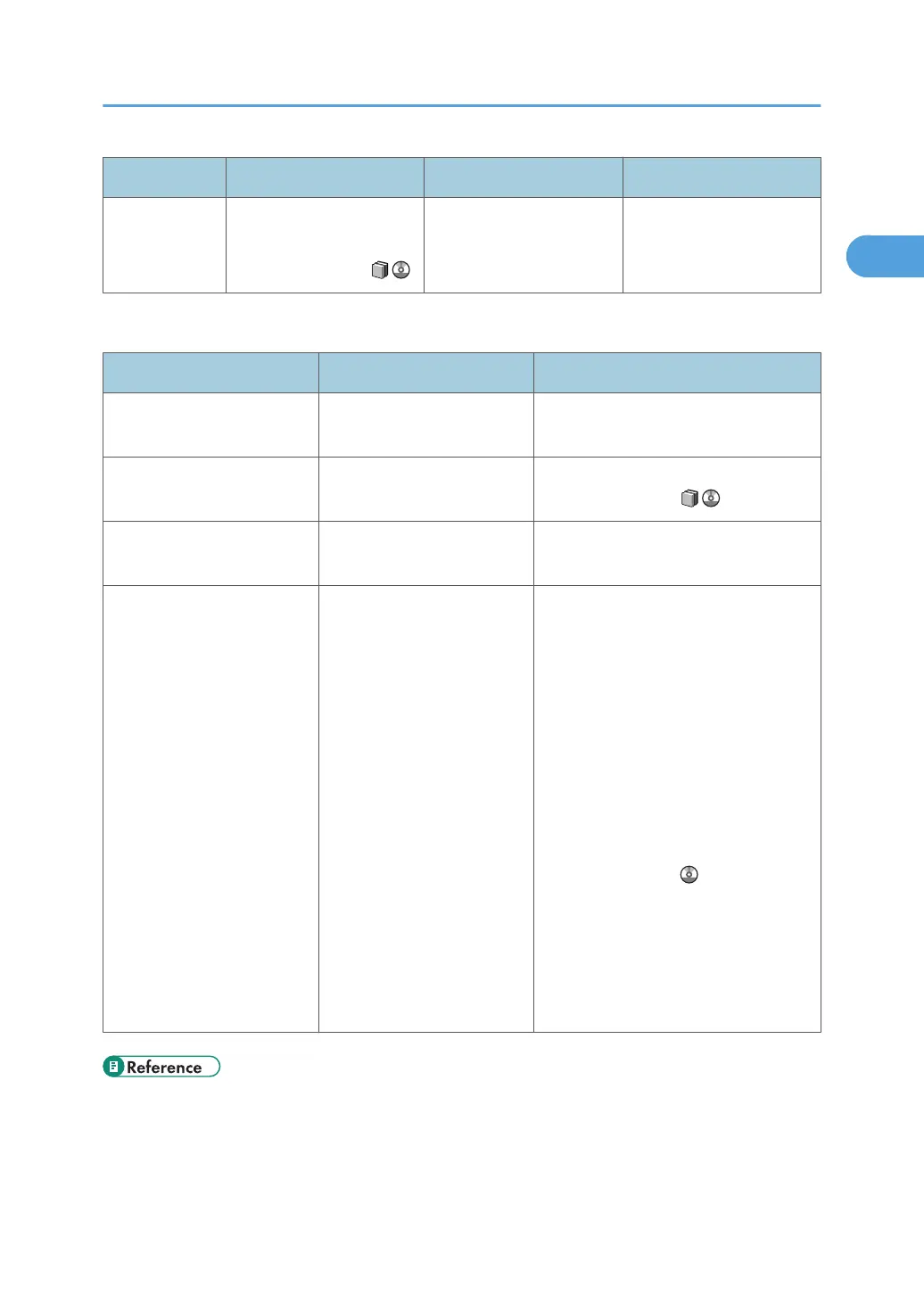
Indicator Status Indicator Function status indicators [Start] indicator
Flashing red Toner has nearly run out.
See "Adding Toner",
About This Machine .
- -
To resolve problems, refer to the following:
Problem Cause Solution
Documents and reports do
not print out.
The paper output tray is full. Remove prints from the tray.
Documents and reports do
not print out.
There is no paper left. Load paper. See "Loading Paper",
About This Machine .
An error has occurred. The function is not working
properly.
See p.21 "Messages Displayed
When Using the Printer Function".
The machine is unable to
connect to the network.
A network error has
occurred.
• Check the displayed message and
take the appropriate action. See
p.21 "Messages Displayed
When Using the Printer Function".
• Check the machine is correctly
connected to the network and that
its network settings are correctly
configured. For details about how
to connect the machine to the
network, see "Connecting the
Machine", Network and System
Settings Guide .
• Contact your network
administrator.
• If the indicator continues to flash,
contact your service
representative.
• p.21 "Messages Displayed When Using the Printer Function"
• p.47 "Removing Jammed Paper"
• p.68 "Removing Jammed Staples"
If the Indicators are Lit Red
17







 To Next Page