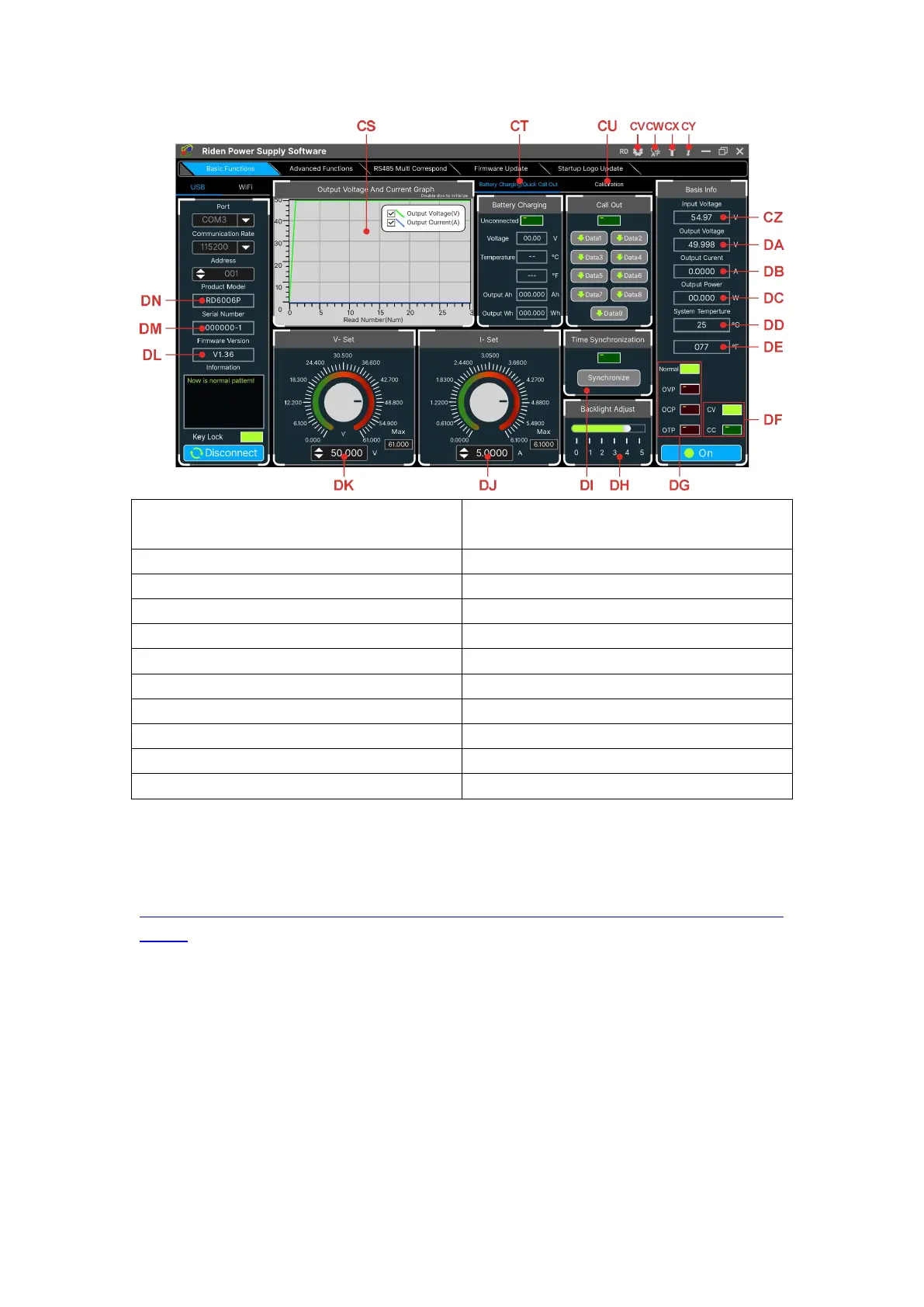
CS: Voltage-Current Curve
CT: Battery information/
Data Group Quick Call Out
DA: Actual Output Voltage
DB: Actual Output Current
DD: System Temperature(℃)
DE: System Temperature(℉)
DF: Constant Voltage/ Constant Current Status
DG: Protection Status Indication
DH: Screen Brightness Setting
DI: Synchronize System Time
DJ: Output Current Preset value
DK: Output Voltage Preset value
4.3.1 Basic Functions
PC software operation video:
https://drive.google.com/drive/folders/1rl-CCOzbFlAONjRfrOpbNsK8rrCGVoKa?usp=s
haring
The basic functions of PC software: voltage/current preset, data group quick call
out, calibration fine tuning, brightness setting, voltage and current curve exporting.
You can rotate the wheel or enter the value to set the voltage and current, the graph
above the button shows the real-time voltage and current curve. You can zoom in
and out the curve by using the mouse wheel, double click the curve to auto adjusts
the axis, you can right click on the curve to clean the curve or export the curve data
to picture or excel.
4.3.2 Calibration



 To Next Page