Hz of bandwidth on your oscilloscope with a 0.1uF parallel capacitor at the output terminals
1.2 Core Function
·Keypad + encoder potentiometer combination adjustment
·10 data groups for storage and call out
·2.4 inch HD color display
·Dedicated terminal for battery charging
·Firmware update, support more functions later
·Brand new PC software
·Support WiFi communication(RD6006P-W) /USB communication
·Support Android/ IOS APP
·Support multiple display interfaces
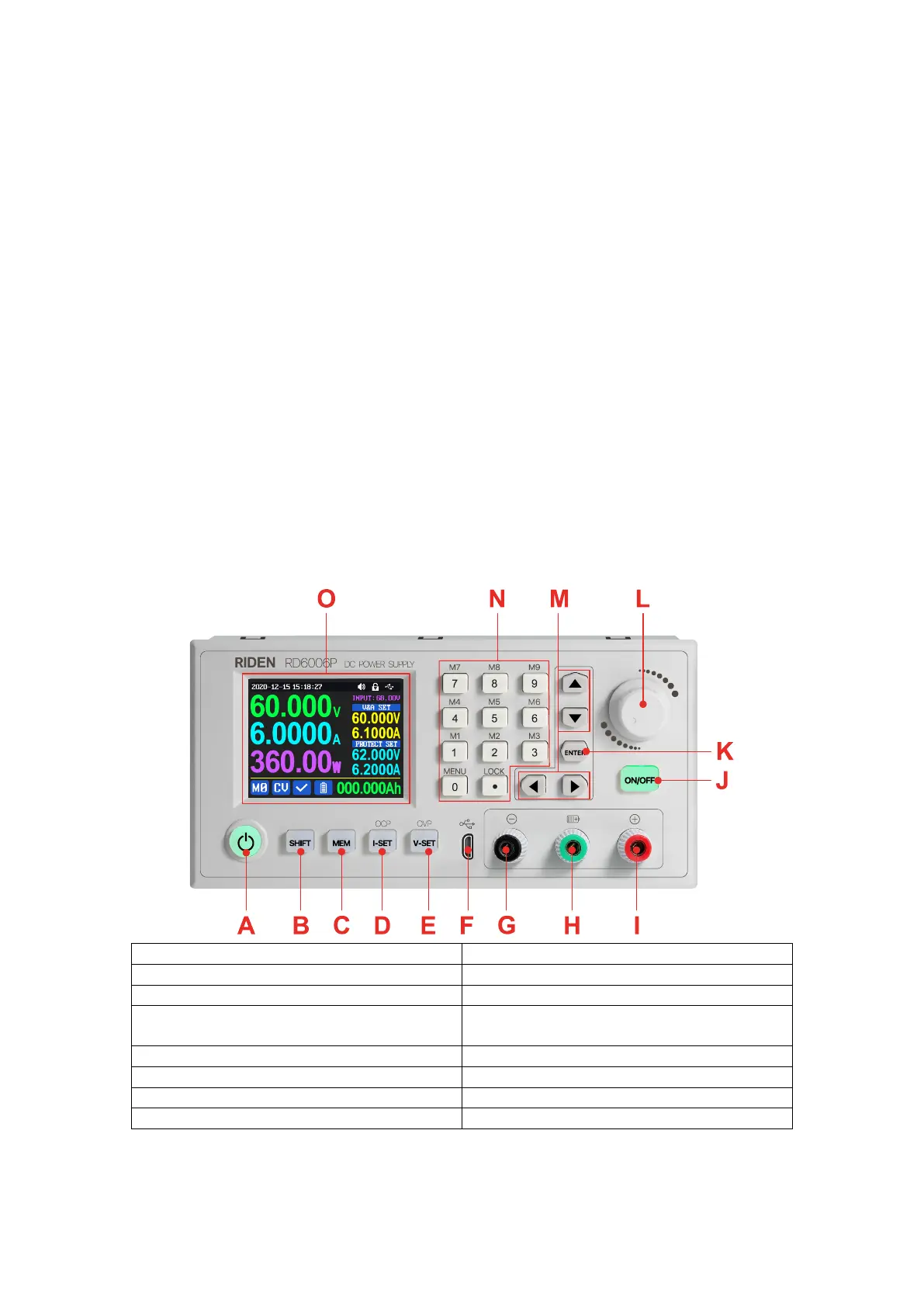
1.3 Panel Instruction
1.3.1 Front Panel
B: SHIFT Second function button
D: Current/Over current protection setting
E: Voltage/Over voltage protection setting
G: Power supply output negative terminal/
Battery charging negative terminal
H: Battery charging positive terminal
(Dedicated terminal for battery charging)
I: Power supply output positive terminal
K: Enter/ Confirm button encoder
L: potentiometer/Cancel button
1.3.2 Back Panel



 To Next Page