45
20068428
Start-up, calibration and operation of the burner
If an error occurs during the backup process, the display
screen shows a negative value.
To determine the cause of the error refer to diagnostic code
137 (see section "Error codes list" at page 56).
6.8.2 Restore
To perform the restore procedure, proceed as follows:
access the Parameters Level referring to "Access proce-
dure with password"
at page 39.
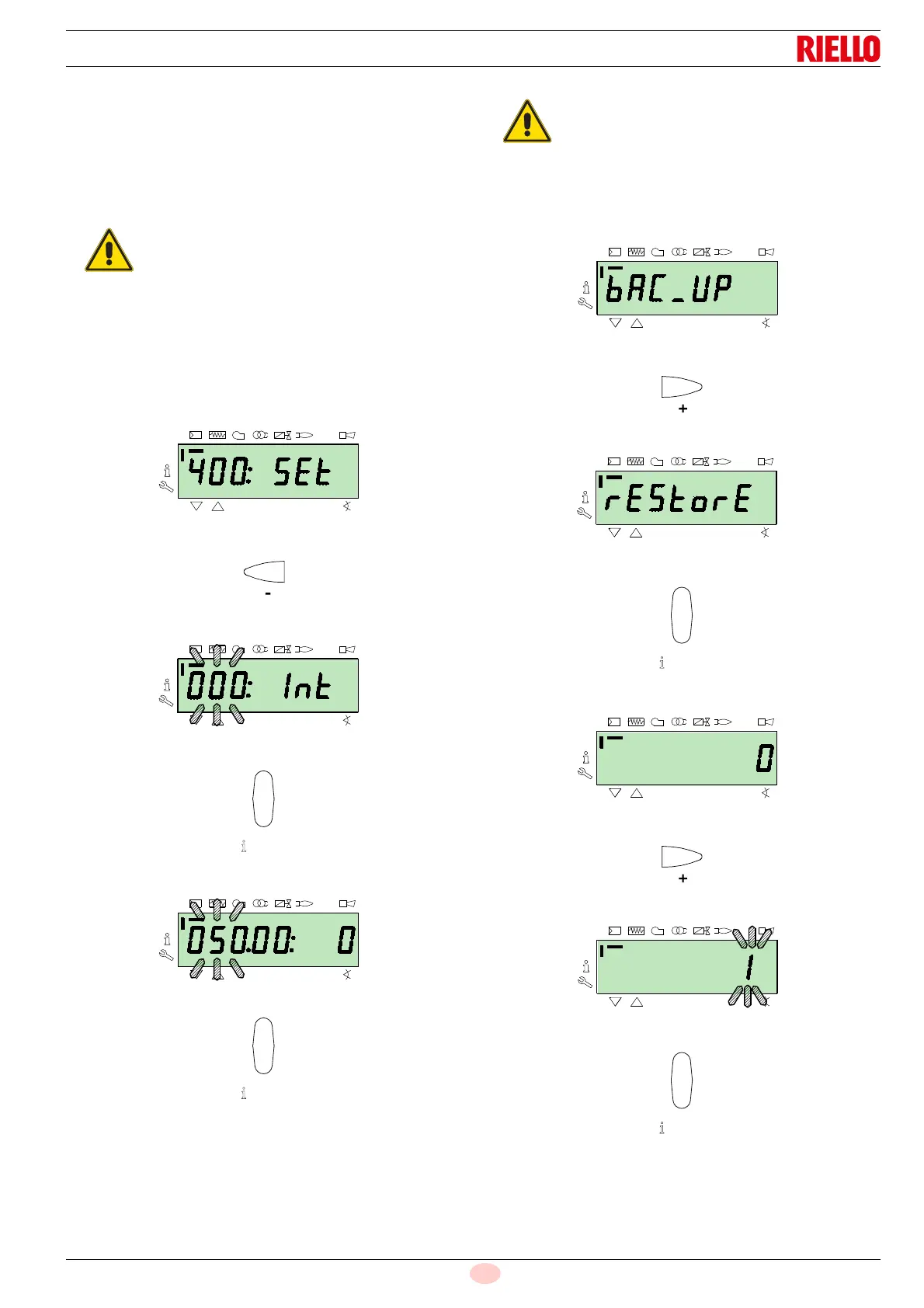
The display screen displays the parameters group
400.
With the key
"-":
Select the parameters group
000:
The
000 parameter blinks, confirm using the "i/reset" key:
The display screen shows parameter
050 blinking:
Confirm with the key
"i/reset":
The parameter
bAC_UP appears on the display screen:
With the key
"+"
Select therEStorE parameter
Confirm with the key
"i/reset":
The display screen shows the following value.
Use the button
"+":
The value will be set to
1. Value 1 is flashing:
confirm with the button
"i/reset" to activate the restore process.
It is advisable to perform a backup every time
that a parameter is changed, after checking
the modification carried out is correct.
Use this procedure when replacing equipment
with a parts code. In this way it is possible to have
the default parameters already memorised or
those memorised during the start-up.
The procedure cannot be carried out on equip-
ment coming from other burners.


 To Next Page