Extended Heating Operation – Heat Mode – Comfort Functions
In addition to the basic functions of simple heating operation, the RIKA pellet stove provides extra comfort
functions. However, before you can use the comfort functions such as frost protection, installation of an external
room thermostat, regulation of the stove mobile telephone, child safety device, you have to change from
simple heating to comfort mode.
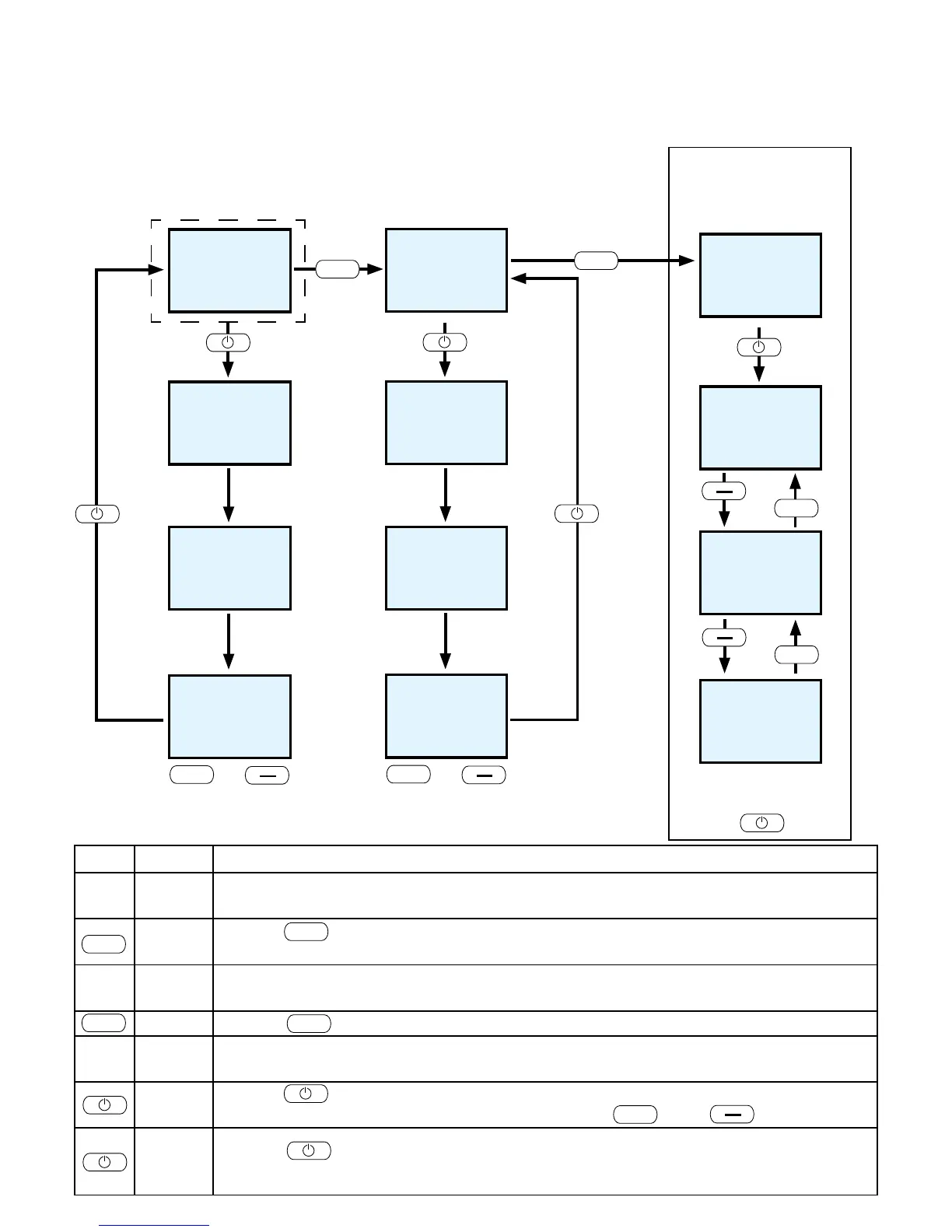
Key Display Description
EASY
OFF
Standard display for stove switched off in simple heating mode.
Pressing for at least 5 seconds changes to HEAT mode. The change is also shown
in the display as confirmation.
HEAT
OFF
Standard display for stove switched off in extended heating mode. (comfort functions can
now be selected)
Pressing once changes to display MODE
MODE
You can select one of three possible stove comfort functions. (the menu item Mode is only
active in connection with the RIKA room sensor or the RIKA wireless room sensor).
Pressing once takes you to the comfort function selection and you can change
between the individual comfort functions using keys and .
HEAT
AUTO
ROOM
Pressing again confirms the comfort function currently visible HEAT, AUTO or
ROOM.
Display panel
Display of respective
operating status
Switch between EASY and HEAT modes
Press Menu key for at least 5 seconds.
I G N I T
E A S Y
5 0
S T A R T
E A S Y
O F F
Change heat output by
pressing the + or – key
(change in 5 % increments)
H E A T
R O O M
A U T O
M O D E
Selection of comfort function
required HEAT/AUTO/ROOM
by pressing the I/O key.
Comfort functions
Menu item Mode only active in
connection with the RIKA room
sensor or the RIKA wireless
room sensor.


 To Next Page