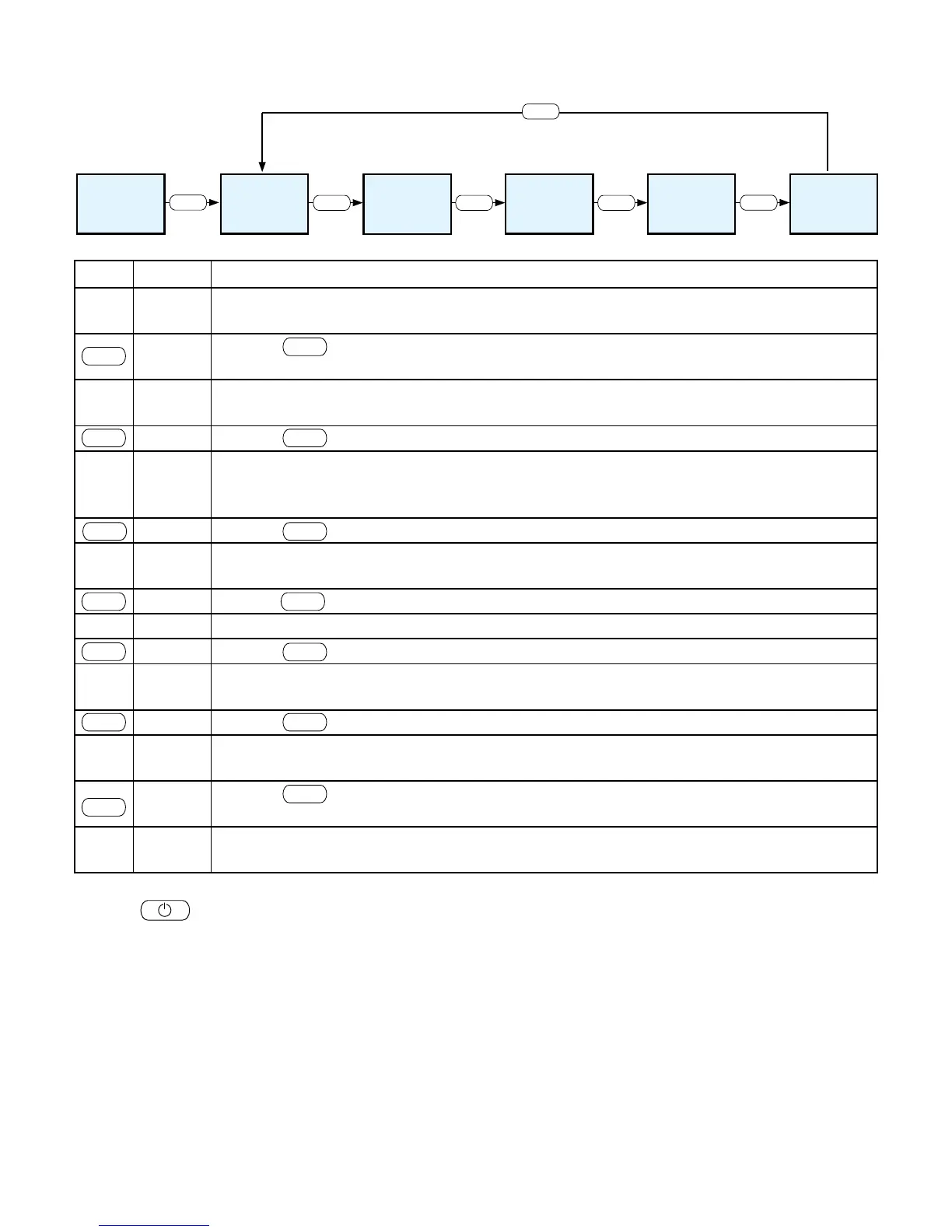
Menu Structure and Main Menu Level
Menu item Mode only active in
connection with the RIKA room sensor
or the RIKA wireless sensor
Switch between EASY
and HEAT modes
Press Menu key for
at least 5 seconds
M O D E
E A S Y
O F F
T I M E
H E A T
O F F
Key Display Description
EASY
OFF
Standard display for stove switched off in simple heating mode.
Pressing for at least 5 seconds changes to HEAT mode. The change is also shown in
the display as confirmation.
HEAT
OFF
Standard display for stove switched off in extended heating mode.
Pressing once changes to display MODE
MODE
You can select one of three possible stove comfort functions. (The menu item Mode is only
active in connection with the GSM option, the RIKA room sensor and/or the RIKA wireless
room sensor active, also see “Extended heating operation – comfort functions”).
Pressing once changes to display TIME
TIME
Settings regarding the time are made here. (Heating time is only available with RIKA room
sensor or RIKA wireless room sensor).
Pressing once changes to display SETUP
SET UP All the additional functions can be regulated here.
Pressing once changes to display INFO
INFO
Access to information menu, various system parameters, temperatures and operating
information can be called up here.
Pressing once changes to display HEAT OFF
HEAT
OFF
Standard display for stove switched off in extended heating mode.
Pressing for at least 5 seconds changes to EASY mode. The change is also shown in
the display as confirmation.
EASY
OFF
Standard display for stove switched off in simple heating mode.
Pressing once on the respective main menu items MODE, TIME, SETUP and INFO selects the submenu
items.
The individual main menu items TIME, SETUP and INFO are explained in more detail on the next pages.
The menu navigation described above remains the same during operation. The respective heat output set is
shown in the display instead of EASY OFF or HEAT OFF. For example EASY 30 or HEAT 30.


 To Next Page