TIMER OPERATION - AVENGER, BLAZE & DYNAMO
PROGRAMMING TIMER 2
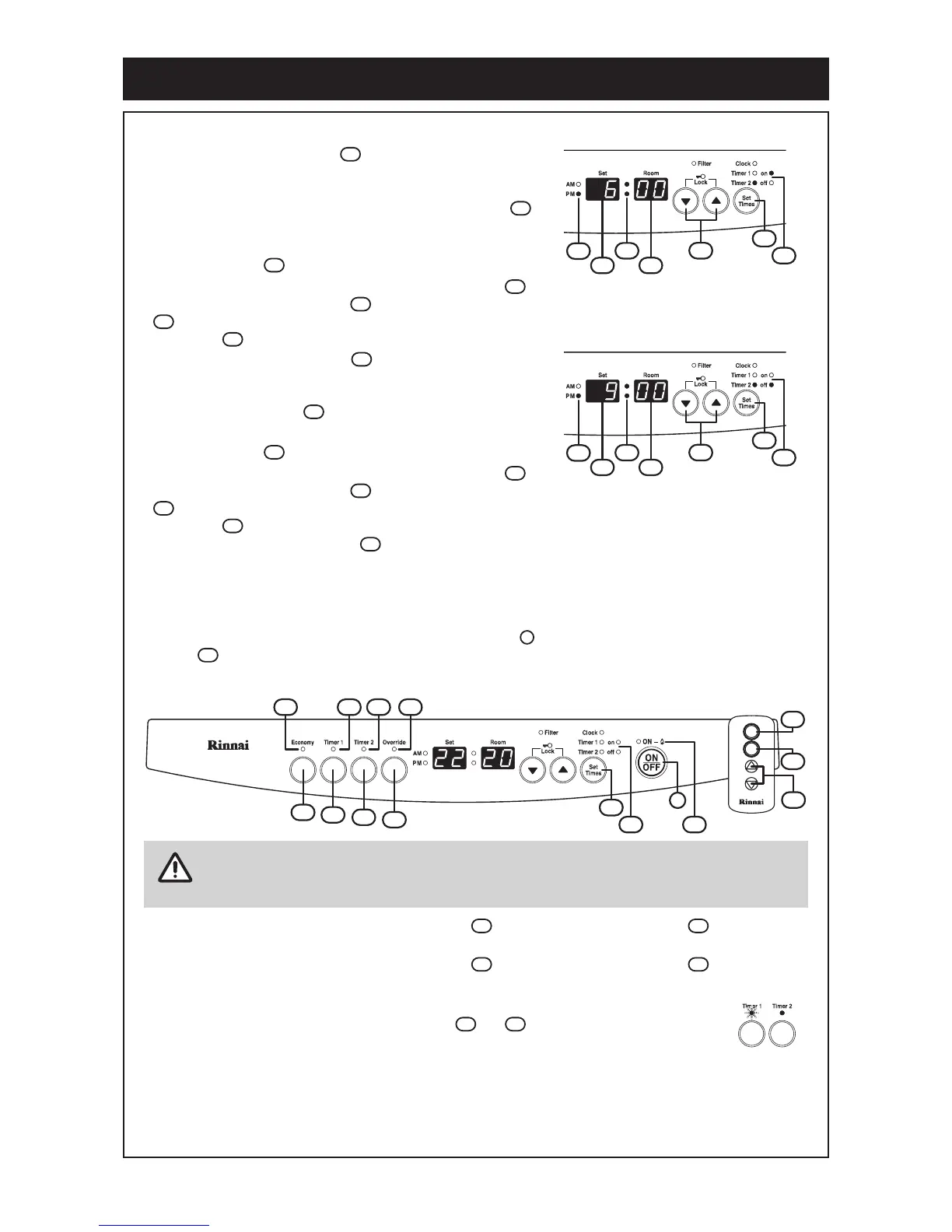
The factory default Timer 2 ‘On’ time is AM 06:00. Press the Up
or Down buttons to adjust the Timer 2 ‘On’ time.
Pressing and holding either the Up or Down buttons will
scroll digits, at first by minute intervals and then by hour
intervals. When adjusting the time ensure that the correct
AM or PM setting is observed.
The factory default Timer 2 ‘Off’ time is AM 09:00. Press the Up
or Down buttons to adjust the Timer 2 ‘Off’ time.
Pressing and holding either the Up or Down buttons will
scroll digits, at first by minute intervals and then by hour
intervals. When adjusting the
time ensure that the correct
AM or PM setting is observed.
OPERATING TIMERS
Turn the appliance on by pressing the ON/OFF button located on the control panel or the ON
button of the remote control.
Set the desired temperature and select the economy mode if required.
To select operation by Timer 1 press the Timer 1 button. The Timer 1 indicator will illuminate
steady to show that the heater is waiting for the programmed ‘on’ time to be reached.
To select operation by Timer 2 press the Timer 2 button. The Timer 2 indicator will illuminate
steady to show that the heater is waiting for the
programmed ‘on’ time to be reached.
The heater automatically turns itself on once the ‘on’ time of the selected timer(s) is
reached and the associated Timer indicator or will flash while the heater is
operating under timer control.
When the ‘off’ time of the selected timer is reached the heater will automatically turn off and the Timer
indicator will illuminate steady to indicate the heater is waiting for the next programmed timer cycle to
begin.
To cancel timer(s) operation press the associated timer button(s). The indicator will go out to signify
that the heater is now operating under manual control.
Timer 1 and Timer 2 may be operated together or individually.
The heater will continue to operate under control of the timers until timer operation is
cancelled.
1715
18
16
14
20
13
13
13
17
15
14
1715
18
16
14
20
13
13
13
17
15
14
2
39
12
2628 2422
20
18
25
23
21
27
2
ON
OFF
41
39
40
NOTE
21 22
23 24
22 24
Pressing the Set Times button again after setting programming
Timer 1 (four presses from the begining) selects the Timer 2 'On'
programming mode which allows adjustment of the time when the
heater switches 'On' (or starts). The Trmer 2 and On indicator are
illuminated.
20
18
Pressing the Set Times button again (five presses from the
beginng) seiects the Timer 2 'Off' programming mode which allows
adjustment of the time when the heater switches 'Off' (or stops). The
Trmer 2 and Off indicator are illuminated.
20
18
Pressing the Set Times button again (or six presses from
the begining) will exit programming mode and return the appli-
ance to normal operation.
18
Rinnai Operation Manual12




 To Next Page