6 | Evolve 950 Operation Guide: 12472-A
Operation using the remote
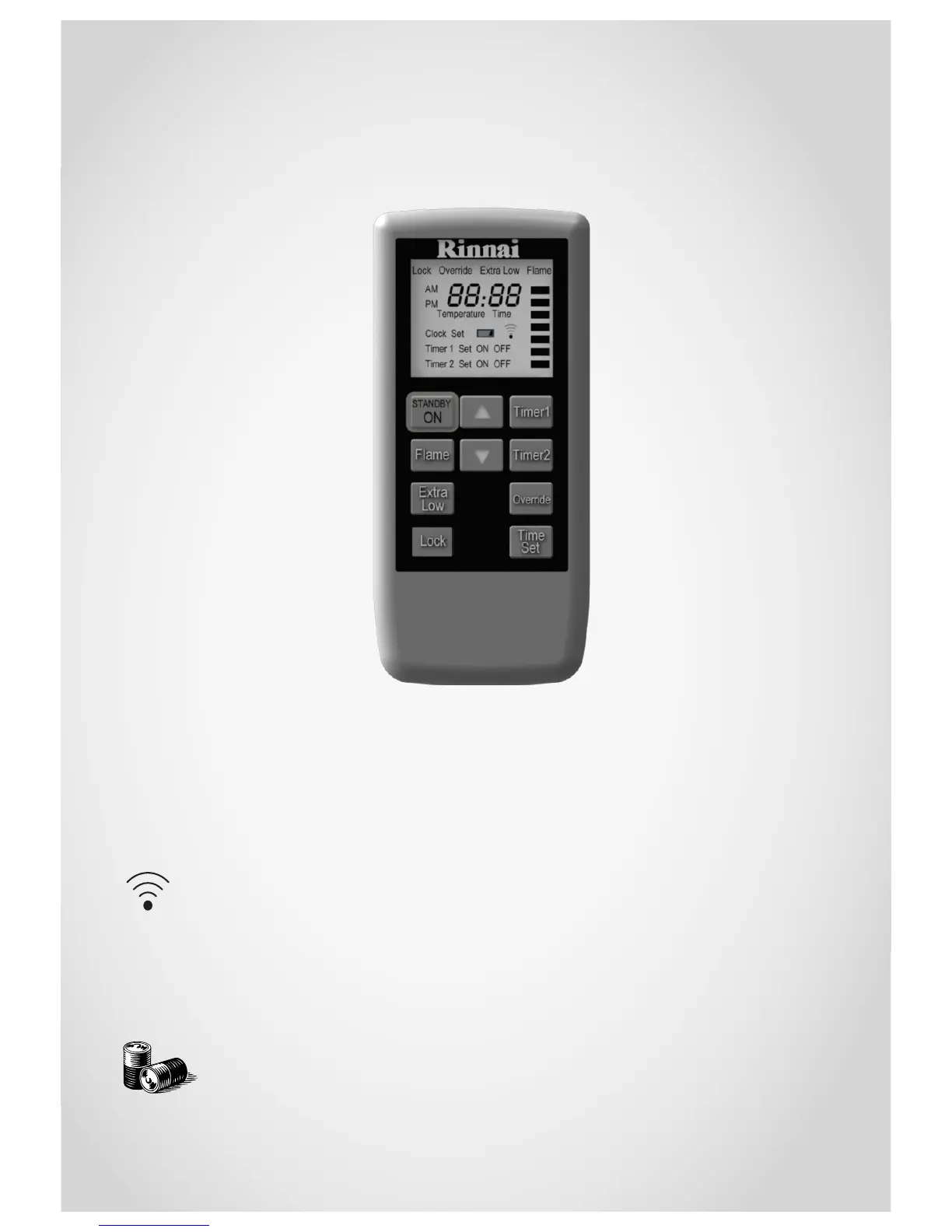
For the remote control functions to be available, the appliance On/Off button
must be in the On position.
General information about
the remote control
The remote control emits an
infra-red signal. It must be
aimed at the receiver unit
located on the lower right
hand side of the unit, normal
operating range is 5 m. Some
fluorescent lights may interfere
with the transmission of the
remote signal. If you experience
this problem, changing position
from which you are operating
the remote may help.
Unless the remote display is
deactivated or the lock function
is activated, the remote control
will transmit information to the
heater every time a button is
pressed.
When the timers are being set,
information is transmitted only
when the ‘Time Set’ button is
pressed.
When the remote is not used for
a period of approximately five
seconds, the display will default
to standby mode, displaying
only the time. To reactivate
press any button on the keypad.
Signal transmissions
Signal transmissions
are confirmed by a
brief illumination of the
signal indicator on the remote.
The unit will also flash and beep
to confirm the settings have
been received.
Batteries
The remote uses
two x 1.5 V AAA
batteries. Never
mix old and new
batteries.
Standby/On
Stops and operates the heater
remotely.
Flame
Sets the flame picture.
Extra low
Energy saving room
temperature control.
Lock
Locks out control to prevent
tampering.
Timer 1
Sets timer program 1.
Timer 2
Sets timer program 2.
Override
Manually overrides current
timer operation.
Time Set
Sets clock and timers.
Remove the batteries if the
remote is not going to be used
for a long time. This will help
avoid damage from leaking
batteries.
After battery replacement the
clock and timers may need to
be reprogrammed.
Turning the heater on
When the heater is in standby
mode, pressing the Standby/
On button will start the ignition
sequence and the LED will glow
blue to indicate that the heater
is operating.
Turning the heater to standby
Press the Standby/On button.
This will turn off the unit and the
LED will glow red to indicate the
appliance is in standby.
Adjusting the temperature
Pressing the up and down
buttons will change the preset
temperature by increments of
1 °C—the temperature will be
displayed on the remote.
The temperature can be preset
to:
• L (low) - continuous
combustion on low
• 16~26 °C (in 1 °C) steps -
combustion rate varies
to maintain the selected
temperature
• H (high) - continuous
combustion on high



 To Next Page