OPERATION
...............................................................................................................................................................................................................
...............................................................................................................................................................................................................
Manual EC 24 · EN05 · 2015-02
13
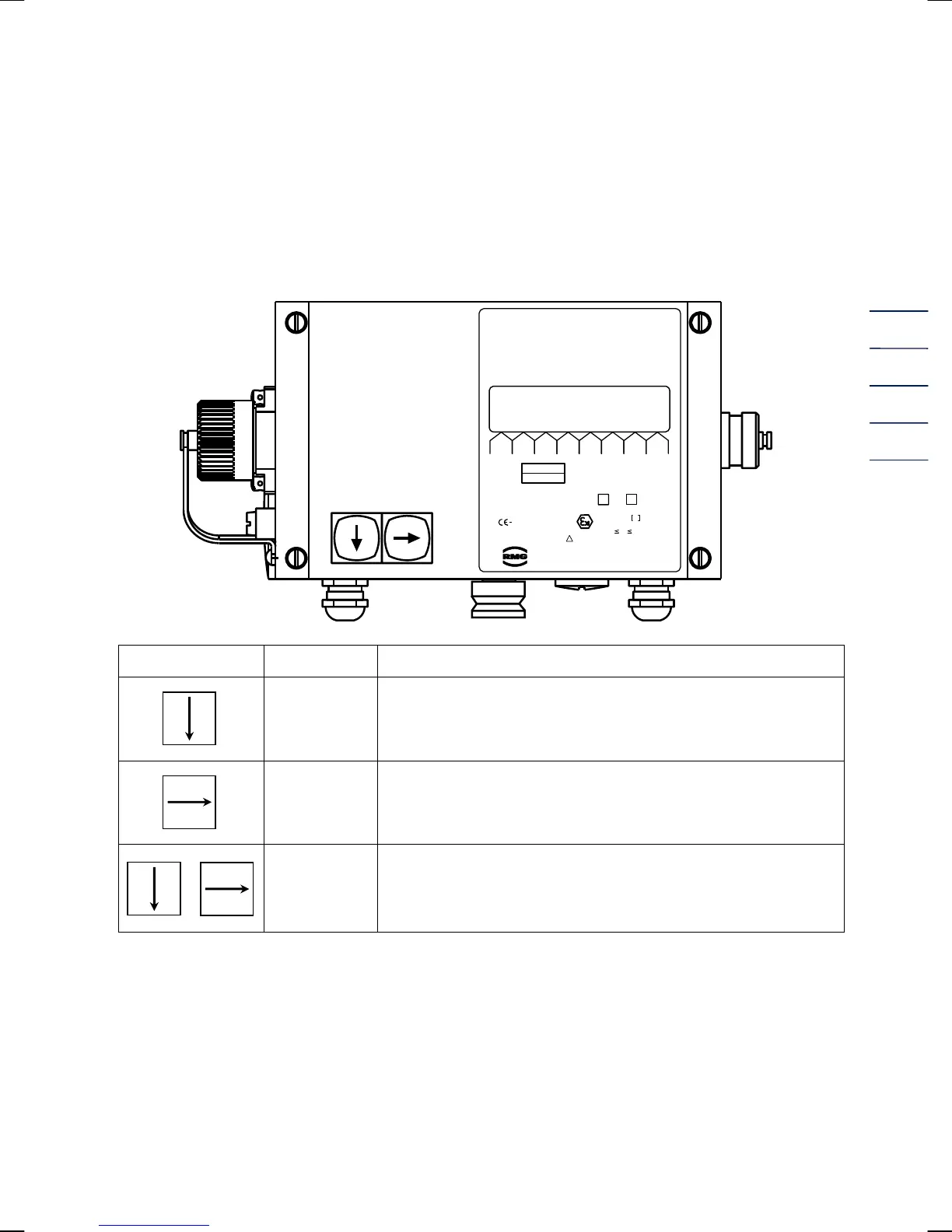
Operation
Front panel and keyboard of the EC 24
Zu
V
m
3
Out
I
mA
o
T
°C
P
bara
V
m/h
3
Error
Typ
.
VOLUME CORRECTOR
EC 24
IP65
Further data
press buttons
II2G
EEx ib ia IIC T3/T4
TÜV 02 ATEX1970
-20°C +60°C/40°C
T
a
EG-type examination certificate
!
Current output 4-20mA yes no
Ser.-No.
Year
MESSTECHNIK GMBH
Germany
0085
0032
00123456
Nm3
Keyboard Designation Effect
Arrow Down
Moves downwards within a list:
Moves from the first value of the list towards the last value.
Arrow Right
Moves to the right towards another list:
Moves from the first list towards the last list.
+
Function
Press both buttons at the same time to initiate the following
functions:
Hold down >2 sec.: Segment test
Hold down < 2 sec.: The coordinate will be displayed.
If the EC 21 / EC 24 is operated together with the measuring element of an electronic turbine
meter, the EC 21 / EC 24 contains the totalizing unit of the meter and the data plate of the meter is
located on the left side of the front panel.


 To Next Page