26
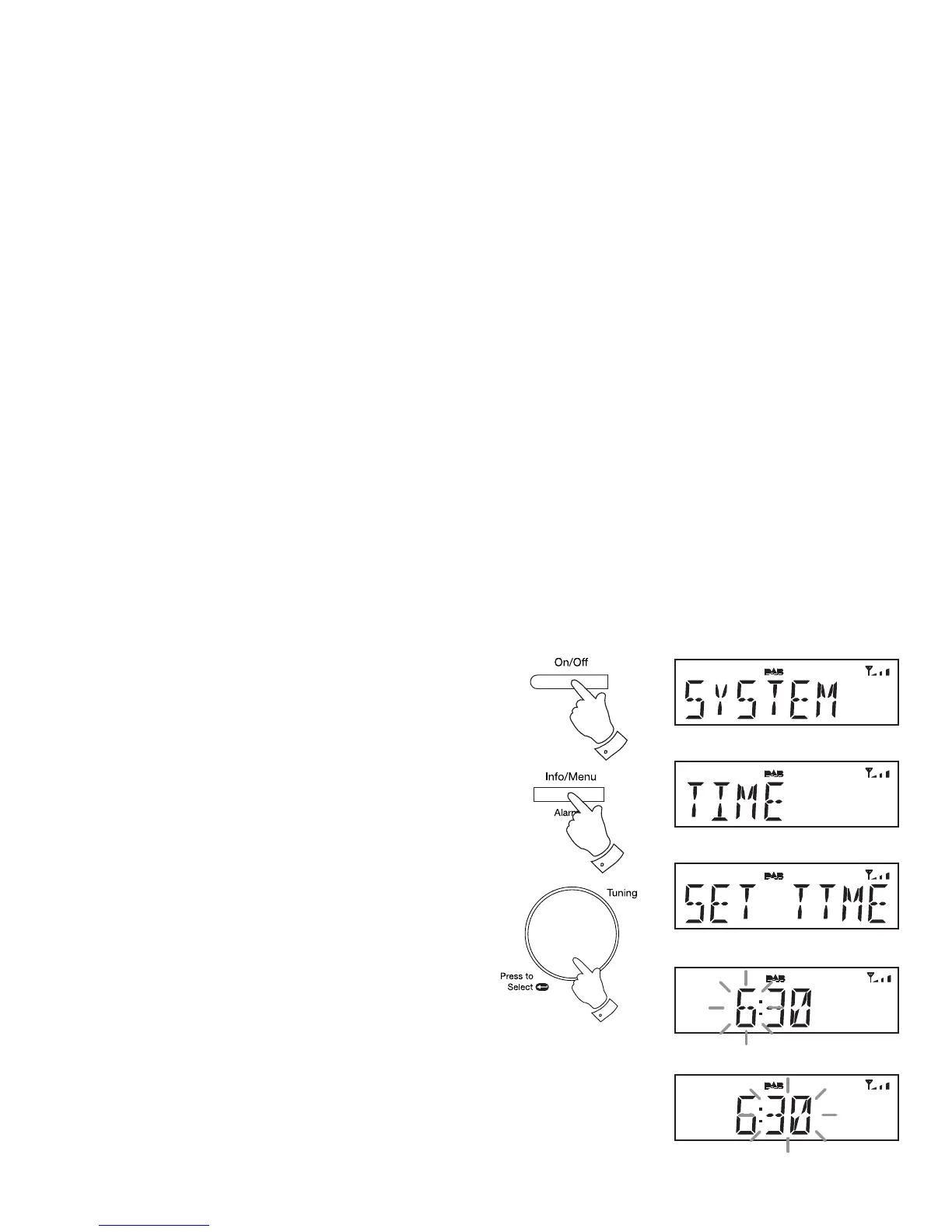
Setting the clock manually
Normally your radio will set its clock automatically using the DAB radio
signal. If no DAB signal is available and you need to set the time manually,
please follow the procedure shown below.
1. Press and release the On/Off button to switch on the radio.
2. To set the clock time, press and hold the Info/Menu button. The
menu will show on the display.
3. If using the DAB or FM mode, rotate the Tuning/Select control until
'SYSTEM' appears on the display. Press and release the Tuning/
Select control.
4. Rotate the Tuning/Select control until 'TIME' appears on the display.
Press and release the Tuning/Select control.
5. Rotate the Tuning/Select control until 'SET TIME' appears on the
display.
6. Press and release the Tuning/Select control to enter the manual
setting procedure. The hour digits will then fl ash on the display.
7. Rotate the Tuning/Select control to set the desired hour.
8. Press and release the Tuning/Select control to enter the hour setting.
9. The minute digits will then fl ash on the display. Rotate the Tuning/
Select control to set the desired minute.
1
3-9
2



 To Next Page