'art
to remove
Rear Cover
-
Description
(1)
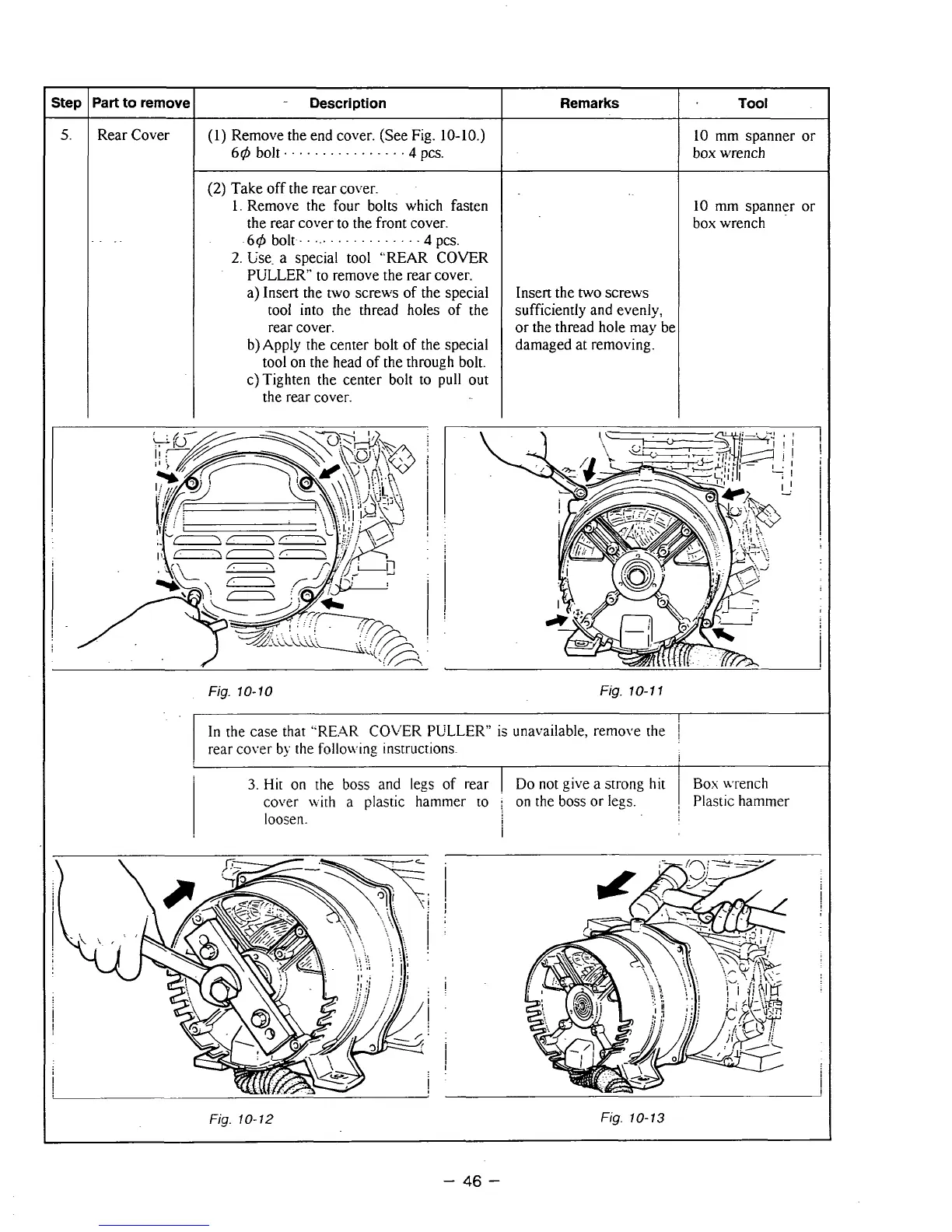
Remove the end cover. (See Fig.
10-10.)
64
bolt.
..............
.4
pa.
(2)
Take off the rear cover.
1.
Remove the four bolts which fasten
the rear cover to the front cover.
64
bolt.
...............
.4
PC-,
2.
Use. a special tool "REAR COVER
PULLER" to remove
the
rear cover.
a) Insert the two screws of the special
tool into the thread holes of
the
rear
cover.
b)Apply the center bolt of the special
tool on the head of the through bolt.
c)Tighten the center bolt to
pull
out
the rear cover.
Remarks
Insert the
two
screws
sufficiently and evenly,
or
the thread hole may be
damaged at removing.
Tool
10
mm
spanner
or
box wrench
10
mm spanner
or
box wrench
Fig.
10-10
Fig.
10-1
1
!
In
the case that
"RE.AR
COLER PULLER'' is unavailable, remove the
I
rear cover
by
the follow-ing instructions.
I
3.
Hit
on
the
boss
and legs of rear
Do
not give a
strong
hit
Box
Lvrench
cover with a plastic hammer to
;
on the boss
or
legs.
I
Plastic hammer
loosen.
i
i
Fig.
10-12
Fig.
10-13
-
46
-



 To Next Page